Event-List adapter for ioBroker
Allows defining the states that must be logged in the event list.
The list can be shown in admin, web, vis, saved as PDF, material (not yet implemented).
Additionally, you can send events via Telegram or WhatsApp.
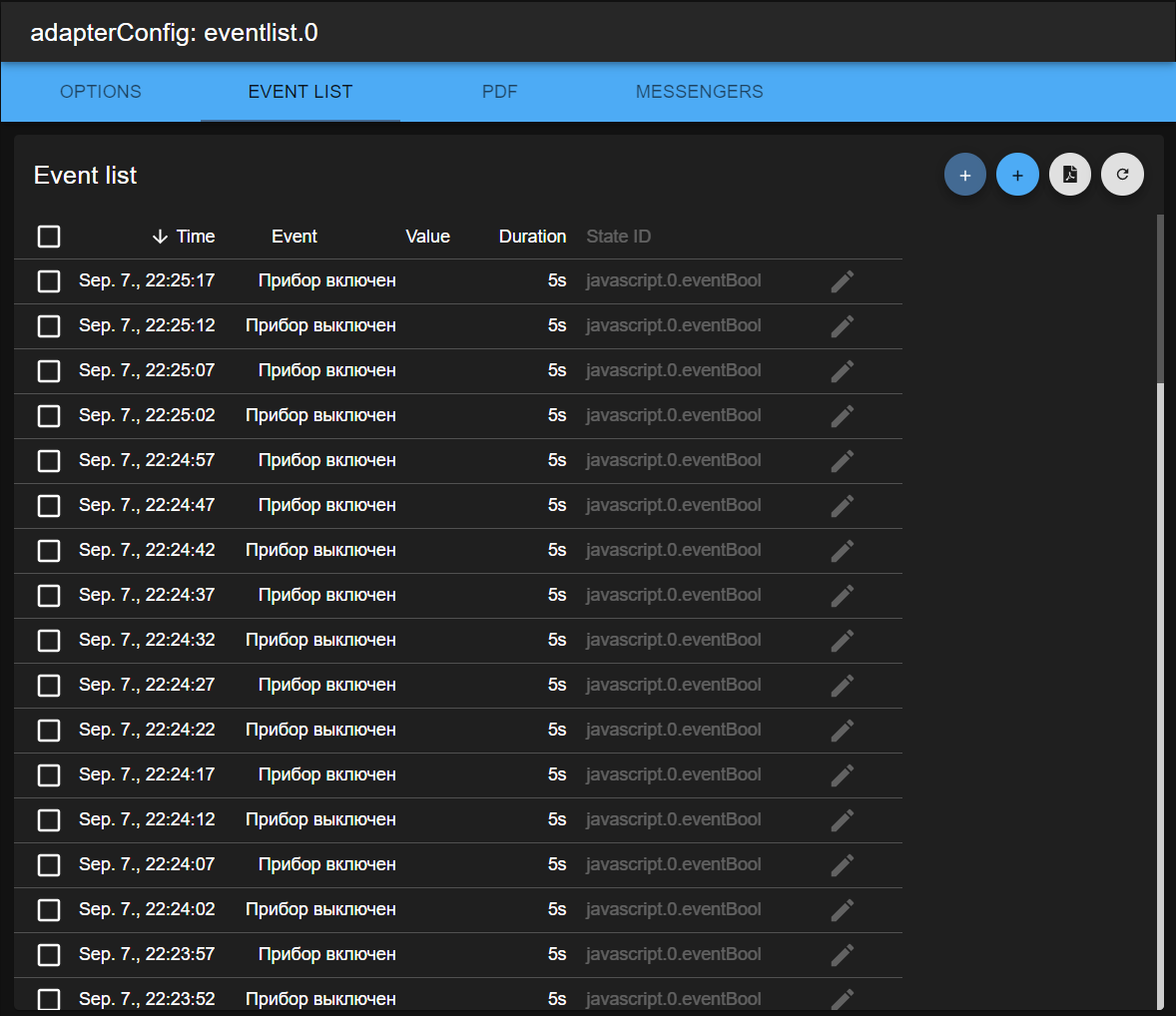
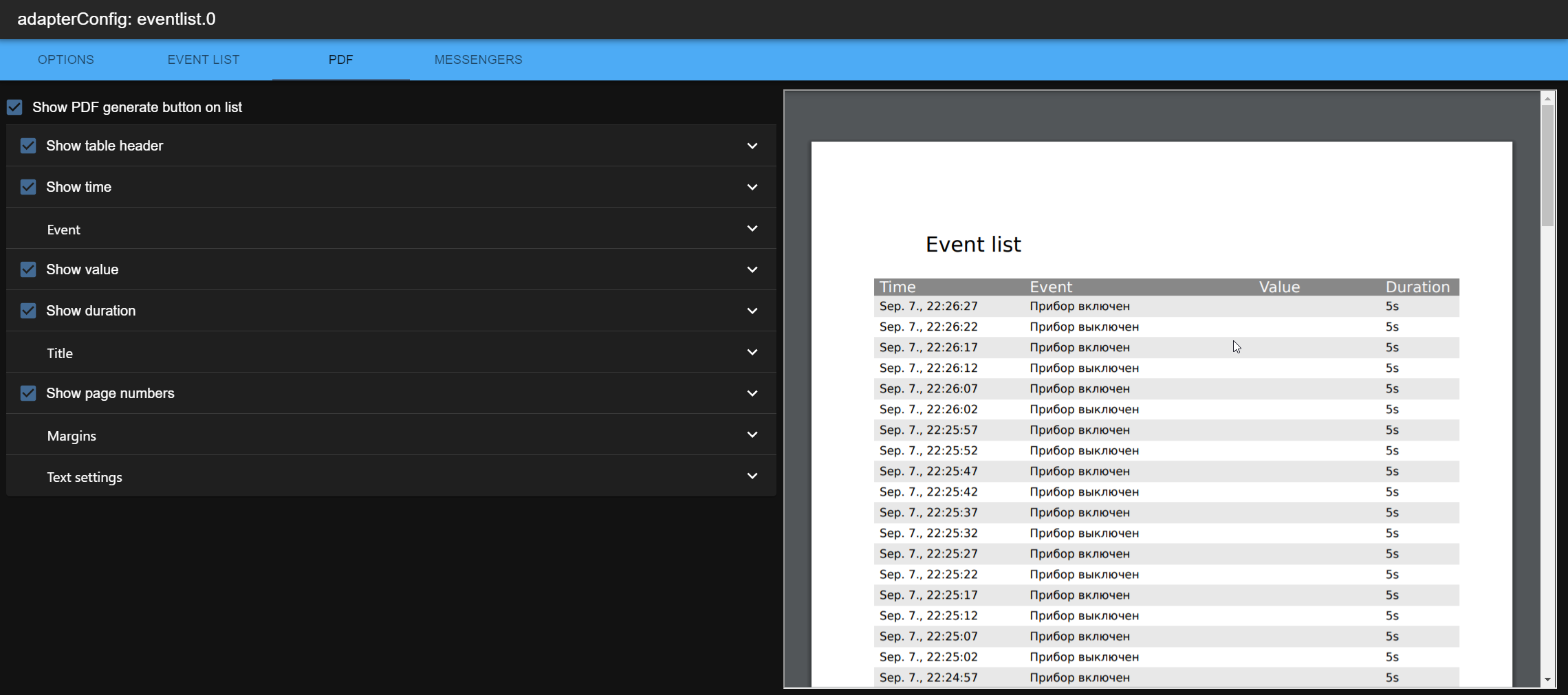
Settings of a state
A state is normally added to the list in the instance settings, where the whole set of settings is available: texts, colours, icons, messengers and the standing messages.
The most important of them are also in the custom settings of the object itself, the tab behind the
gear symbol in the objects list: the event text, "only changes", and for a boolean state the text
and the colour of TRUE and FALSE. This is the same set the old dialog of the adapter offered, and it
writes into the same place, common.custom.<eventlist.X>, so both ways can be mixed.
Alarm mode
The events could be generated only in alarm mode.
The alarm mode could be controlled by variable eventlist.X.alarm.
Additionally, the messages to messengers could be sent only if the alarm mode is ON.
Use case:
- E.g., door sensor can send the messages only if nobody is home. Else the events about door opening will be only collected in the event list.
Messages
Beside the event list, which logs what happened, the adapter keeps a list of what is standing: a message comes when a condition becomes true, it goes when the condition becomes false, and it leaves the list only once it has been acknowledged. This is the usual behaviour of a control room and something the event list alone cannot do.
Do not confuse it with the alarm mode above. The alarm mode is an arming switch, a message is a fault.
Levels and alarm classes
The four levels fatal, alarm, warning and info always exist, and every one of them carries
the three sub-levels high, normal and low. That grid is the twelve built-in alarm classes,
addressed as fatal.high down to info.low.
The numbers behind it are the ones of OPC UA (part 9, "Alarms & Conditions"): a severity from 1 to 1000, and the specification's rule that an alarm lives above 400. So the bands are
| level | severity | acknowledged by default | stands |
|---|---|---|---|
fatal | 801 – 1000 | always, it cannot be switched off | yes |
alarm | 601 – 800 | yes | yes |
warning | 401 – 600 | no | yes |
info | 1 – 400 | no | no, it is only an entry in the event list |
Every level is split into its three sub-levels in thirds, alarm high for example is 731 – 800.
In the admin, the tab Alarm classes shows the whole grid as a tree and lets the plant add its
own classes under it: a name, a colour, an icon, the severity inside the band of its sub-level,
whether it has to be acknowledged, and whether it stands at all. The classes of the instance are
stored in native.alarmClasses; only what differs from a built-in class is written, so an untouched
installation keeps an empty list.
{
    "id": "boiler_pressure",
    "name": "Boiler pressure",
    "level": "alarm",
    "subLevel": "high",
    "severity": 770,
    "standing": true,
    "requiresAck": true,
    "color": "#B3122B",
    "icon": ""
}
A class that does not stand writes only its coming into the event list: nothing to acknowledge,
nothing that stays in the message list. That is what the info classes do by default, and it is the
same line the OPC UA specification draws at severity 400.
The four states of a message
| code | active | acknowledged | in the list |
|---|---|---|---|
| K | yes | no | yes |
| KQ | yes | yes | yes |
| KG | no | no | yes |
| KGQ | no | yes | no |
A message that goes and comes again before it was acknowledged does not produce a second entry, it counts its repetitions instead. So a flapping contact cannot flood the list.
Messages from a state
The message settings sit next to the other settings of a state, in
common.custom.<eventlist.X>.message:
{
    "alarmClass": "alarm.normal",
    "text": "%n too hot: %s%u",
    "condition": { "operator": ">", "limit": 90 },
    "requiresAck": true,
    "priority": 50,
    "hysteresis": 5,
    "delay": 3000,
    "delayGone": 60000,
    "group": "boiler"
}
alarmClass is the id of one of the classes above, condition is either a comparison with
operator and limit for numbers, or a value that raises the message for booleans and texts. In
the text the patterns %s, %u, %n, %l and %c may be used, the last one for the name of the
class.
Several limits of one state
A number rarely has one limit. Instead of alarmClass and condition a state can carry a ladder of
them, and the state settings in the admin show it as a small table:
{
    "text": "%n: %s%u",
    "limits": [
        { "alarmClass": "warning.normal", "operator": ">", "limit": 200 },
        {
            "alarmClass": "fatal.normal",
            "operator": ">",
            "limit": 300,
            "hysteresis": 20,
            "text": "%n dangerously high: %s%u",
            "requiresAck": true,
            "priority": 90
        },
        { "alarmClass": "warning.normal", "operator": "<", "limit": 50 }
    ]
}
The state raises one message, not one per limit, and its class follows the value: the limit with the highest severity that is reached wins. So a pressure of 250 stands as a warning and becomes fatal at 320, without a second entry in the list.
Every limit may bring its own text, requiresAck and priority; without them the ones of the
state count, and without those what the class says - so the warning of a ladder passes by and its
fatal has to be confirmed, without setting anything.
A changed level is a new occurrence: it is written into the event list, it counts as a repetition,
and it has to be acknowledged again - an acknowledgement of the warning must not cover the fatal that
follows it. The other way round the duty follows the new level as well, so a message that falls back
to a warning stops asking for one. The hysteresis of a limit holds its band: with > 300 and a
hysteresis of 20 the message stays fatal until the value is below 280.
For states with an enumeration, every single value can carry an alarmClass instead. Then every
value is its own message and only the one of the current value stands. Text, group and the delays are shared
by all of them.
Quiet in the list
Four settings keep the list readable, all of them optional:
| setting | |
|---|---|
delay | the condition has to hold that many milliseconds before the message comes |
delayGone | the same for going. A fault that stops for a moment is not repaired. |
hysteresis | only for numbers: a message that stands goes only once the value has come back over the limit by that much. Against a value that trembles at its limit. |
| flapping protection | set for the whole instance, by default more than ten transitions in five minutes |
A message that flaps stays in the list, is marked with flapping and writes no further entries into
the event list until it has calmed down. Only the beginning and the end of the restlessness are
written, so a loose contact costs two lines and not two hundred.
A state that is only watched for its message does not need its history in the event list at all. The
setting Only the message in the event list (messagesOnly) writes only the coming and the going of
the message, so a temperature that is read every ten seconds gives one line when it goes over the
limit and one when it comes back, instead of one line per reading.
Groups
group is a free name. Messages of the same group are acknowledged together, and the one that came
first is marked with first in the list — usually the fault, while the rest is its consequence.
// acknowledge the whole group
setState('eventlist.0.messages.ack', 'boiler');
Messages from a script
Not every fault hangs on a single signal. A script can raise and clear a message itself, the freely
chosen id holds it together over its life cycle:
sendTo('eventlist.0', 'message', {
    id:         'heating.flow',
    alarmClass: 'alarm.normal',
    text:       'Flow too cold although the pump runs',
});

// the same message goes again
sendTo('eventlist.0', 'message', { id: 'heating.flow', state: 'gone' });
Instead of alarmClass a script may name a level, or bring a severity from 1 to 1000 as a
foreign system does. The severity lands in the band of its level: from 801 fatal, from 601
alarm, from 401 warning, everything below info.
Acknowledging
// one message, a group, or "*" for everything that can be acknowledged
setState('eventlist.0.messages.ack', 'heating.flow');

// with the name of the user, and with the number of acknowledged messages as an answer
sendTo('eventlist.0', 'ack', { id: '*', user: 'ben' }, result => console.log(result.acknowledged));

// read the standing messages
sendTo('eventlist.0', 'messages', null, result => console.log(JSON.stringify(result)));
During a maintenance
While somebody works on the heating, everything reports. A message or a whole group can be taken out of the list for a while:
// half an hour of quiet for the group "boiler"
setState('eventlist.0.messages.suppress', 'boiler:30');

// the same with the message API, and "*" suppresses everything
sendTo('eventlist.0', 'suppress', { target: 'boiler', minutes: 30 });

// let it back in
setState('eventlist.0.messages.suppress', 'boiler:0');
Without a duration the one from the instance settings is used, an hour by default, and a suppression lasts a month at most. That end matters: a message that is suppressed for ever is a fault nobody knows about any more. A suppressed message keeps working internally, it is only out of the list, out of the counters and out of the event list; the beginning and the end of the suppression are written into the event list, so the gap in the history has a reason.
Alarm journal
The message list says what stands right now, the event list says what happened at one moment. The journal is the third view: one entry per alarm cycle, from its coming until it is closed.
A cycle begins when an alarm comes and nothing of it was standing. It collects what happens to it - repetitions, the escalation to a more severe class, the acknowledgement, the going - and it is closed when the alarm has gone and somebody has acknowledged it. An alarm that comes back after that starts a new cycle: two occurrences are two events in the plant, not one.
{
    "id": "my.0.boiler#1780736137474",
    "messageId": "my.0.boiler",
    "stateId": "my.0.boiler",
    "alarmName": "Boiler pressure",
    "level": "fatal",
    "severity": 900,
    "text": "Boiler pressure too high",
    "state": "CLOSED",
    "activatedAt": 1780736137474,
    "acknowledgedAt": 1780736142000,
    "ackUser": "admin",
    "clearedAt": 1780736401000,
    "closedAt": 1780736401000,
    "count": 3
}
The state messages.journal holds the cycles, oldest first; how many it keeps is set in the
instance settings (Alarm cycles in the journal, 0 switches the journal off). A cycle that is not
closed yet is never thrown away, however full the journal is.
A script can ask for a part of it:
sendTo('eventlist.0', 'journal', { level: 'fatal', openOnly: false, limit: 50 }, result =>
    console.log(result),
);
from, to, level, stateId, openOnly and limit all filter, and the answer is newest first.
The monthly archive
The state keeps the last cycles only. So that the history does not end there, a closed cycle is
written into a file of its month as well - journal/2026-09.jsonl in the file storage of the
adapter, one cycle per line. The switch Archive the journal monthly in the instance settings turns
it on, and it is on by default.
The files are written a few seconds after a cycle closes and once more when the adapter stops, so a restart loses nothing. A month that is written again - after a restart, for example - keeps every cycle only once: the file is read, merged and written back.
A query reaches into them with archive:
sendTo('eventlist.0', 'journal', { archive: true, from: Date.now() - 90 * 86400000 }, result =>
    console.log(`${result.length} alarm cycles in the last three months`),
);
Without from every month that is there is read, with from and to only the months of the range.
What is still open stands in the state alone, so both are always put together, and no cycle comes
twice.
Export as CSV
The same query answers as a table that a spreadsheet opens:
sendTo('eventlist.0', 'journalCsv', { archive: true, level: 'fatal' }, result =>
    console.log(result.csv),
);
The answer is { csv, fileName, count }. The columns are the times of the cycle - came,
acknowledged, gone, closed - with level, class, state, message, value, unit, user, count, source and
group, separated by semicolons and in the language of the installation. ids exports exactly the
cycles of that list, which is what the buttons in the GUI send: they export what the table shows,
with its filter and its search.
The journal tab has the switch With the archived months and the button that saves the CSV.
The table in the admin
The instance settings have a tab Messages with everything that stands: level, the combined state
K / KQ / KG, how long it has been standing, the text, the value, how often it came, the group
and the state ID. The first message of a group and a flapping one are marked, what is suppressed at
the moment is named above the table, and single messages or all of them at once can be acknowledged
from there. The order is the one of a control room: level, then priority, then time.
The horn
messages.horn is true while an unacknowledged message of a configurable level or a more severe one
stands, by default from error on. It is meant for a siren, a lamp or a tile colour and goes quiet
with the acknowledgement, not with the repair. Messages that nobody has to acknowledge never sound
it.
States
| state | |
|---|---|
messages.list | the standing messages, sorted and ready for display |
messages.raw | the same messages with their internal state, survives a restart |
messages.count | how many messages stand |
messages.countFatal … countInfo | the same per level |
messages.unacknowledged | how many of them nobody has acknowledged |
messages.highest | the most severe standing level, empty if nothing stands |
messages.horn | an unacknowledged message from the configured level on stands |
messages.ack | write here to acknowledge a message, a group or * |
messages.suppress | write here to suppress, as target:minutes |
messages.suppressed | what is suppressed at the moment, and until when |
Every transition also writes a normal entry into the event list, with the level, the message id and what happened. So the history stays complete and all existing views, the PDF and the messengers keep working.
After a restart the conditions are evaluated again. A message whose condition is no longer true goes at that moment and stays in the list unacknowledged, because otherwise nobody would ever learn that the fault happened. Messages from a script cannot be re-evaluated, only the script knows their condition, so they stay as they were. Running delays do not survive a restart, they start again; suppressions do, they keep running until their end.
Possible presentations
In the Admin as tab
You can enable the event list as a tab in the admin.
Web
Event list could be shown under http://<IP>:8082/eventlist/index.html. (for instances > 0: http://<IP>:8082/eventlist/index.html?X, where X is the instance number)
Vis Widget
Two widgets for vis-2:
- Events shows the event list, with the columns, texts and widths of the vis-1 widget.
- Alarms and events shows the standing alarms and the event list, one above the other. Its
attribute
Showdecides whether both, only the alarms or only the events are drawn, andHeight of the alarms in %how the space is divided. The alarms can be filtered by level, the events by state ID, and withAcknowledge with a clicka click on an alarm acknowledges it. The groupJournalputs the alarm cycles under them;With the archived monthslets them reach back into the monthly files andAllow the CSV exportshows a button that saves what is shown.
Device manager
Two widgets for the device manager:
- Last event: a tile with the newest event. A click on it opens the whole list in a dialog. The tile can be limited to the events of one state, so every device can have its own tile.
- Alarms: a tile with the worst standing alarm - its class, its text and its value, in the
colour of the level, and how many more alarms stand. The click opens the big view with the alarms
and the events; the settings decide what is shown there and whether a click acknowledges. With
Show=Journalthe dialog shows the alarm cycles, reaches into the archived months if it is allowed to, and exports what it shows as a CSV file.
PDF generation
There is a possibility to generate a PDF document with all events.
Document title can consist the generation date if you place the pattern into it: Event list on {{YYYY MM DD}}.
The exact description of time format could be found here: https://momentjs.com/docs/#/displaying/format/
The generation of PDF can be triggered by writing a true into eventlist.0.triggerPDF.
The PDF file could be accessed via:
- web:
http://<IP>:8082/eventlist/eventlist/report.pdf(for instances > 0:http://<IP>:8082/eventlist/eventlist/report-X.pdf, where X is the instance number) - admin:
http://<IP>:8081/files/eventlist/report.pdf(for instances > 0:http://<IP>:8081/files/eventlist/report-X.pdf, where X is the instance number)
The icons could not be shown in PDF.
Message box
Users can add custom events to the list via javascript:
// add custom event to event list
sendTo('eventlist.0', 'insert', {
    event: 'My custom text',
    id: 'ID.that.linked.with.this.event',  // optional
    ts: new Date('2020-09-25T16:11:00'),    // optional. Default is Date.now()
    val: 5,                                // optional
    duration: 5,                           // in ms
});

// Or simple
sendTo('eventlist.0', 'insert', 'My custom text');
// or
setState('eventlist.0.insert', 'My custom text');
// or
setState('eventlist.0.insert', JSON.stringify({event: 'My custom text %s', val: 5}));
User can request a formatted JSON list for a specific ID. Of course the ID must be enabled in the eventlist before.
// add custom event to event list
sendTo('eventlist.0', 'list', {
    ids: ['my.0.state.id1', 'my.0.state.id2'],
    count: 10, // optional limit of maximal lines in table,
    allowRelative: false, // optional if relative times, e.g. "one minute ago", may be used (Default: true)
}, result => {
    console.log(JSON.stringify(result)); // array with events
    // result = [{id: 'my.0.state.id1',
    //
});

// or
sendTo('eventlist.0', 'list', 'my.0.state.id1', result => {
    console.log(JSON.stringify(result)); // array with events
});
Users can delete some or all events from the event list.
// delete all events
sendTo('eventlist.0', 'delete', '*', result => {
    console.log(`Deleted ${result.deleted} events`);
});

// delete all events for specific state ID
sendTo('eventlist.0', 'delete', 'hm-rpc.0.AEOI99389408.1.STATE', result => {
    console.log(`Deleted ${result.deleted} events`);
});

// delete one event by timestamp
sendTo('eventlist.0', 'delete', '2020-10-20T21:00:12.000Z', result => {
    console.log(`Deleted ${result.deleted} events`);
});
Patterns
In the event texts and in the state texts, the following patterns could be used:
- %s - value (
State changed to %s=>State changed to 5), - %u - unit (
State changed to %s%u=>State changed to 5%), - %n - name (
%n changed state to %s=>Device A changed state to 5), - %t - time (
State changed state on %t=>State changed state on Sep Fr, 16:32:00), - %r - relative time (
State changed state %r=>State changed state 5 seconds ago), - %d - duration (
State was in previous state for %d=>State was in previous state for 5s), - %g - value difference, so the new value minus the previous one. Only for states of type
number(State was changed on %g%=>State was changed on 1%), - %o - previous value (
State changed value from %o to %s=>State changed value from 4 to 5)
Usage of multiple instances in the web
E.g., you can show the specific list for instance 2, like http://IP:8082/eventlist/index.html?2.
The generated report will be stored for instance 0 in eventlist/report.pdf, but for instance 1 in eventlist/report-1.pdf.
Todo
- Change initial texts in PDF in according language
- Many predefined icons (minimum 100)
- Send messages to syslog (maybe splunk) https://www.npmjs.com/package/splunk-logging
Changelog
WORK IN PROGRESS
- (@GermanBluefox) Added devices widget
- (@GermanBluefox) Added messages with levels, coming and going, and acknowledgement
- (@GermanBluefox) Added delays, hysteresis, groups, flapping protection, suppression and horn for the messages
- (@GermanBluefox) Added the tab with the standing messages and the acknowledgement in the admin
- (@GermanBluefox) Brought the settings of a state back into the custom tab of the objects, as a JSON config component
- (@GermanBluefox) Added several limits per state:
> 200a warning,> 300a fatal. One message whose level follows the value, every limit with its own text, acknowledgement duty and priority - (@GermanBluefox) The messages can be set in the custom tab of the objects as well, not only in the instance settings
- (@GermanBluefox) Added
Only the message in the event list: a state that is watched for its message writes only the coming and the going of it, not every value it takes - (@GermanBluefox) Durations are written with a space and with proper unit words in all languages (
15 Sek.instead of15Sekunde) - (@GermanBluefox) Fixed: a message that does not have to be acknowledged is no longer shown as
not acknowledged, it sayscameorgone - (@GermanBluefox) The values in the GUI follow the setting
Comma as decimal separatorof ioBroker - (@GermanBluefox) Added the alarm classes: four levels with three sub-levels each, the severity of OPC UA (1 to 1000), and own classes with name, colour, icon, acknowledgement duty and severity. The selection of a class is a tree
- (@GermanBluefox) The level
erroris calledalarmnow, as OPC UA and PCS 7 call it - (@GermanBluefox) A class below the alarm line of OPC UA (severity 400) does not stand: it writes only its coming into the event list. That is what the
infoclasses do - (@GermanBluefox) The ID of an own alarm class can be changed, and every state that uses it is changed with it. Two classes cannot carry the same name any more
- (@GermanBluefox) The event list shows the coming, the going and the acknowledgement as
K,GandQin a column of their own, and the name of the state with its ID below it - (@GermanBluefox) The alarm view follows the SCADA concept: unacknowledged alarms sort before acknowledged ones of the same severity, the table shows the acknowledgement time, the going time and the priority, and a counter strip says how many are unacknowledged, active and how many events there are
- (@GermanBluefox) Added the states
messages.active(alarms whose condition is true right now) andeventCount - (@GermanBluefox) Fixed: the times in the admin were written in English (
Sep 7th) although the admin speaks another language - the locale of moment was registered on a copy of it that nobody used - (@GermanBluefox) The alarm journal and the table of the standing messages show the name of the state with its ID under it, the way the event list does
- (@GermanBluefox) A relative time like
a few seconds agosays the exact time in its tooltip - in the event list, in both vis-2 widgets and in the widgets of the device manager - (@GermanBluefox) The tab view divides its height between the three sections and carries a line to drag between every two of them, so the alarm journal gets its own space
- (@GermanBluefox) The journal is archived in one file per month (
journal/2026-09.jsonl), so the history does not end at the length of the state.sendTo('eventlist.0', 'journal', { archive: true, from, to })reads them,journalCsvanswers with a CSV table, and the journal tab, the vis-2 widget and the device manager widget can show the archived months and save what they show - (@GermanBluefox) Added the alarm journal: one entry per alarm cycle with the times of its coming, its acknowledgement, its going and its closing, in the state
messages.journal, as a tab and as a section of the tab view, in the vis-2 widget and in the device manager widget. A new occurrence starts a new cycle, andsendTo('eventlist.0', 'journal', { level, stateId, from, to, openOnly, limit })asks for it - (@GermanBluefox) Fixed: a line of the event list lost its state and its
K/Guntil the adapter wrote the list again, depending on which of the two states arrived first - (@GermanBluefox) The tab shows the event list and the standing messages one above the other, both can be folded away and the line between them can be dragged
- (@GermanBluefox) The table of the messages shows the value the state has now next to the value that raised the message, if they are not the same
- (@GermanBluefox) Added the vis-2 widget
Alarms and events: the standing alarms and the event list in one widget, and the attributes decide what is shown and how much of each - (@GermanBluefox) Added the device manager widget
Alarms: the tile shows the worst standing alarm, the click opens the alarms and the events - (@GermanBluefox) Fixed: a message kept standing after its limits were changed. The messages of a state are looked at again as soon as its settings change, and not only at its next value
- (@GermanBluefox) The value column of the event list and of the message table shows the unit of the state
- (@GermanBluefox) Added a closeable info box that explains how a standing message works, and tooltips for
Only changesandOnly in alarm state - (@GermanBluefox) Translated the whole GUI into all eleven languages, the words of the messages included
- (@GermanBluefox) Fixed: a click into the first rows of the event list opened the dialog of a toolbar button instead of selecting the row. The text of the button had a line box of 336 pixels and hung invisibly over the table
- (@GermanBluefox) Fixed the alarm mode, that was switched off by every restart
3.0.0 (2026-09-04)
- (@GermanBluefox) Updated packages
- (@GermanBluefox) A Minimum node.js version is 22
- (@GermanBluefox) Migrated to TypeScript
- (@GermanBluefox) Added blockly und vis-2 widgets (only for vis-2 >= 2.20.0)
2.1.0 (2025-05-20)
- (maeb3) Correction for handover of a message to pushover
- (bluefox) The packages were updated
- (bluefox) GUI migrated to vite
2.0.1 (2024-02-11)
- (bluefox) Translated the duration
2.0.0 (2023-10-12)
- (bluefox) Caught errors by subscribe
- (bluefox) Minimum node.js version is 16
1.2.4 (2023-05-17)
- (bluefox) Just the packages were updated
1.2.3 (2023-03-16)
- (bluefox) Corrected the edit of the event sources
- (bluefox) Added possibility to use default texts for string values like for booleans
1.2.2 (2022-12-27)
- (bluefox) Corrected web page loading in web adapter
1.2.1 (2022-12-23)
- (bluefox) Updated GUI packages
1.2.0 (2022-11-12)
- (bluefox) Fixed error with edit of the state settings
- (bluefox) Added possibility to use default texts for string values like for booleans
1.1.1 (2022-10-12)
- (bluefox) Fixed icons of devices
- (bluefox) Migrated GUI to
mui5 - (bluefox) Allowed the editing of list name
- (Hirsch-DE) corrected events without a unit
1.0.1 (2022-06-22)
- (bluefox) Added preparations for ioBroker cloud
1.0.0 (2022-06-20)
- (bluefox) Allowed working behind reverse proxy
0.5.5 (2022-04-23)
- (Apollon77) Fix a crash issue
- (Apollon77) Add Sentry also for the Node.js part
0.5.4 (2022-02-14)
- (bluefox) Corrected the image paths
0.5.3 (2022-02-13)
- (bluefox) Corrected the error with "changes only" option
- (bluefox) Added possibility to use icons with custom events
0.4.4 (2021-06-24)
- (bluefox) Corrected the warning for js-controller 3.x
0.4.3 (2021-04-19)
- (bluefox) Added the support for Admin5
0.4.2 (2020-12-05)
- (bluefox) Added possibility to add multiple states
- (bluefox) Moved the duration to the previous state
- (bluefox) Support for multiple instances
0.4.0 (2020-11-10)
- (bluefox) Added setting of even/odd background for widget
- (bluefox) Added filter
0.2.9 (2020-10-20)
- (bluefox) Corrected error in GUI by disabling of state
- (bluefox) Implemented the deletion of events from the event list
0.2.8 (2020-10-14)
- (bluefox) Corrected error in pdf settings
- (bluefox) Implemented the recalculation of the relative time every 10 seconds
0.2.6 (2020-09-25)
- (bluefox) Corrected error in pdf creation
0.2.5 (2020-09-24)
- (bluefox) Extended icon selector
0.2.1 (2020-09-21)
- (bluefox) Vis-widget was corrected
0.1.3 (2020-09-15)
- (bluefox) Implemented the alarm mode and messengers
0.0.3 (2020-09-08)
- (bluefox) Objects with states are supported now
0.0.2 (2020-09-07)
- (bluefox) initial commit
0.0.1
- (bluefox) initial release
License
MIT License
Copyright (c) 2020-2026 ioBroker dogafox@gmail.com
Permission is hereby granted, free of charge, to any person obtaining a copy of this software and associated documentation files (the "Software"), to deal in the Software without restriction, including without limitation the rights to use, copy, modify, merge, publish, distribute, sublicense, and/or sell copies of the Software, and to permit persons to whom the Software is furnished to do so, subject to the following conditions:
The above copyright notice and this permission notice shall be included in all copies or substantial portions of the Software.
THE SOFTWARE IS PROVIDED "AS IS", WITHOUT WARRANTY OF ANY KIND, EXPRESS OR IMPLIED, INCLUDING BUT NOT LIMITED TO THE WARRANTIES OF MERCHANTABILITY, FITNESS FOR A PARTICULAR PURPOSE AND NONINFRINGEMENT. IN NO EVENT SHALL THE AUTHORS OR COPYRIGHT HOLDERS BE LIABLE FOR ANY CLAIM, DAMAGES OR OTHER LIABILITY, WHETHER IN AN ACTION OF CONTRACT, TORT OR OTHERWISE, ARISING FROM, OUT OF OR IN CONNECTION WITH THE SOFTWARE OR THE USE OR OTHER DEALINGS IN THE SOFTWARE.