Schedules with fullcalendar.
Plan the events (control your devices)
You must not use any external resources, the scheduling is processed only in ioBroker and will be not combined with any external services like "google calendar" or "iTunes".
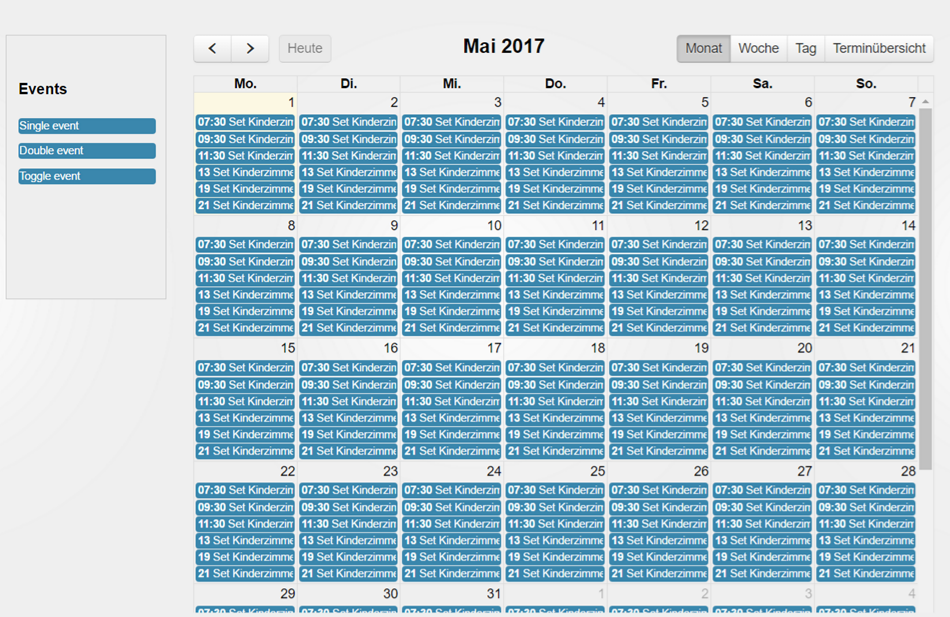
You can control your events with a calendar and can plan to control them periodically.
- Duration of "On/Off" and "Toggle" events can be given in seconds, minutes or hours. With a duration of 1 second, an event works like a push button.
- Condition ("Only if"): an event writes its value only if another state has the given value at that time (
==,!=,>,>=,<,<=), e.g. the shutter goes down only if the terrace door is closed. If the condition is not met, the whole event is skipped (an "On/Off" event does not write the end value either), and a line is written to the log. - Calendars can be switched off (button in the calendar list or "Active" in the calendar dialog): their events stay, but are not executed until the calendar is switched on again. This way you can prepare scenarios like "Vacation" and switch them by a script (
enableCalendar, see below).
Events simulation
You can record your behavior and can play it back later. For example, you can create two recordings for workday and for weekend and play them back on according days.
Or you can record the whole week and can play it back in the next weeks while you are away.
How to use:
- Go to the simulation tab
- Create the new simulation by clicking on the "+" button and selecting the type of simulation: day or week
- Click the record button and wait 24 hours or 7 days till simulation stops to record events
- Now you can replay the simulation by clicking on the play button. Additionally, you can define the time when the simulation should be started.
Agenda states
The adapter writes what is planned into states, e.g. to ask a chat or voice assistant about it or to show it in a visualization:
| State | Content |
|---|---|
fullcalendar.0.events.list | all events (JSON): name, calendar, state, value, time or cron, next execution |
fullcalendar.0.events.today | executions today (JSON), also the ones already done |
fullcalendar.0.events.tomorrow | executions tomorrow (JSON) |
fullcalendar.0.events.next | the next execution (JSON, null = none) |
fullcalendar.0.events.count | number of events |
fullcalendar.0.events.lastChanged | time of the last change of an event |
One execution looks like this (times are local times of the ioBroker host):
{"id": "fullcalendar.0.event-…", "name": "Light living room", "calendar": "", "time": "2026-10-28T22:30:00", "ts": 1793223000000,
 "oid": "hm-rpc.0.ABC.1.STATE", "value": false, "recurring": false}
A "double" event has endTime and endValue too, calendar is "" for the default calendar. Events of simulations are not part of the agenda.
Script and adapter API (sendTo)
Other adapters and scripts can plan events, e.g. a voice assistant for "turn off the light in 2 hours":
// in 2 hours (`in`: seconds, or "90s", "30m", "2h", "1h30m", "1d")
sendTo('fullcalendar.0', 'addEvent', { oid: 'hm-rpc.0.ABC.1.STATE', value: false, in: '2h' }, res => log(JSON.stringify(res)));
// at a time (local time, or a timestamp in ms), for 10 minutes, in the calendar "Garden"
sendTo('fullcalendar.0', 'addEvent', {
    oid: 'hm-rpc.0.PUMP.1.STATE', value: true, start: '2026-10-29T07:30', duration: '10m', calendar: 'Garden', name: 'Pump',
}, res => log(JSON.stringify(res))); // {id, name, start, ts} or {error}
| Command | Message | Answer |
|---|---|---|
addEvent | oid, value, start or in; optional duration + endValue (a boolean switches back by itself), name, calendar (name or ID), color | {id, name, start, ts} |
deleteEvent | id | {result: "ok"} |
listEvents | optional from, to (default now … 7 days, or days), calendar, max | {events: [execution, …]} |
getEvents | optional calendar | {events: [definition, …]} |
getCalendars | – | {calendars: [{id, name, enabled}, …]} |
enableCalendar | calendar (name or ID), enabled (true/false) | {id, enabled} |
Errors come back as {error}. A new event is a one-shot event and appears in the calendar like one created by hand.
Todo
- Week and day must scroll to the current time
Changelog
3.2.0 (2026-10-29)
- (bluefox) Fixed white screen when adding an event in the vis-2 widget (#444)
- (bluefox) Fixed: the recording of a simulation stopped immediately after the start (#234)
- (bluefox) Fixed: the simulation recorded repeated status updates without a change of the value, e.g. of Tasmota or Sonoff devices (#285, #235)
- (bluefox) Fixed: the subscriptions of a stopped recording were not removed
- (bluefox) Added: the duration of "On/Off" and "Toggle" events can be given in seconds, minutes or hours, e.g. for a push button (#354)
- (bluefox) Added: conditions for events, e.g. do not close the shutter if the door is open (#257)
- (bluefox) Added: calendars can be switched off and on, also with the message
enableCalendar(#236)
3.1.1 (2026-10-29)
- (GermanBluefox) Fixed display of recurring events after DST change (#448)
3.1.0 (2026-10-28)
- (bluefox) Added agenda states
events.list/today/tomorrow/next/count/lastChanged - (bluefox) Added the messages
addEvent,deleteEvent,listEvents,getEventsandgetCalendars, e.g. for voice assistants - (bluefox) A one-shot event in the past is no longer marked as disabled in memory
3.0.5 (2026-10-19)
- (ioBroker-Bot) Adapter requires js-controller >= 6.0.11 now.
- (bluefox) Migrated GUI to vite
- (bluefox) Updated packages
3.0.1 (2026-08-05)
- (bluefox) Migrated GUI to React19
License
The MIT License (MIT)
Copyright (c) 2017-2026 Bluefox dogafox@gmail.com
Permission is hereby granted, free of charge, to any person obtaining a copy of this software and associated documentation files (the "Software"), to deal in the Software without restriction, including without limitation the rights to use, copy, modify, merge, publish, distribute, sublicense, and/or sell copies of the Software, and to permit persons to whom the Software is furnished to do so, subject to the following conditions:
The above copyright notice and this permission notice shall be included in all copies or substantial portions of the Software.
THE SOFTWARE IS PROVIDED "AS IS", WITHOUT WARRANTY OF ANY KIND, EXPRESS OR IMPLIED, INCLUDING BUT NOT LIMITED TO THE WARRANTIES OF MERCHANTABILITY, FITNESS FOR A PARTICULAR PURPOSE AND NONINFRINGEMENT. IN NO EVENT SHALL THE AUTHORS OR COPYRIGHT HOLDERS BE LIABLE FOR ANY CLAIM, DAMAGES OR OTHER LIABILITY, WHETHER IN AN ACTION OF CONTRACT, TORT OR OTHERWISE, ARISING FROM, OUT OF OR IN CONNECTION WITH THE SOFTWARE OR THE USE OR OTHER DEALINGS IN THE SOFTWARE.