Implementation of ModBus Slave and Master for ioBroker. The following types are supported:
- Modbus RTU over serial (master)
- Modbus RTU over TCP (master)
- Modbus TCP (slave, master)
- Modbus TCP with SSL/TLS (master)
SSL/TLS Support
For secure connections to devices that require SSL/TLS encryption (such as the Kostal KSEM Smart Energy Meter on port 802), you can select "TCP with SSL/TLS" as the connection type. This provides the following configuration options:
- SSL Certificate file path: Path to your SSL certificate file in PEM format
- SSL Private key file path: Path to your SSL private key file in PEM format
- SSL CA Certificate file path: Path to CA certificate file in PEM format (optional)
- Reject unauthorized certificates: Uncheck to allow self-signed certificates
Note: Certificate files must be accessible by the ioBroker process and in PEM format.
Settings
Partner IP Address
IP address of modbus partner.
Port
TCP Port of modbus partner if configured as master (client) or own port if configured as slave(server).
Device ID
Modbus Device ID. Important if TCP/Modbus bridge is used.
Type
Slave (Server) or Master (Client).
Select device by (serial)
For serial connections you can choose how the device is addressed:
- Serial port: pick a fixed port path (e.g.
COM3or/dev/ttyUSB0). - USB device ID: pick the device by its stable USB identifier (vendor ID / product ID / serial number). The actual port is resolved at start, so the connection keeps working even if the operating system assigns a different port name (e.g. after a reboot or replugging).
Use aliases as address
Normally, all registers can have address from 0 to 65535. By using of aliases, you can define virtual address fields for every type of registers. Normally:
- discrete inputs are from 10001 to 20000
- coils are from 1 to 1000
- input registers are from 30001 to 40000
- holding registers are from 40001 to 60000
Every alias will be mapped internally to address, e.g., 30011 will be mapped to input register 10. and so on.
Direct addresses
Used for binary inputs and coils.
Without this flag the bits will be addressed from like: 0 => 15, 1 => 14, 2 => 13, ..., 15 => 0.
With this flag activated the bits will be addressed as: 0 => 0, 1 => 1, 2 => 2, ..., 15 => 15.
Do not align addresses to 16 bits (word)
Normally, the coils and the discrete inputs addresses are aligned to 16 bits. Like addresses from 3 to 20 will be aligned to 0 up 32. If this option is active, the addresses will not be aligned.
Do not use multiple registers
If a slave does not support the "write multiple registers" command, you can activate it to get warnings when the multiple registers will be written.
Use only multiple write registers
If a slave only supports the "write multiple registers" command, you can activate so the registers will be written always with FC15/FC16 command.
Round Real to
How many digits after comma for float and doubles.
Data polling interval
Cyclic poll interval (Only relevant for master)
Reconnect delay
Reconnection interval (Only relevant for master)
Read timeout
Timeout for read requests in milliseconds. If no response is received from a slave at this time, the connection will be terminated.
Pulse time
If pulse is used for coils, this defines the interval in milliseconds how long is the pulse.
Wait time
Wait time between polling of two different device IDs in milliseconds.
Max read request length
Maximal length of command READ_MULTIPLE_REGISTERS as the number of registers to read.
Some systems require first "write request" to deliver the data on "read request". You can force this mode by setting of the "Max read request length" to 1.
Notice:
Some USB Modbus solutions (e.g. based on socat) can have trouble to work with serialport npm module.
There is a software Modbus RTU <-> Modbus RTU over TCP gateway to enable using of serial RTU over TCP protocol.
Both solutions RTU over TCP and TCP work well.
Read interval
Delay between two read requests in milliseconds. Default 0.
Write interval
Delay between two write requests in milliseconds. Default 0.
Update unchanged states
Normally, if the value has not changed, it will not be written into ioBroker. This flag allows updating the value's timestamp by every cycle.
Ignore transaction ID of responses
Only for a master over TCP, UDP or TCP with SSL. Normally a response is taken only if its transaction ID is the one of the request,
otherwise it is dropped with the warning Dropped a response with transaction ID .... A stale or duplicated answer could otherwise be
taken for the next request, and the registers of another block would be stored (issue #829).
Enable this option only if the device does not echo the transaction ID, i.e. every response is dropped.
Value Sanitization
Enable automatic sanitization of invalid register values (NaN, Infinity, extreme float values like ±3.4e38). This feature helps prevent corrupted Modbus float values from propagating into ioBroker states, which is especially useful for devices like SolarEdge inverters that occasionally return invalid values due to timeouts or internal scaling errors.
When enabled, you can configure per-register sanitization options:
- Sanitize: Enable sanitization for this specific register
- Sanitize Action: Choose how to handle invalid values
- Keep Last Valid: Keeps the last known valid value when an invalid value is detected
- Replace with 0: Replaces invalid values with 0
- Min Valid Value: Optional minimum valid value threshold
- Max Valid Value: Optional maximum valid value threshold
Invalid values detected:
NaN(Not a Number)Infinityor-Infinity- Extreme float values (≥3.4e38 or ≤-3.4e38) - typical Modbus error values
- Values outside the configured min/max range
Do not include addresses in ID
Do not add address in the generated ioBroker iD. 10_Input10 vs _Input10.
Preserve dots in ID
With this flag the Name will be Inputs.Input10. Without => Inputs_Input10.
Parameters for a single address line in config
Address
Modbus address to read.
Slave ID
In case there are multiple slaves, then this is the ID if not the default one that is given in global config.
Name
This is the name for the Parameter.
Description
Parameter description.
Unit
Unit of the Parameter.
Type
Datatype to read from Bus. For details about the possible data types, see the section Data types.
Length
Length of parameter. For most parameters, this is determined based on the data type, but for Strings this defines the length in Bytes / characters.
Factor
This factor is used to multiply the read value from Bus for static scaling. So the calculation looks like following val = x * Factor + Offset.
Offset
This offset is added to the read value after the above multiplication. So the calculation looks like following val = x * Factor + Offset.
Formula
This field can be used for advanced calculations if Factor and Offset are not enough. If this field is set, then the Factor and Offset fields are ignored. The Formula is executed by the eval() function. Therefore, all common functions are supported. Especially the Math functions. The formula must comply with JavaScript syntax, therefore, also take care about upper and lower cases.
In the formula, "x" has to be used for the read value from Modbus. E.g. x * Math.pow(10, sf['40065'])
Using the "sf" array (see above example), you can access other read modbus values if they are flagged as "Scale Factor" in the config (see below info on "SF" flag).
If the formula cannot be evaluated during runtime, then the Adapter writes a warning message to the log.
Another use case for formulas could also be to prevent implausible data with a formula like x > 2000000 ? null : x
Role
ioBroker role to assign.
Room
ioBroker room to assign.
Poll
If activated, the values are polled in a predefined interval from a slave.
WP
Write pulse
CW
Cyclically write
SF
Use value as a scaling factor.
This is necessary to be used by dynamic scaling factors which are on some systems provided through values on interface.
If a value is marked with this flag, then the value will be stored into a variable with the following naming convention: sf['Modbus_address'].
This variable can be then later used in any formula for other parameters. E.g., the following formula can set: (x * sf['40065']) + 50;
Sanitize (Expert Mode)
Enable value sanitization for this register. Only available when "Value Sanitization" is enabled globally in the adapter settings.
Sanitize Action (Expert Mode)
Choose the action to take when an invalid value is detected:
- Keep Last Valid: Retains the last known valid value
- Replace with 0: Replaces the invalid value with 0
Min Valid / Max Valid (Expert Mode)
Optional minimum and maximum value thresholds for range validation. Values outside this range will be treated as invalid and sanitized according to the Sanitize Action.
Data types
uint16be-Unsigned 16 bit (Big Endian): AABB => AABBuint16le-Unsigned 16 bit (Little Endian): AABB => BBAAint16be-Signed 16 bit (Big Endian): AABB => AABBint16le-Signed 16 bit (Little Endian): AABB => BBAAuint32be-Unsigned 32 bit (Big Endian): AABBCCDD => AABBCCDDuint32le-Unsigned 32 bit (Little Endian): AABBCCDD => DDCCBBAAuint32sw-Unsigned 32 bit (Big Endian Word Swap): AABBCCDD => CCDDAABBuint32sb-Unsigned 32 bit (Big Endian Byte Swap): AABBCCDD => DDCCBBAAint32be-Signed 32 bit (Big Endian): AABBCCDD => AABBCCDDint32le-Signed 32 bit (Little Endian): ABBCCDD => DDCCBBAAint32sw-Signed 32 bit (Big Endian Word Swap): AABBCCDD => CCDDAABBint32sb-Signed 32 bit (Big Endian Byte Swap): AABBCCDD => DDCCBBAAuint64be-Unsigned 64 bit (Big Endian): AABBCCDDEEFFGGHH => AABBCCDDEEFFGGHHuint64le-Unsigned 64 bit (Little Endian): AABBCCDDEEFFGGHH => HHGGFFEEDDCCBBAAuint8be-Unsigned 8 bit (Big Endian): AABB => BBuint8le-Unsigned 8 bit (Little Endian): AABB => AAint8be-Signed 8 bit (Big Endian): AABB => BBint8le-Signed 8 bit (Little Endian): AABB => AAfloatbe-Float (Big Endian): AABBCCDD => AABBCCDDfloatle-Float (Little Endian): AABBCCDD => DDCCBBAAfloatsw-Float (Big Endian Word Swap): AABBCCDD => CCDDAABBfloatsb-Float (Big Endian Byte Swap): AABBCCDD => DDCCBBAAdoublebe-Double (Big Endian): AABBCCDDEEFFGGHH => AABBCCDDEEFFGGHHdoublele-Double (Little Endian): AABBCCDDEEFFGGHH => HHGGFFEEDDCCBBAAstring-String 8 bit (Zero-end): ABCDEF\0 => ABCDEF\0stringle-String 8 bit (Little Endian, Zero-end): ABCDEF\0 => BADCFE\0string16-String 16 bit (Zero-end): \0A\0B\0C\0D\0E\0F\0\0 => ABCDEF\0string16le-String 16 bit (Little Endian, Zero-end): A\0B\0C\0D\0E\0F\0\0\0 => ABCDEF\0rawhex-String with value in hex representation AABBCCDD.... => AABBCCDD....
The following description was copied from here
The point-to-point Modbus protocol is a popular choice for RTU communications if for no other reason than its basic convenience. The protocol itself controls the interactions of each device on a Modbus network, how the device establishes a known address, how each device recognizes its messages and how basic information is extracted from the data. In essence, the protocol is the foundation of the entire Modbus network.
Such a convenience does not come without any complications, however, and Modbus RTU Message protocol is no exception. The protocol itself was designed based on devices with a 16-bit register length. Consequently, special considerations were required when implementing 32-bit data elements. This implementation settled on using two consecutive 16-bit registers to represent 32 bits of data or essentially 4 bytes of data. It is within these four bytes of data that single-precision floating point data can be encoded into a Modbus RTU message.
The Importance of Byte Order
Modbus itself does not define a floating point data type, but it is widely accepted that it implements 32-bit floating point data using the IEEE-754 standard. However, the IEEE standard has no clear definition of the byte order of the data payload. Therefore, the most important consideration when dealing with 32-bit data is that data is addressed in the proper order.
For example, the number 123/456.00 as defined in the IEEE 754 standard for single-precision 32-bit floating point numbers appears as follows:

The effects of various byte orderings are significant. For example, ordering the 4 bytes of data that represent 123456.00 in a B A D C sequence in known as a “byte swap”. When interpreted as an IEEE 744 floating point data type, the result is quite different:

Ordering the same bytes in a “C D A B” sequence is known as a “word swap”. Again, the results differ drastically from the original value of 123456.00:

Furthermore, both a byte swap and a word swap would essentially reverse the sequence of the bytes altogether to produce yet another result:

Clearly, when using network protocols such as Modbus, strict attention must be paid to how bytes of memory are ordered when they are transmitted, also known as the ‘byte order’.
Determining Byte Order
The Modbus protocol itself is declared as a ‘big-Endian’ protocol, as per the Modbus Application Protocol Specification, V1.1.b:
Modbus uses a “big-Endian” representation for addresses and data items. This means that when a numerical quantity larger than a single byte is transmitted, the most significant byte is sent first.
Big-Endian is the most commonly used format for network protocols – so common, in fact, that it is also referred to as ‘network order’.
Given that the Modbus RTU message protocol is big-Endian, in order to successfully exchange a 32-bit datatype via a Modbus RTU message, the endianness of both the master and the slave must be considered. Many RTU master and slave devices allow specific selection of byte order, particularly in the case of software-simulated units. It only has to be ensured that both units are set to the same byte order.
As a rule of thumb, the family of a device’s microprocessor determines its endianness. Typically, the big-Endian style (the high-order byte is stored first, followed by the low-order byte) is generally found in CPUs designed with a Motorola processor. The little-Endian style (the low-order byte is stored first, followed by the high-order byte) is generally found in CPUs using the Intel architecture. It is a matter of personal perspective as to which style is considered ‘backwards’.
If, however, byte order and endianness are not a configurable option, you will have to determine how to interpret the byte. This can be done by requesting a known floating-point value from the slave. If an impossible value is returned, i.e., a number with a double-digit exponent or such, the byte ordering will most likely need modification.
Practical Help
The FieldServer Modbus RTU drivers offer several function moves that handle 32-bit integers and 32-bit float values. More importantly, these function moves consider all different forms of byte sequencing. The following table shows the FieldServer function moves that copy two adjacent 16-bit registers to a 32-bit integer value.
| Function Keyword | Swap Mode | Source Bytes | Target Bytes |
|---|---|---|---|
| 2.i16-1.i32 | N/A | [ a b ] [ c d ] | [ a b c d ] |
| 2.i16-1.i32-s | byte and word swap | [ a b ] [ c d ] | [ d c b a ] |
| 2.i16-1.i32-sb | byte swap | [ a b ] [ c d ] | [ b a d c ] |
| 2.i16-1.i32-sw | word swap | [ a b ] [ c d ] | [ c d a b ] |
The following table shows the FieldServer function moves that copy two adjacent 16-bit registers to a 32-bit floating point value:
| Function Keyword | Swap Mode | Source Bytes | Target Bytes |
|---|---|---|---|
| 2.i16-1.ifloat | N/A | [ a b ] [ c d ] | [ a b c d ] |
| 2.i16-1.ifloat-s | byte and word swap | [ a b ] [ c d ] | [ d c b a ] |
| 2.i16-1.ifloat-sb | byte swap | [ a b ] [ c d ] | [ b a d c ] |
| 2.i16-1.ifloat-sw | word swap | [ a b ] [ c d ] | [ c d a b ] |
The following table shows the FieldServer function moves that copy a single 32-bit floating point value to two adjacent 16-bit registers:
| Function Keyword | Swap Mode | Source Bytes | Target Bytes |
|---|---|---|---|
| 1.float-2.i16 | N/A | [ a b ] [ c d ] | [ a b ][ c d ] |
| 1.float-2.i16-s | byte and word swap | [ a b ] [ c d ] | [ d c ][ b a ] |
| 1.float-2.i16-sb | byte swap | [ a b ] [ c d ] | [ b a ][ d c ] |
| 1.float-2.i16-sw | word swap | [ a b ] [ c d ] | [ c d ][ a b ] |
Given the various FieldServer function moves, the correct handling of 32-bit data is dependent on choosing the proper one. Observe the following behavior of these FieldServer function moves on the known single-precision decimal float value of 123456.00:
| 16-bit Values | Function Move | Result | Function Move | Result |
|---|---|---|---|---|
| 0x2000 0x47F1 | 2.i16-1.float | 123456.00 | 1.float-2.i16 | 0x2000 0x47F1 |
| 0xF147 0x0020 | 2.i16-1.float-s | 123456.00 | 1.float-2.i16-s | 0xF147 0X0020 |
| 0x0020 0xF147 | 2.i16-1.float-sb | 123456.00 | 1.float-2.i16-sb | 0x0020 0xF147 |
| 0x47F1 0x2000 | 2.i16-1.float-sw | 123456.00 | 1.float-2.i16-sw | 0x47F1 0x2000 |
Notice that different byte and word orderings require the use of the appropriate FieldServer function move. Once the proper function move is selected, the data can be converted in both directions.
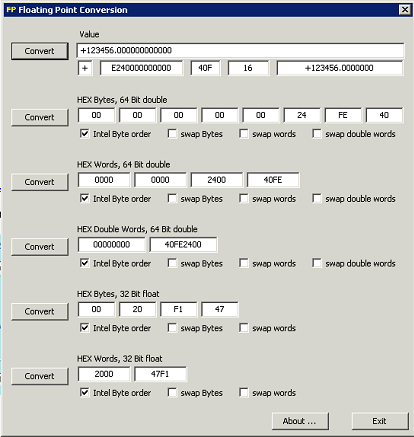
Of the many hex-to-floating point converters and calculators that are available on the Internet, very few actually allow manipulation of the byte and word orders. One such utility is located at www.61131.com/download.htm where both Linux and Windows versions of the utilities can be downloaded. Once installed, the utility is run as an executable with a single dialog interface. The utility presents the decimal float value of 123456.00 as follows:
One can then swap bytes and/or words to analyze what potential endianness issues may exist between Modbus RTU master and slave devices.
Export / Import of registers
With export / import functionality, you can convert all register data (only of one type) to a TSV (Tab-separated values) file and back to easily copy data from one device to another or to edit register in Excel.
You can share your schemas with other users in modbus-templates, or you can find some register schemas there.
Test
There are some programs in folder test to test the TCP communication:
- Ananas32/64 is a slave simulator (only holding registers and inputs, no coils and digital inputs)
- RMMS is a master simulator
- mod_RSsim.exe is a slave simulator. It can be that you need Microsoft Visual C++ 2008 SP1 Redistributable Package to start it (because of a Side-By-Side error).
Changelog
9.2.2 (2026-10-23)
- (@GermanBluefox) A response is taken only for the request it belongs to (issue #829): over TCP, SSL and UDP a response with another transaction ID is dropped, over RTU one from another unit. Before, a stale or duplicated answer - e.g. in the first poll cycle on a fresh connection - shifted every following response by one request, so the registers of another block were stored
- (@GermanBluefox) New option "Ignore transaction ID of responses" for devices that do not echo the transaction ID
- (@GermanBluefox) If a device returns fewer registers than requested, the whole block is discarded with a warning instead of storing the registers that fit
- (@GermanBluefox) The debug check of the scale factor read block works with aliases
9.2.1 (2026-10-13)
- (@GermanBluefox) Admin 7.6.20+ is required. The adapter is tested now also on Windows and macOS
9.2.0 (2026-09-25)
- (@GermanBluefox) The adapter reports the resources it really occupies to js-controller 8, which keeps a per-host registry of them (
system.host.<name>.usedResources): the serial port in RTU mode - as master and as slave - and the port a TCP slave or the proxy listens on. A master over TCP, UDP or SSL reports nothing, because the endpoint belongs to the device on the other side. Before a port is opened, the log names the other instance that has declared it, instead of only "Resource temporarily unavailable" or EADDRINUSE. The reporting itself lives in@iobroker/modbus, so it needs the next release of that package; an older js-controller is unaffected
9.1.2 (2026-09-20)
- (@GermanBluefox) Added explanations of timings in GUI
- (@GermanBluefox) Corrected proxy mode with multiple DeviceIDs
- (@GermanBluefox) Added better problem logging
9.1.1 (2026-08-27)
- (@nobl) Fixed stale and overlapping polling cycles after a reconnect (ioBroker.modbus issue #595): a block read error was logged and swallowed, so the polling loop kept running after the request timeout had already trashed the socket and cleared the request FIFO. The next register request was queued after that cleanup and was therefore sent on the reconnected socket, before the fresh cycle started by the connect handler — two polling cycles then ran in parallel. A pending reconnect, a lost connection or a stopping master now aborts the remaining blocks, register types and device IDs of the running cycle
- (@GermanBluefox) Limited that abort to connection failures: a plain Modbus exception response (illegal data address, illegal function, device busy) leaves the socket intact, so the remaining blocks of that register type are read as before. Otherwise a single register the device rejects would have permanently hidden every block behind it, because the block order is fixed
- (@GermanBluefox) Fixed a second source of stale requests: the block loops only checked connected, which is still true while a reconnect is pending. A connection that died during the wait between two blocks therefore queued the next request into the already cleared FIFO
- (@GermanBluefox) A pending reconnect timer is now cancelled when the client reports connect, so the timer of the deliberately dropped socket cannot tear the fresh connection down again
- (@GermanBluefox) Added a regression test for the polling of the remaining blocks after a device rejects one of them with an exception response
License
The MIT License (MIT)
Copyright (c) 2015-2026 Bluefox dogafox@gmail.com
Permission is hereby granted, free of charge, to any person obtaining a copy of this software and associated documentation files (the "Software"), to deal in the Software without restriction, including without limitation the rights to use, copy, modify, merge, publish, distribute, sublicense, and/or sell copies of the Software, and to permit persons to whom the Software is furnished to do so, subject to the following conditions:
The above copyright notice and this permission notice shall be included in all copies or substantial portions of the Software.
THE SOFTWARE IS PROVIDED "AS IS", WITHOUT WARRANTY OF ANY KIND, EXPRESS OR IMPLIED, INCLUDING BUT NOT LIMITED TO THE WARRANTIES OF MERCHANTABILITY, FITNESS FOR A PARTICULAR PURPOSE AND NONINFRINGEMENT. IN NO EVENT SHALL THE AUTHORS OR COPYRIGHT HOLDERS BE LIABLE FOR ANY CLAIM, DAMAGES OR OTHER LIABILITY, WHETHER IN AN ACTION OF CONTRACT, TORT OR OTHERWISE, ARISING FROM, OUT OF OR IN CONNECTION WITH THE SOFTWARE OR THE USE OR OTHER DEALINGS IN THE SOFTWARE.