
REST-API adapter
This is a RESTFul interface to read the objects and states from ioBroker and to write/control the states over HTTP Get/Post requests.
The purpose of this adapter is similar to simple-api. But this adapter supports long-polling and URL hooks for subscribing.
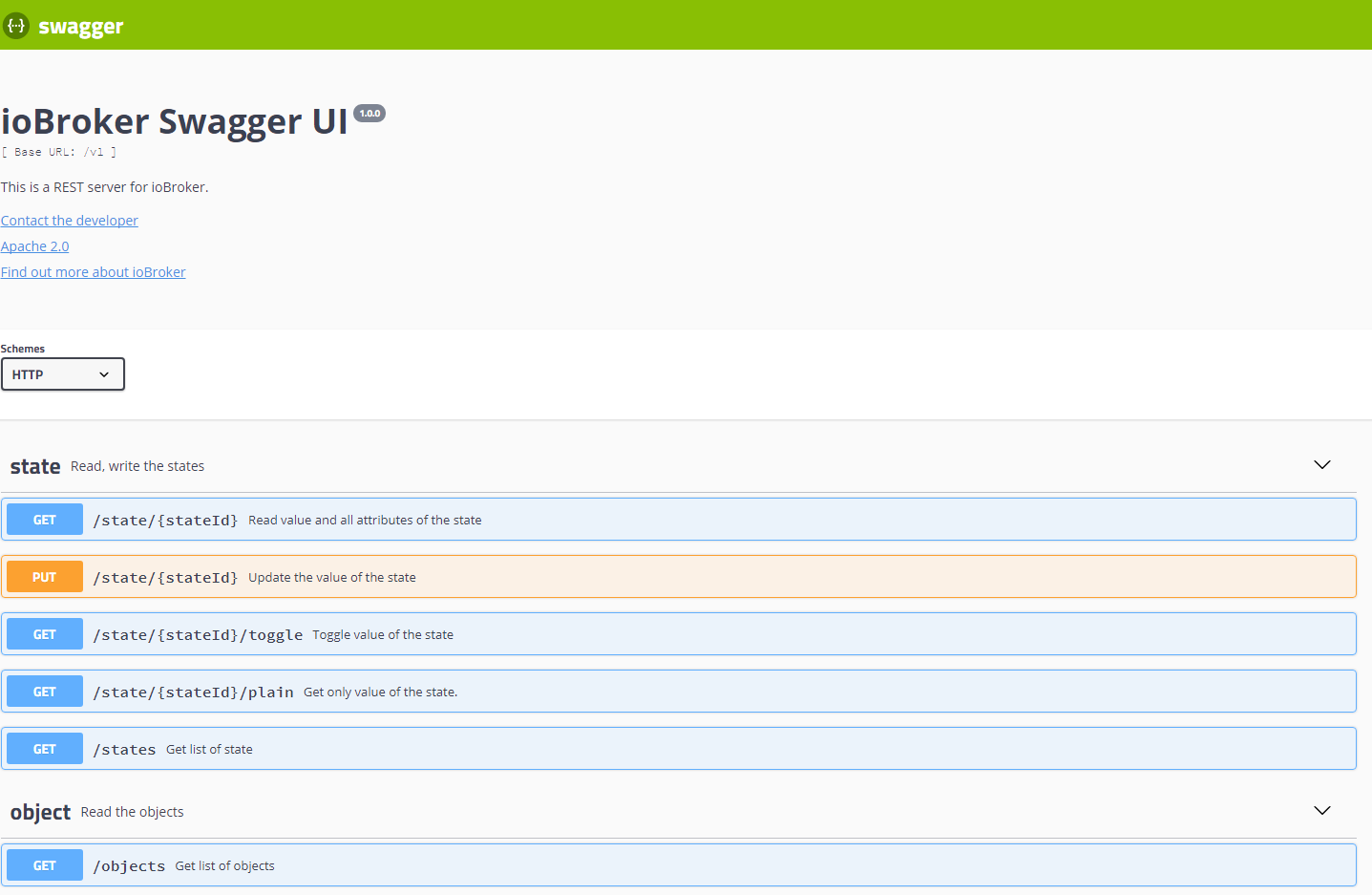
It has a beneficial web interface to play with the requests:
Usage
Call in browser http://ipaddress:8093/ and use Swagger UI to request and modify the states and objects.
Some request examples:
http://ipaddress:8093/v1/state/system.adapter.rest-api.0.memHeapTotal- read state as JSONhttp://ipaddress:8093/v1/state/system.adapter.rest-api.0.memHeapTotal/plain- read state as string (only value)http://ipaddress:8093/v1/state/system.adapter.rest-api.0.memHeapTotal?value=5- write state with GET (only for back compatibility with simple-api)http://ipaddress:8093/v1/sendto/javascript.0?message=toScript&data={"message":"MESSAGE","data":"FROM REST-API"}- send a message tojavascript.0in scriptscriptName
Authentication
To enable the authentication, you must set the Authentication option in the configuration dialog.
There are three types of authentication supported:
- Credentials in a query
- Basic authentication
- OAuth2 (Bearer)
For authentication in a query, you must set user and pass in query like:
http://ipaddress:8093/v1/state/system.adapter.rest-api.0.memHeapTotal?user=admin&pass=admin
For basic authentication, you must set the Authorization header with the value Basic base64(user:pass).
For Oauth2 authentication, you must set the Authorization header with the value Bearer <AccessToken>.
The access token can be retrieved with an HTTP request like:
http://ipaddress:8093/oauth/token?grant_type=password&username=<user>&password=<password>&client_id=ioBroker
The answer is like:
{
    "access_token": "21f89e3eee32d3af08a71c1cc44ec72e0e3014a9",
    "expires_in": "2025-02-23T11:39:32.208Z",
    "refresh_token": "66d35faa5d53ca8242cfe57367210e76b7ffded7",
    "refresh_token_expires_in": "2025-03-25T10:39:32.208Z",
    "token_type": "Bearer"
}
Subscribe to the state's or object's changes
Your application could get notifications by every change of the state or object.
For that, your application must provide an HTTP(S) end-point to accept the updates.
Example in node.js see here demoNodeClient.js
Long polling
This adapter supports subscribing on data changes via long polling.
Example for the browser could be found here: demoNodeClient.js
Web extension
This adapter can run as a web extension. In this case, the path is available under http://ipaddress:8082/rest-api/
Reverse proxy
If the adapter runs behind a reverse proxy under a sub-path, set this path in the instance settings (Reverse proxy path, e.g. /rest-api).
Swagger UI then sends its requests to /rest-api/v1/... instead of /v1/....
The proxy must strip the prefix before forwarding the request, e.g. for nginx:
location /rest-api/ {
    proxy_pass http://iobroker-host:8093/;
}
If the adapter runs as a web extension, the path is prepended to /rest-api/ of the web adapter.
Write many states with one request
PATCH /v1/states writes several states with one request (replacement for setBulk of simple-api):
PATCH http://ipaddress:8093/v1/states
Content-Type: application/json

[
    { "id": "0_userdata.0.nfc.UserID", "val": "4711" },
    { "id": "0_userdata.0.nfc.NFCID", "val": "04A224B2C35E80" },
    { "id": "0_userdata.0.nfc.TagContent", "val": "door", "ack": true }
]
Instead of an array, an object can be sent: { "0_userdata.0.a": 1, "0_userdata.0.b": { "val": 2, "ack": true } }.
The answer contains one entry per state in the same order: { id, val, ack } or { id, index, error } if this state could not be written.
With ?stopOnError=true the processing stops at the first error. Maximum 1000 states per request.
Important: the states are written one after another in the given order. It is not a transaction: every state fires its own change event, and a script triggered by the first state may not see the new values of the following states yet. If a script needs all values together, trigger it only on the last state of the list and read the other states there.
Notice
POSTis always for creating a resource (does not matter if it was duplicated)PUTis for checking if resource exists then update, else create new resourcePATCHis always for updating a resource
Commands
Additionally, you can execute many socket commands via a special interface:
http://ipaddress:8093/v1/command/<commandName>?arg1=Value2&arg2=Value2
E.g.
http://ipaddress:8093/v1/command/getState?id=system.adapter.admin.0.alive- to read the state ofsystem.adapter.admin.0.alivehttp://ipaddress:8093/v1/command/readFile?adapter=admin.admin&fileName=admin.png- to read the fileadmin.admin/admin.pngas JSON resulthttp://ipaddress:8093/v1/command/readFile?adapter=admin.admin&fileName=admin.png?binary- to read the fileadmin.admin/admin.pngas filehttp://ipaddress:8093/v1/command/extendObject?id=system.adapter.admin.0?obj={"common":{"enabled":true}}- to restart admin
You can request all commands with the POST method too. As body must be an object with parameters. E.g.:
curl --location --request POST 'http://ipaddress:8093/v1/command/sendTo' \
--header 'Content-Type: application/json' \
--data-raw '{
"adapterInstance": "history.0",
"command": "getHistory",
"message": {"id": "system.adapter.admin.0.memRss","options": {"aggregate": "onchange", "addId": true}}
}'
You cannot send a POST request to commands via GUI.
States
getStates(pattern)- get the list of states for a pattern (e.g. for system.adapter.admin.0.*). GUI can have problems with visualization of the answer.getForeignStates(pattern)- same as getStatesgetState(id)- get state value by IDsetState(id, state)- set state value with JSON object (e.g.{"val": 1, "ack": true})getBinaryState(id)- get binary state by IDsetBinaryState(id, base64)- set binary state by ID
Objects
getObject(id)- get object by IDgetObjects(list)- get all states and rooms. GUI can have problems with visualization of the answer.getObjectView(design, search, params)- get specific objects, e.g. design=system, search=state, params={"startkey": "system.adapter.admin.", "endkey": "system.adapter.admin.\u9999"}setObject(id, obj)- set object with JSON object (e.g.{"common": {"type": "boolean"}, "native": {}, "type": "state"})delObject(id, options)- delete an object by ID
Files
readFile(adapter, fileName)- read file, e.g. adapter=vis.0, fileName=main/vis-views.json. Additionally, you can set an option in query binary=true to get the answer as a file and not as JSONreadFile64(adapter, fileName)- read file as base64 string, e.g. adapter=vis.0, fileName=main/vis-views.json. Additionally, you can set an option in query binary=true to get the answer as a file and not as JSONwriteFile64(adapter, fileName, data64, options)- write file, e.g. adapter=vis.0, fileName=main/vis-test.json, data64=eyJhIjogMX0=unlink(adapter, name)- delete file or folderdeleteFile(adapter, name)- delete filedeleteFolder(adapter, name)- delete folderrenameFile(adapter, oldName, newName)- rename filerename(adapter, oldName, newName)- rename file or foldermkdir(adapter, dirName)- create folderreadDir(adapter, dirName, options)- read content of folderchmodFile(adapter, fileName, options)- change file mode. E.g. adapter=vis.0, fileName=main/*, options ={"mode": 0x644}chownFile(adapter, fileName, options)- change file owner. E.g. adapter=vis.0, fileName=main/*, options ={"owner": "newOwner", "ownerGroup": "newgroup"}fileExists(adapter, fileName)- check if a file exists
Admins
getHostByIp(ip)- read host information by IP. e.g. by localhostreadLogs(host)- read file name and size of log files. You can read them with http://ipaddress:8093/delState(id)- delete state and object. Same as delObjectgetRatings(update)- read adapter ratings (as in admin)getCurrentInstance()- read adapter namespace (always rest-api.0)decrypt(encryptedText)- decrypt string with system secretencrypt(plainText)- encrypt string with system secretgetAdapters(adapterName)- get objects of type "adapter". You can optionally define adapterNameupdateLicenses(login, password)- read licenses from ioBroker.net portalgetCompactInstances()- read list of instances with short informationgetCompactAdapters()- read list of installed adapters with short informationgetCompactInstalled(host)- read short information about installed adaptersgetCompactSystemConfig()- read short system configgetCompactSystemRepositories()getCompactRepository(host)- read short repositorygetCompactHosts()- get short information about hostsaddUser(user, pass)- add new userdelUser(user)- delete useraddGroup(group, desc, acl)- create a new groupdelGroup(group)- delete groupchangePassword(user, pass)- change user passwordgetAllObjects()- read all objects as a list. GUI can have problems with visualization of the answer.extendObject(id, obj)- modify an object by ID with JSON. (.e.g.{"common":{"enabled": true}})getForeignObjects(pattern, type)- same as getObjectsdelObjects(id, options)- delete objects by pattern
Others
updateTokenExpiration(accessToken)log(text, level[info])- no answer - add log entry to ioBroker logcheckFeatureSupported(feature)- check if feature is supported by js-controller.getHistory(id, options)- read history. See for options: https://github.com/ioBroker/ioBroker.history/blob/master/docs/en/README.md#access-values-from-javascript-adapterhttpGet(url)- read URL from server. You can set binary=true to get an answer as a filesendTo(adapterInstance, command, message)- send command to instance. E.g. adapterInstance=history.0, command=getHistory, message={"id": "system.adapter.admin.0.memRss","options": {"aggregate": "onchange", "addId": true}}listPermissions()- read static information with function permissionsgetUserPermissions()- read object with user permissionsgetVersion()- read adapter name and versiongetAdapterName()- read adapter name (always rest-api)clientSubscribe(targetInstance, messageType, data)getAdapterInstances(adapterName)- get objects of type "instance". You can optionally define adapterName
Changelog
4.1.2 (2026-10-13)
- (@GermanBluefox) Added
PATCH /v1/statesto write many states with one request (bulk update) - (@GermanBluefox) Fixed
413 Payload Too Largefor request bodies larger than 100kB when authentication is enabled - (@GermanBluefox) Added option
Reverse proxy pathto make Swagger UI work behind a reverse proxy
4.0.4 (2026-10-13)
- (@GermanBluefox) Updated packages
- (@GermanBluefox) Added option to use HTTP/2 on a secure connection (enabled by default, falls back to HTTP/1.1)
- (@GermanBluefox) Report the used port to js-controller
4.0.3 (2026-10-13)
- (iobroker-bot) Adapter requires node.js >= 22 now.
- (@GermanBluefox) Replaced
process.exit()withterminate()for compact mode and added tests on Windows and macOS
4.0.2 (2026-06-14)
- (@GermanBluefox) Packages were updated
- (@GermanBluefox) Allowed to define the response content type by sendTo queries
- (@GermanBluefox) Corrected some minor issues
4.0.1 (2026-02-17)
- (@GermanBluefox) Corrected some minor issues
License
Apache 2.0, see LICENSE
Copyright (c) 2017-2026 bluefox dogafox@gmail.com