Versions
RPI-Monitor Adapter for ioBroker
RPI-Monitor implementation for integration into ioBroker. It is the same implementation as for iobroker.rpi, but with GPIOs.
Important Information
ioBroker needs special permissions to control GPIOs. On most Linux distributions this can be achieved by adding the ioBroker user to the gpio group.
You need to install libgpiod-dev in version 2.2 or newer before installing the adapter (see below), otherwise the installation is aborted.
Debian 13 / Trixie ships 2.2.1. Debian 12 / Bookworm only has older versions (1.6, or 2.1 from other sources), which are not enough.
You can check the installed version with dpkg -s libgpiod-dev | grep Version.
[!CAUTION] Version 3.x.x and newer of this adapter supports and requires Debian 13 / Trixie (Linux kernel 5.10 or newer). Do not update if you are using older o/s.
Installation
After installation you can configure the monitor settings in the instance settings.
After start of iobroker.rpi, all selected modules generates
an object tree in ioBroker within rpi..
e.g. rpi.0.cpu
The adapter needs some os dependencies. Usually js-controller should take care of this, but if you have problems, please install the following packages manually:
sudo apt update
sudo apt install -y build-essential python3
sudo apt install -y libgpiod-dev
sudo apt install -y pkg-config
libgpiod-dev (version 2.2 or newer) is always required, the installation checks for it.
pkg-config is only necessary if you rebuild node-dht-sensor with libgpiod support for DHTxx/AM23xx sensors (see DHTxx/AM23xx Sensors).
Disk temperature
You can now read NVMe and SSD temperatures. To do this, you need to install the smartmontools package on your system.
You can do this with the following command: sudo apt install smartmontools. You will also need to add the command to the ioBroker
sudoers file /etc/sudoers.d/iobroker. But we use a dropin file and do not touch the original file as otherwise it will be reseted after a iobroker fix. Create it with visudo: sudo visudo -f /etc/sudoers.d/iobroker-disktemp and add the following lines:
Cmnd_Alias SMARTCTL = /usr/sbin/smartctl -A /dev/sd[a-z], \
                      /usr/sbin/smartctl -A /dev/nvme[0-9]
Defaults!SMARTCTL !syslog, !pam_session
iobroker ALL=(root) NOPASSWD: SMARTCTL
GPIOs
You can read and control GPIOs too. All what you need to do is to configure in the settings the GPIOs options (additional tab).
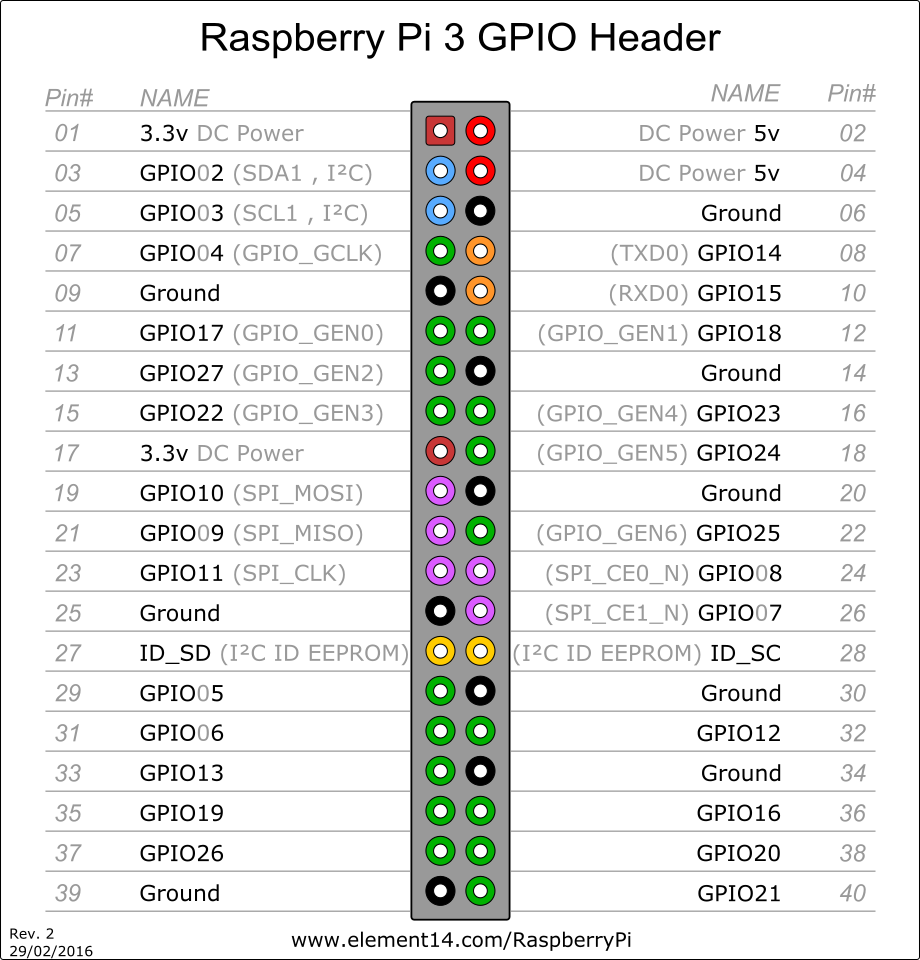
After some ports are enabled following states appear in the object tree:
- rpi.0.gpio.PORT.state
The numeration of ports is BCM (BroadComm pins on chip). You can get the enumeration with gpio readall.
For instance PI2:
+-----+-----+---------+------+---+---Pi 2---+---+------+---------+-----+-----+
| BCM | wPi |   Name  | Mode | V | Physical | V | Mode | Name    | wPi | BCM |
+-----+-----+---------+------+---+----++----+---+------+---------+-----+-----+
|     |     |    3.3v |      |   |  1 || 2  |   |      | 5v      |     |     |
|   2 |   8 |   SDA.1 | ALT0 | 1 |  3 || 4  |   |      | 5V      |     |     |
|   3 |   9 |   SCL.1 | ALT0 | 1 |  5 || 6  |   |      | 0v      |     |     |
|   4 |   7 | GPIO. 7 |   IN | 1 |  7 || 8  | 0 | IN   | TxD     | 15  | 14  |
|     |     |      0v |      |   |  9 || 10 | 1 | IN   | RxD     | 16  | 15  |
|  17 |   0 | GPIO. 0 |   IN | 0 | 11 || 12 | 0 | IN   | GPIO. 1 | 1   | 18  |
|  27 |   2 | GPIO. 2 |   IN | 0 | 13 || 14 |   |      | 0v      |     |     |
|  22 |   3 | GPIO. 3 |   IN | 0 | 15 || 16 | 0 | IN   | GPIO. 4 | 4   | 23  |
|     |     |    3.3v |      |   | 17 || 18 | 0 | IN   | GPIO. 5 | 5   | 24  |
|  10 |  12 |    MOSI |   IN | 0 | 19 || 20 |   |      | 0v      |     |     |
|   9 |  13 |    MISO |   IN | 0 | 21 || 22 | 1 | IN   | GPIO. 6 | 6   | 25  |
|  11 |  14 |    SCLK |   IN | 0 | 23 || 24 | 1 | IN   | CE0     | 10  | 8   |
|     |     |      0v |      |   | 25 || 26 | 1 | IN   | CE1     | 11  | 7   |
|   0 |  30 |   SDA.0 |   IN | 1 | 27 || 28 | 1 | IN   | SCL.0   | 31  | 1   |
|   5 |  21 | GPIO.21 |   IN | 1 | 29 || 30 |   |      | 0v      |     |     |
|   6 |  22 | GPIO.22 |   IN | 1 | 31 || 32 | 0 | IN   | GPIO.26 | 26  | 12  |
|  13 |  23 | GPIO.23 |   IN | 0 | 33 || 34 |   |      | 0v      |     |     |
|  19 |  24 | GPIO.24 |   IN | 0 | 35 || 36 | 0 | IN   | GPIO.27 | 27  | 16  |
|  26 |  25 | GPIO.25 |  OUT | 1 | 37 || 38 | 0 | IN   | GPIO.28 | 28  | 20  |
|     |     |      0v |      |   | 39 || 40 | 0 | IN   | GPIO.29 | 29  | 21  |
+-----+-----+---------+------+---+----++----+---+------+---------+-----+-----+
| BCM | wPi |   Name  | Mode | V | Physical | V | Mode | Name    | wPi | BCM |
+-----+-----+---------+------+---+---Pi 2---+---+------+---------+-----+-----+
DHTxx/AM23xx Sensors
You can read from DHT11, DHT21 (AM2301), DHT22 and AM2302 temperature/humidity sensors.
Connect such a sensor to a GPIO pin as described on the node-dht-sensor package page. Multiple sensors can be connected to multiple pins (this is not a bus system) as discussed.
In the GPIO table, select DHT11 for DHT11 sensors and DHT22/AM23xx for all others, and enter the poll interval in milliseconds into the Debounce / Poll column. The sensors cannot be read faster than every 2000 ms (DHT11: 1000 ms); without a value, the adapter polls every 30000 ms.
The adapter reads a sensor in one of two ways and logs at startup which one it uses for each sensor.
Linux kernel driver (recommended, works on every Raspberry Pi including the Pi 5)
Linux has its own driver for these sensors (it handles DHT11, DHT21, DHT22 and AM2302 alike). Enable it for each sensor by adding a line to /boot/firmware/config.txt (/boot/config.txt on older systems) and reboot:
dtoverlay=dht11,gpiopin=17
gpiopin is the GPIO (BCM) number, the same as in the adapter's GPIO table. You can check that it works with cat /sys/bus/iio/devices/iio:device*/in_temp_input (the value is in 1/1000 °C). The adapter detects the driver and uses it automatically, there is nothing else to configure.
node-dht-sensor
Without the kernel driver, the adapter uses node-dht-sensor. On Raspberry Pi 1 to 4 this works as installed.
On a Raspberry Pi 5 (also Pi 500 and Compute Module 5), the default build of node-dht-sensor cannot work, because it accesses GPIO registers the Pi 5 does not have. Either use the kernel driver above, or rebuild node-dht-sensor with libgpiod support:
sudo apt-get install -y build-essential libgpiod-dev pkg-config
cd /opt/iobroker
sudo -u iobroker -H npm rebuild node-dht-sensor --use_libgpiod=true
Then restart the adapter. pkg-config is required: without it, the build assumes the outdated libgpiod 1 and fails on current systems. Whenever node-dht-sensor is reinstalled or rebuilt later (for example after a Node.js upgrade), it gets the default build again - the adapter then logs an error at startup and the rebuild has to be repeated. The kernel driver does not have this problem.
Changelog
4.0.0 (2026-10-07)
- (copilot) Adapter requires node.js >= 22 now
- (copilot) Adapter requires admin >= 7.7.22 now
- (mcm1957) Dependencies have been updated.
- (copilot) ENHANCED: Added
temperature.fan_activityobject to monitor fan RPM via/sys/devices/platform/cooling_fan/...; falls back to0when unavailable. - (Garfonso/Claude): Improve GPIO handling.
- (Garfonso/Claude): FIXED: GPIO outputs no longer switch off and on again during adapter start (#431).
- (Garfonso/Claude): Use the
@garfonso/opengpionpm package instead of a git branch of the fork. - (Garfonso/Claude): FIXED: The fan parser unit test matched the old single-hwmon path and failed since the fan reading fix.
- (Garfonso/Claude): FIXED: DHT sensors ignored the configured poll interval (with no interval they were read continuously, so every read failed) and every sensor's timer read all sensors.
- (Garfonso/Claude): NEW: DHT sensors are read through the Linux dht11 kernel driver if it is enabled (
dtoverlay=dht11,gpiopin=<n>). This makes them work on a Raspberry Pi 5 without rebuilding node-dht-sensor (#406). - (Garfonso/Claude): ENHANCED: DHT sensor problems are logged with their cause and how to fix them; the startup log shows how each sensor is read.
- (Garfonso/Claude): FIXED: Raspberry Pi 500 and Compute Module 5 are recognised as Raspberry Pi 5 boards and use the same GPIO chip.
- (Garfonso/Claude): FIXED: The humidity object of a DHT sensor was named "temperature".
- (Garfonso/Claude): BREAKING: GPIO and DHT sensor handling changed in several places (see above). This mostly fixes problems, but please check your GPIO setup after updating.
3.0.2 (2025-12-01)
- (@klein0r) Check for required libgpiod-dev package version
3.0.1 (2025-11-28)
- (@klein0r) Updated logo, workflows and documentation
- (@klein0r) admin 7.6.17 and js-controller 6.0.11 (or later) are required
3.0.0 (2025-11-28)
- (@klein0r) NodeJS 20.x (or newer) is required
- (@klein0r) Updated opengpio to v2 (works on Debian trixie)
2.4.0 (2025-03-06)
- (Garfonso) read the current state of GPIO outputs during adapter startup.
- (Garfonso) re-read GPIO input, if set by the user (with ack=false).
- (Garfonso) add an option to invert true/false mapping to 1/0.
- (Garfonso) Allow multiple instances of this adapter per host.
- (Garfonso) tried to improve initialization of GPIO inputs.
License
MIT License
Copyright (c) 2026 iobroker-community-adapters iobroker-community-adapters@gmx.de
Copyright (c) 2024-2025 Garfonso garfonso@mobo.info
Permission is hereby granted, free of charge, to any person obtaining a copy of this software and associated documentation files (the "Software"), to deal in the Software without restriction, including without limitation the rights to use, copy, modify, merge, publish, distribute, sublicense, and/or sell copies of the Software, and to permit persons to whom the Software is furnished to do so, subject to the following conditions:
The above copyright notice and this permission notice shall be included in all copies or substantial portions of the Software.
THE SOFTWARE IS PROVIDED "AS IS", WITHOUT WARRANTY OF ANY KIND, EXPRESS OR IMPLIED, INCLUDING BUT NOT LIMITED TO THE WARRANTIES OF MERCHANTABILITY, FITNESS FOR A PARTICULAR PURPOSE AND NONINFRINGEMENT. IN NO EVENT SHALL THE AUTHORS OR COPYRIGHT HOLDERS BE LIABLE FOR ANY CLAIM, DAMAGES OR OTHER LIABILITY, WHETHER IN AN ACTION OF CONTRACT, TORT OR OTHERWISE, ARISING FROM, OUT OF OR IN CONNECTION WITH THE SOFTWARE OR THE USE OR OTHER DEALINGS IN THE SOFTWARE.