tedee adapter for ioBroker
Adapter for Tedee Locks
This Adapter uses the local bridge API to control a tedee lock
All Lock devices by Tedee are supported.
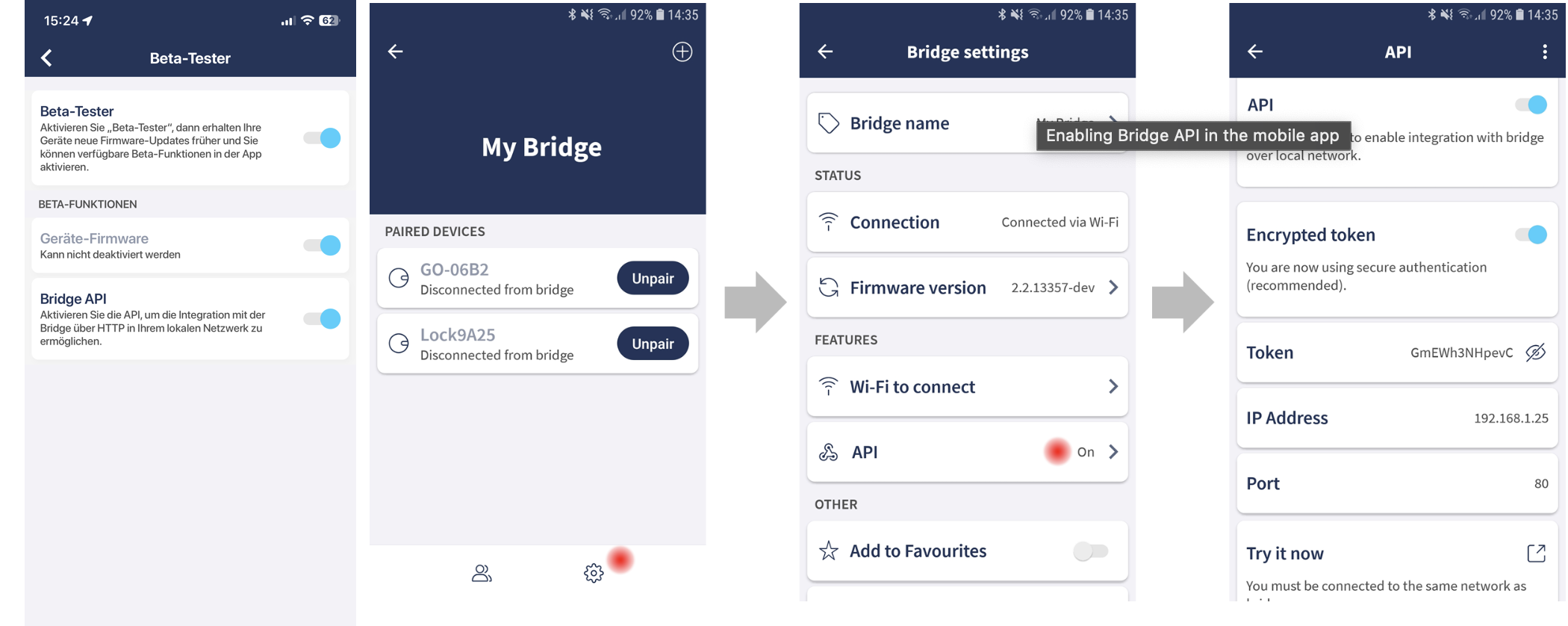
- Activate Beta Testing in your user profile
- Enable API in the bridge settings
- Copy the IP and the token in the instance settings
The Adapter receives all status update immediatly via webhooks. The interval in the settings is only a backup for continuously refreshs.
Webhooks / Callback host
The adapter starts a small web server (port 29170 or the next free port) and registers it at the bridge. The bridge must be able to reach this port, e.g. allow it in the firewall if the bridge is in a separate (IoT) network.
By default the first IPv4 address of the ioBroker system is used. Set Callback host in the instance settings if this is not the right one, e.g. with Docker, several network interfaces or to use IPv6.
Only webhooks pointing to this ioBroker system are removed on start/stop, webhooks of other systems (e.g. Home Assistant) are kept.
Current State of a lock: tedee.0.id.state
- 0 Uncalibrated
- 1 Calibrating
- 2 Unlocked
- 3 SemiLocked
- 4 Unlocking
- 5 Locking
- 6 Locked
- 7 Pulled
- 8 Pulling
- 9 Unknown
- 18 Updating
- 255 Unpulling
Usage
You can control the tedee lock via tedee.0.id.remote
- lock to Lock/Unlock
- pull to Pull
- unlock unlock
Unlock modes:
- 0 - (or no parameter set) - Normal. From close position: unlock only or unlock with auto pull if enabled. From open position: nothing.
- 2 - Force. Force movement until lock hits resistance.
- 3 - Without Pull. From close position: unlock only without auto pull. From open position: nothing.
- 4 - Unlock or Pull. From close position: unlock only or unlock with auto pull if enabled. From open position: pull.
Last action (who opened the door)
Each lock gets a channel tedee.0.<lockId>.lastAction, filled by the webhooks:
| State | Content |
|---|---|
action | unlock, lock or pull. Written last, use it as trigger in scripts |
source | how: 1 = Button / manual, 2 = App / API, 10 = Keypad, 23 = Fingerprint |
sourceName | text of source |
userId | Tedee user id (app), PIN id (keypad) or fingerprint id; empty if unknown |
pinAlias | name of the PIN for keypad actions (Bridge API 1.19+, loaded from the lock) |
The source values are not documented by Tedee and were determined with a Lock PRO and Keypad PRO. Unknown values are shown as Unknown (n), please report them.
The PIN names are read from the lock once at start and again when an unknown PIN id is used. While reading, the bridge is blocked (about 1 second per 5 PINs). Disable Load PIN names for lastAction in the instance settings (tab PINs) if you do not need pinAlias.
PIN management
Shows all keypad PINs of a lock in ioBroker and lets you create, change and delete PINs, e.g. a guest PIN that only works on weekends. Requires a Tedee Keypad and Bridge API 1.19 or newer.
Enable
Instance settings → tab PINs → Enable PIN management. The feature is off by default because it changes access codes of your door.
Security: the PIN codes themselves are never written to states or to the log. Anybody who can write to the delete buttons or send sendTo commands to the adapter (scripts, VIS, cloud/IoT adapters) can change the PINs of your door, so restrict access accordingly.
States
| State | Content |
|---|---|
pins.count | number of PINs |
pins.list | all PINs as JSON array (same fields as below), e.g. for VIS tables |
pins.listVersion | version of the PIN list on the lock, increases with every change |
pins.refresh | button: reload the PINs from the lock |
pins.<pinId>.alias | name of the PIN |
pins.<pinId>.active | true if the PIN can be used right now (date, weekday, daily window) |
pins.<pinId>.validFrom | start of validity (timestamp, null = unbounded) |
pins.<pinId>.validTo | end of validity (timestamp, null = unbounded) |
pins.<pinId>.dayStart | daily window start HH:MM (empty = whole day) |
pins.<pinId>.dayEnd | daily window end HH:MM (empty = whole day) |
pins.<pinId>.weekdays | weekdays as bitmask: 1 = Mon, 2 = Tue, 4 = Wed … 64 = Sun, 127 = all |
pins.<pinId>.weekdaysText | weekdays as text, e.g. Sat,Sun or every day |
pins.<pinId>.delete | button: delete this PIN from the lock |
The list is loaded at adapter start, after every change made by the adapter and every 15 minutes (changes made in the Tedee app). Use pins.refresh to load it immediately. active is calculated with the time zone of the ioBroker host.
Commands (sendTo)
All commands return { error: '...' } if something went wrong. lockId can be omitted if only one lock is connected.
| Command | Parameters | Result |
|---|---|---|
getPins | lockId | { lockId, pins: [...] } |
getPin | lockId, pinId, includeCode (optional, true = also return code) | { lockId, pin: {...} } |
createPin | lockId, pin, alias, optional: validity fields (see below) | { lockId, pinId } |
updatePin | lockId, pinId, only the fields to change | { lockId, pinId } |
deletePin | lockId, pinId | { lockId, pinId } |
refreshPins | lockId | { lockId, pins: [...] } |
Fields for createPin / updatePin:
| Field | Format |
|---|---|
pin | string with 5 – 8 digits, e.g. '048213' (use a string, otherwise leading zeros are lost) |
alias | name, max. 32 bytes |
startDate | '2026-11-01', '2026-11-01T08:00', timestamp in ms or s; null = unbounded |
endDate | as startDate; a plain date means the end of that day (23:59:59) |
dayStartTime | '08:00' or seconds from midnight; null = whole day |
dayEndTime | '16:30' or seconds from midnight; null = whole day |
weekdays | ['Sat', 'Sun'] (also German ['Sa', 'So']), day numbers [6, 7] (1 = Mon) or bitmask 96 |
updatePin keeps all fields that are not given, including the PIN code.
Examples (JavaScript adapter)
// list all PINs
sendTo('tedee.0', 'getPins', {}, (res) => log(JSON.stringify(res)));

// guest PIN: November, weekends, 10:00 - 18:00
sendTo(
  'tedee.0',
  'createPin',
  {
    pin: '482913',
    alias: 'Guest',
    startDate: '2026-11-01',
    endDate: '2026-11-30',
    weekdays: ['Sat', 'Sun'],
    dayStartTime: '10:00',
    dayEndTime: '18:00',
  },
  (res) => (res.error ? log(res.error, 'warn') : log(`created PIN ${res.pinId}`)),
);

// extend the guest PIN until end of December, everything else stays
sendTo('tedee.0', 'updatePin', { pinId: 5, endDate: '2026-12-31' }, (res) => log(JSON.stringify(res)));

// delete a PIN
sendTo('tedee.0', 'deletePin', { pinId: 5 }, (res) => log(JSON.stringify(res)));
Example (Blockly)
Use the block sendTo (category Sendto), set the instance tedee.0 and the command, and add one parameter per field with the gear icon. Keep the PIN as text, otherwise leading zeros are lost. Weekdays can be given as text, e.g. Sa,So or Sat,Sun. Do not set a log level on this block, it would write the parameters incl. the PIN code to the log. The adapter logs the result itself (PIN "Guest" created (id 5) or the error).
To import the example: Blockly editor → Import blocks (icon at the top right) → paste the XML. Change the values before you run it, the example creates a real PIN on your lock.
Blockly XML: create a guest PIN and delete a PIN
<xml xmlns="https://developers.google.com/blockly/xml">
  <block type="sendto_custom" x="20" y="20">
    <mutation xmlns="http://www.w3.org/1999/xhtml" items="pin,alias,startDate,endDate,weekdays,dayStartTime,dayEndTime"></mutation>
    <field name="INSTANCE">tedee.0</field>
    <field name="COMMAND">createPin</field>
    <field name="LOG"></field>
    <field name="WITH_STATEMENT">FALSE</field>
    <value name="ARG0"><shadow type="text"><field name="TEXT">482913</field></shadow></value>
    <value name="ARG1"><shadow type="text"><field name="TEXT">Guest</field></shadow></value>
    <value name="ARG2"><shadow type="text"><field name="TEXT">2026-11-01</field></shadow></value>
    <value name="ARG3"><shadow type="text"><field name="TEXT">2026-11-30</field></shadow></value>
    <value name="ARG4"><shadow type="text"><field name="TEXT">Sa,So</field></shadow></value>
    <value name="ARG5"><shadow type="text"><field name="TEXT">10:00</field></shadow></value>
    <value name="ARG6"><shadow type="text"><field name="TEXT">18:00</field></shadow></value>
  </block>
  <block type="sendto_custom" x="20" y="300">
    <mutation xmlns="http://www.w3.org/1999/xhtml" items="pinId"></mutation>
    <field name="INSTANCE">tedee.0</field>
    <field name="COMMAND">deletePin</field>
    <field name="LOG"></field>
    <field name="WITH_STATEMENT">FALSE</field>
    <value name="ARG0"><shadow type="math_number"><field name="NUM">5</field></shadow></value>
  </block>
</xml>
The blocks generate the same code as the JavaScript example above, e.g. sendTo('tedee.0', 'createPin', { 'pin': '482913', 'alias': 'Guest', ... });. Connect them to a trigger (e.g. a VIS button state) or run the script once.
Notes
- While the bridge reads the PIN list, it cannot handle other requests (about 1 second per 5 PINs, plus one request per PIN for the details).
- If the Tedee app changes PINs at the same moment, the bridge answers "another PIN operation is in progress" — just try again.
- With PIN management enabled, Load PIN names for lastAction is not needed,
lastAction.pinAliasuses the same list. - When PIN management is switched off, the
pinschannels are removed at the next start.
Changelog
WORK IN PROGRESS
- (Schimi1983) New: PIN management for keypad PINs (show, create, change, delete), see section "PIN management" [#49]
- (Schimi1983) New: channel
lastActionshows who and how the lock was operated, incl. the PIN name [#13] - (Schimi1983) New: optional setting "Callback host" for webhooks (Docker, several network interfaces, IPv6)
- (Schimi1983) Instance settings reworked: tabs, help texts, translations
- (Schimi1983) Fix: webhooks are registered with the IP address instead of the host name
- (Schimi1983) Fix: webhooks of other systems (e.g. Home Assistant) are no longer deleted
- (Schimi1983) Fix: lock commands are no longer repeated on errors and no longer fail with ECONNRESET
- (Schimi1983) Fix: unlock mode is validated, polling waits for the previous request
- (Schimi1983) Fix: lock states 3 (partially open) and 255 (unpulling)
- (Schimi1983) Fix: clean shutdown, the adapter was killed on stop
- (Schimi1983, ioBroker-Bot) Node.js >= 22, js-controller >= 6.0.11 and admin >= 7.8.23 required
- (Schimi1983) Dependencies updated, ESLint 9, tests for Node.js 22, 24 and 26
0.3.2 (2024-04-10)
- add retry when request fails
0.3.1 (2023-12-16)
- (TA2k) initial release
Disclaimer
Tedee is a trademark of tedee. I am in no way endorsed by or affiliated with tedee, or any associated subsidiaries, logos or trademarks
License
MIT License
Copyright (c) 2024-2026 TA2k tombox2020@gmail.com
Permission is hereby granted, free of charge, to any person obtaining a copy of this software and associated documentation files (the "Software"), to deal in the Software without restriction, including without limitation the rights to use, copy, modify, merge, publish, distribute, sublicense, and/or sell copies of the Software, and to permit persons to whom the Software is furnished to do so, subject to the following conditions:
The above copyright notice and this permission notice shall be included in all copies or substantial portions of the Software.
THE SOFTWARE IS PROVIDED "AS IS", WITHOUT WARRANTY OF ANY KIND, EXPRESS OR IMPLIED, INCLUDING BUT NOT LIMITED TO THE WARRANTIES OF MERCHANTABILITY, FITNESS FOR A PARTICULAR PURPOSE AND NONINFRINGEMENT. IN NO EVENT SHALL THE AUTHORS OR COPYRIGHT HOLDERS BE LIABLE FOR ANY CLAIM, DAMAGES OR OTHER LIABILITY, WHETHER IN AN ACTION OF CONTRACT, TORT OR OTHERWISE, ARISING FROM, OUT OF OR IN CONNECTION WITH THE SOFTWARE OR THE USE OR OTHER DEALINGS IN THE SOFTWARE.