Beschreibung
Das jqui-mfd-Widget-Set ist für ioBroker.vis und ioBroker.vis-2 verfügbar. Die Widgets sind Schaltflächen im Stil des jQuery UI-Themes der Ansicht mit den Symbolen des OpenAutomationProject für Lampen, Steckdosen, Rollläden, Markisen, Ventile, Fenster, Türen, Heizung und Kameras.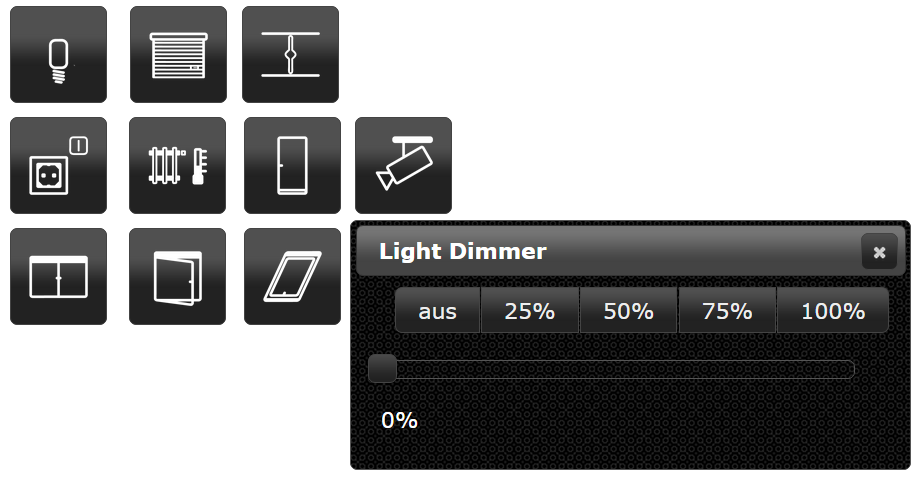
vis und vis-2
Der Adapter liefert jedes Widget zweimal aus:
- vis (vis-1) verwendet das EJS/jQuery-Widget-Set in
widgets/jqui-mfd.htmlDie - vis-2 verwendet das React-Widget-Set in
widgets/vis-2-widgets-jqui-mfd/, gebaut aussrc-widgets/Die
Beide deklarieren die gleichen Widget-IDs (tplMfdLight, tplMfdShutterDialog, ...) und dieselben Attributnamen, und vis-2 bevorzugt ein React-Widget gegenüber einem EJS-Widget. Daher funktioniert ein mit vis erstelltes Projekt auch nach dem Wechsel zu vis-2 weiterhin – die Widgets werden einfach mit der React-Implementierung gerendert, ohne jQuery und jQuery UI-Dialoge. Die Schaltflächen dieser Widgets werden weiterhin vom jQuery UI-Theme der Ansicht gezeichnet und sehen daher wie zuvor aus. In vis-2 erstellte Widgets verwenden stattdessen das Theme von vis-2 (Option „vis-2 theme“).
Die React-Widgets benötigen vis-2 2.12.8 oder neuer.
Dokumentation
Alle Widgets mit ihren Einstellungen und Screenshots: Englisch | Deutsch
Symbole
Die Icons stammen aus dem KNX User Forum Iconset von mfd und sind unter CC BY-SA 3.0 DE lizenziert.
Changelog
WORK IN PROGRESS
- (@GermanBluefox) All widgets were ported to vis-2 as React widgets, without jQuery and jQuery UI dialogs
- (@GermanBluefox) Added documentation for every vis-2 widget with screenshots (English and German)
- (@GermanBluefox) New widgets follow the vis-2 theme (option "vis-2 theme"); widgets from vis-1 keep the jQuery UI look
- (@GermanBluefox) Lamp, shutter, blind and valve are drawn as SVG for the exact value instead of 11 (5) fixed images
- (@GermanBluefox) The dialogs follow the dark theme of vis-2, can be moved and closed with Escape
- (@GermanBluefox) The slider of the dialogs writes the value once, when it is released
- (@GermanBluefox) "Auto close" 0 keeps the dialog open; before it closed after one second
- (@GermanBluefox) "Working object ID" holds the slider while the device moves - it was ignored before
- (@GermanBluefox) Icon colors also work for the switched-off lamp and do not remove own PNG icons any more
- (@GermanBluefox) "Show active background" of shutter, blind, valve and Custom10 compares with "Max" instead of 1
- (@GermanBluefox) The window with rotary handle shows the own icons per state
- (@GermanBluefox) The adapter icon is an SVG now
- (@GermanBluefox) The widget set has its own icon, label and color in the widget palette of vis-2
- (@GermanBluefox) Every widget describes itself in the palette of the vis-2 editor
1.1.3 (2026-01-25)
- (@GermanBluefox) Allowed installation with vis-2 without installing vis-1
1.1.1 (2024-01-16)
- (bluefox) Make it compatible with ioBroker.vis 2.0
1.0.12 (2018-06-27)
- (bluefox) Custom10-Widget and Light-Widget are fixed if the icon color used
1.0.11 (2018-02-18)
- (Bjoern3003) Heating widget was extended
1.0.9 (2017-10-13)
- (bluefox) Fix iframes
1.0.8 (2017-07-12)
- (KNXBroker) Fix of ShutterDialog Labels
1.0.7 (2017-05-14)
- (bluefox/Apollon77) Fix size of lamp-off-svg
1.0.6 (2016-11-24)
- (bluefox) Add to all dialogs autoclose
1.0.5 (2016-09-13)
- (bluefox) add blind widget
1.0.4 (2016-07-28)
- (bluefox) fix custom 10 dialog
1.0.3 (2016-07-25)
- (jens-maus) removed left over debugger statement
1.0.2 (2016-07-21)
- (jens-maus) implemented color support for each separate state of the jqui-mfd wigets
1.0.0 (2016-06-14)
- (bluefox) increase default width of popup windows
0.1.0 (2015-10-31)
- (bluefox) change Light Dialog => to OnOff Dialog
- (bluefox) expand auto close with timeout
0.0.1 (2015-09-20)
- (bluefox) initial checkin
License
Copyright (c) 2014-2026 hobbyquaker https://github.com/hobbyquaker, bluefox https://github.com/GermanBluefox MIT
The icons are licensed under CC BY-SA 3.0 DE, see
widgets/jqui-mfd/img/license.txt.