whatsapp-cmb adapter for ioBroker
Big thanks to free CallMeBot service, this adapter allows you to send WhatsApp messages to yourself or other number.
Note : The Free API is only for personal use!
Configuration
Following documentation was copied from callmebot page.
You need to get the API key from the bot before using the API:
- Add the phone number XXXX (get the current one from the CallMeBot page) into your Phone Contacts. (Name it as you wish.)
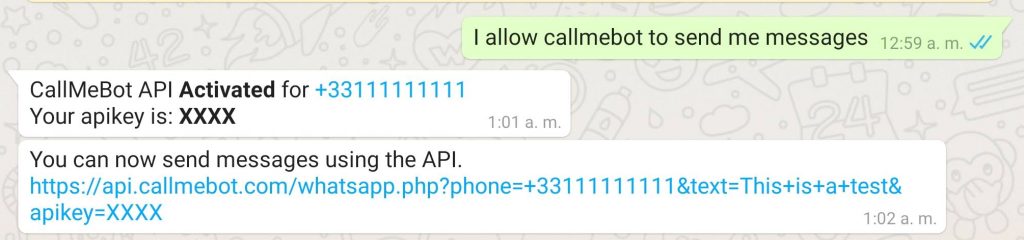
- Send this message
I allow callmebot to send me messages(in English) to the new contact created (using WhatsApp of course). - Wait until you receive the message
API Activated for your phone number. Your APIKEY is 123123from the bot. As this is still in beta testing, the activation can take up to 2 minutes. - The WhatsApp message from the bot will contain the API key needed to send messages using the API.
- You can now use the API KEY in the ioBroker configuration.
Example:
Usage
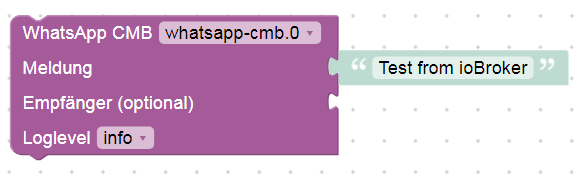
There are two possibilities to send a messages:
- via
whatsapp-cmb.0.sendMessage. Just write some text into this state and the message will be sent to default number, that was configured in settings dialog. - via message from javascript adapter:
sendTo('whatsapp-cmb.0', 'send', {
    text: 'My message',
    phone: '+491234567890' // optional, if empty the message will be sent to the default configured number
});
If you want to send emojis please refer to https://www.callmebot.com/uncategorized/how-to-use-emoticos-with-the-api/
Changelog
1.0.0 (2026-10-13)
- (ioBroker-Bot) Adapter requires js-controller >= 6.0.11 now.
- (bluefox) The adapter was refactored to TypeScript and JsonConfig
- (bluefox) Breaking: Node.js >= 22.19, js-controller >= 6.0.11 and admin >= 7.0.0 are required now
- (bluefox) Replaced the deprecated
requestpackage withaxios - (bluefox) The Blockly block was migrated to TypeScript and works again with the current Blockly editor
- (bluefox) Blockly: an empty message no longer breaks the script, the log shows the phone number value
0.3.0 (2024-05-25)
- Important: Node.js 18 and js-controller 5.0.19 is required at least
- (Sneak-L8) Treats all response codes other than 200 as errors
0.2.3 (2022-08-29)
- (Apollon77) Refer to website for current phone number
0.2.2 (2022-03-27)
- (Apollon77) Fix message encoding
0.2.1 (2022-03-25)
- (Apollon77) Add Emoticons support
- (Apollon77) Add Sentry for crash reporting
License
MIT License
Copyright (c) 2020-2026 Bluefox dogafox@gmail.com
Permission is hereby granted, free of charge, to any person obtaining a copy of this software and associated documentation files (the "Software"), to deal in the Software without restriction, including without limitation the rights to use, copy, modify, merge, publish, distribute, sublicense, and/or sell copies of the Software, and to permit persons to whom the Software is furnished to do so, subject to the following conditions:
The above copyright notice and this permission notice shall be included in all copies or substantial portions of the Software.
THE SOFTWARE IS PROVIDED "AS IS", WITHOUT WARRANTY OF ANY KIND, EXPRESS OR IMPLIED, INCLUDING BUT NOT LIMITED TO THE WARRANTIES OF MERCHANTABILITY, FITNESS FOR A PARTICULAR PURPOSE AND NONINFRINGEMENT. IN NO EVENT SHALL THE AUTHORS OR COPYRIGHT HOLDERS BE LIABLE FOR ANY CLAIM, DAMAGES OR OTHER LIABILITY, WHETHER IN AN ACTION OF CONTRACT, TORT OR OTHERWISE, ARISING FROM, OUT OF OR IN CONNECTION WITH THE SOFTWARE OR THE USE OR OTHER DEALINGS IN THE SOFTWARE.