In September, that's latest -Repository grew from 798 to 812 adapters , in stable There are now 667. In this issue, we present 20 adapters , plus 17 familiar ones that have made the leap to stable have succeeded.
This time the focus is on the garden and the garage: three robotic lawnmower adapters (Navimow, Anthbot, Sunseeker) and two for Škoda, which couldn't be more different. Plus a few adapters you'd never think of: one is connected to the alarm monitor of a fire department control center, one retrieves the timetable from the school software, and one monitors network devices via SNMP as thoroughly as a dedicated tool.
Essentially, it was a month of noticeable small changes. No migration like in August, but many places where the user interface now explains what it does. And one bigger change in the JavaScript adapter, which introduces a completely new way of building logic.
And one more note: Because October has already provided plenty of material, this issue will focus on September. October will have its own review.
Core updates
ioBroker.admin 8.0.11 → 8.0.21
The admin saw ten versions in September. The four you'll notice in everyday use are:
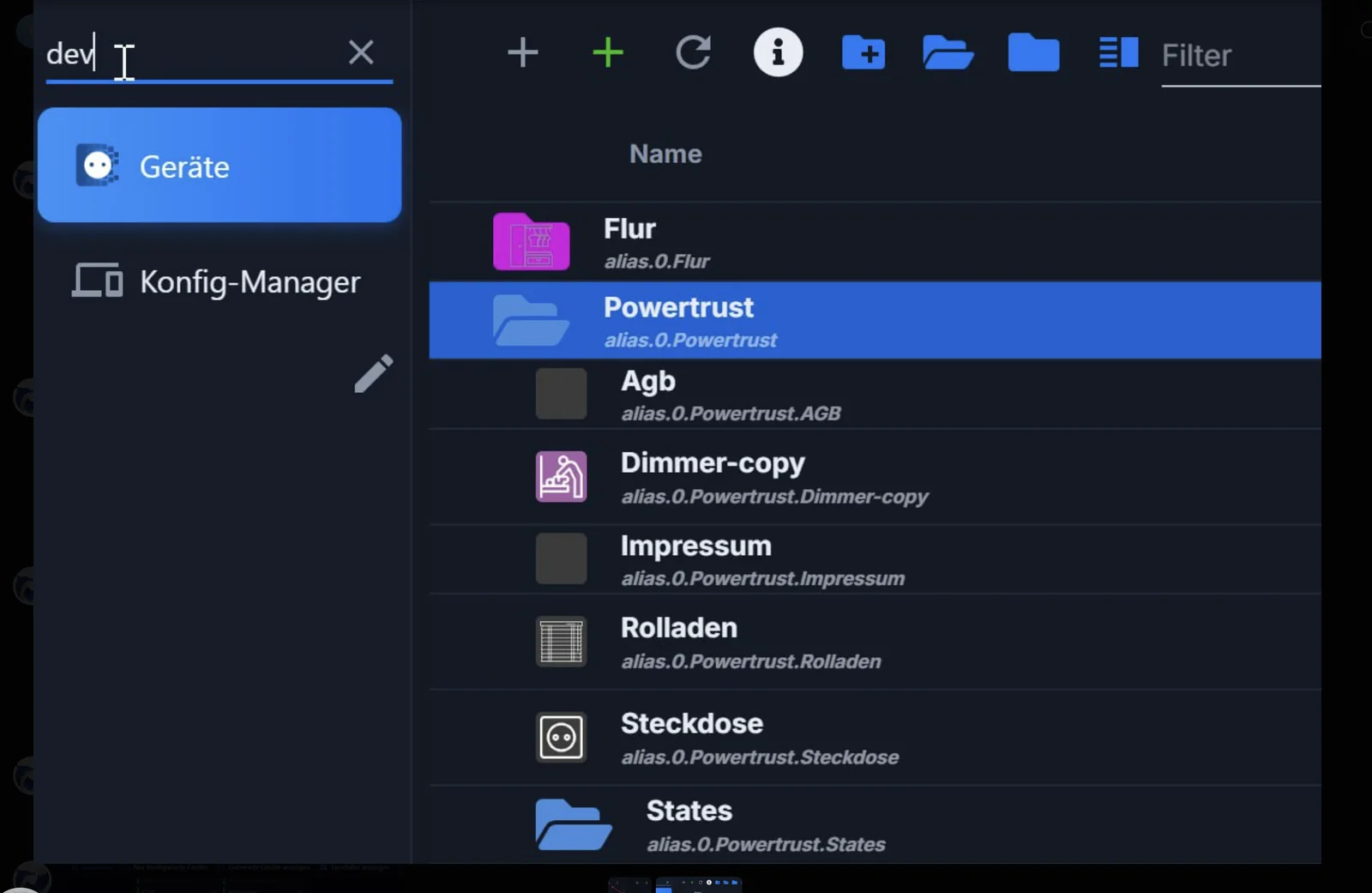
A quick filter is available in the menu. A magnifying glass appears next to the logo when eleven or more entries are found. Clicking it transforms the header into a text field and hides all entries that don't match the criteria. The search is performed using both the translated and English names, so the English name of a tab will find it in every language. Pressing Enter opens the first result, and Escape closes the filter.
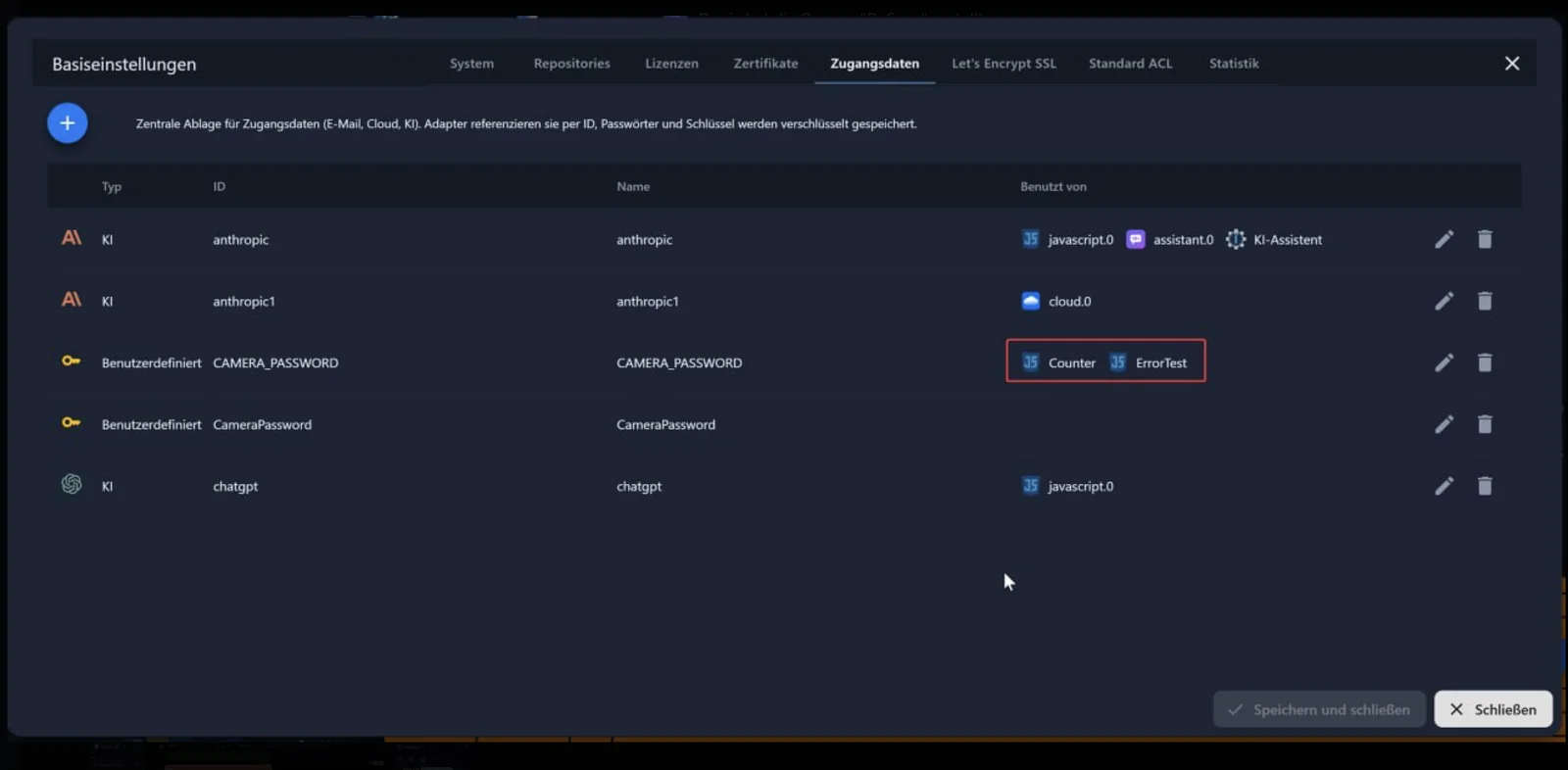
The login credentials now also show the scripts. Previously, the " Used by" column in the central repository only listed instances. The administrator now also searches the source code of all scripts for... SECRETS.<ID> and SECRETS['<ID>'] and shows which script reads which entry. Hovering over it displays the full script ID in the tooltip. The icon comes from the script engine. script.js.* and script.py.* They will therefore be treated equally. Anyone who wants to know what might break before replacing a key can now see it all in one place.
The log files are now searchable. Previously, the input field in the log tab only filtered what was already displayed on the screen. Now, pressing Enter searches the log files of the selected host, including rotated and compressed files. The time column selects the range, from the most recent entries back 30 days. New lines are still displayed live, and multi-line entries like stack traces remain together. This is based on ioBroker.logsearch by @disaster123. A new button exports the displayed data as a text file.
Small changes that speed up startup. Previously, the start page read the entire object database just to count objects and states: on a system with 10,000 objects, this amounted to 32 MB, blocking the admin process for several seconds. Now, the server performs the counting and responds with two numbers. As a result, the entire startup process transfers 2.4 MB instead of half the database. Additionally, with HTTPS enabled, the admin now communicates via HTTP/2, and objects on an adapter can only be deleted in expert mode. When dragging an object from one room to another, it is now moved instead of copied. Copying only occurs when the Shift, Ctrl, or Alt key is held down. The pointer displays a preview of the action.
js-controller
There was no new version in September. latest However, work has been progressing well. What's currently on the agenda is listed below under "What we're currently working on" .
In line with this, the recommendation in the forum was updated on September 29th: Node.js 24 is now officially recommended . Those still running on version 22 don't need to act immediately, but should plan for the switch.
ioBroker.vis-2
We are currently working hard on vis-2, but nothing has been released yet. More information can be found below under "What we are currently working on" .
Important adapter updates
ioBroker.javascript 10.1.4 → 10.4.0
This is the biggest new feature in this edition: function blocks , or more precisely, function block diagrams in the style of CFC. Besides JavaScript, TypeScript, Blockly, and rules, there is now a fifth way to build logic. Anyone with a background in automation technology will recognize it immediately.
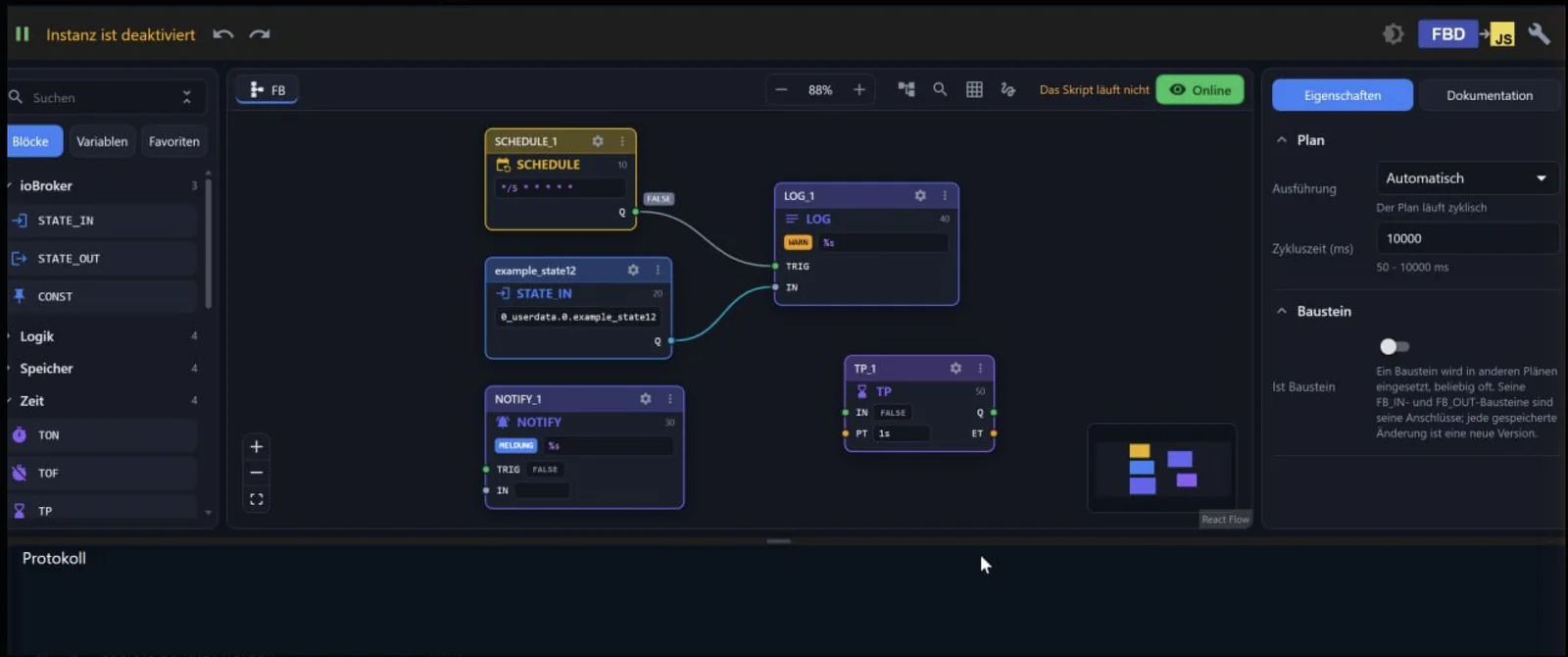
You drag building blocks onto a surface and connect their inputs and outputs with lines. Included are timers, counters, flip-flops, edge detection, comparisons, arithmetic operations, conversions, sequence control, a calendar with cron and solar events, a log, and notifications. There's also a building block with its own JavaScript, in case something is missing. Everything is connected via the building blocks. STATE_IN and STATE_OUT directly to your objects.
A plan runs cyclically with an adjustable cycle time of 50 to 10,000 milliseconds. And a plan itself can become a building block: once created, it can be used any number of times in other plans. FB_IN and FB_OUT as connections. A detailed description can be found in the adapter's documentation .
And every script now has a history. A button in the editor's toolbar opens the list of all saved versions, including the time, line number, and user who saved it.
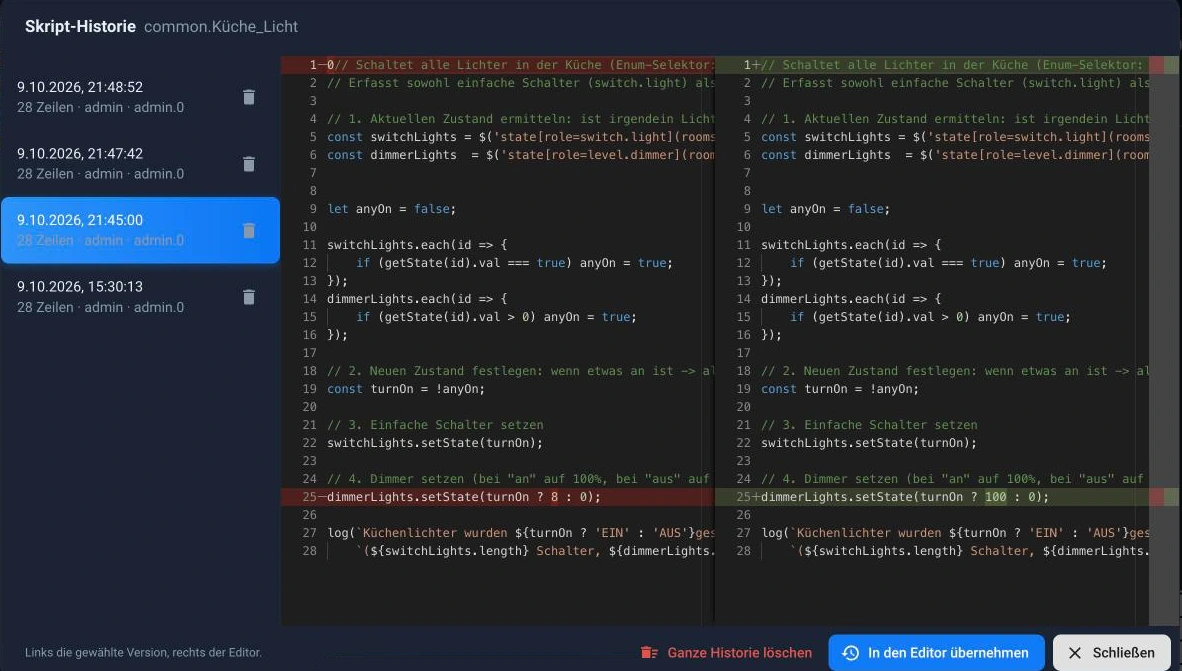
On the left, you select a version; on the right, the current version is displayed, and in between, the differences are shown line by line. "Apply to editor" restores the old version. Anyone who's ever spent half an hour tinkering and lost track of what they've actually changed will appreciate this.
You can configure how many versions are retained: 30 per script is the default, 0 disables the history. The new "Script History" tab in the instance settings shows how much space each script occupies. There you can delete individual histories, orphaned ones, or all at once.
Also in this series: Monaco, Blockly, and the rule blocks are only loaded when a script of this type is opened, resulting in noticeably faster editor startup. And the rules have been significantly cleaned up; an empty ampersand now collapses into its heading instead of occupying 292 pixels for nothing.
ioBroker.snmp 3.x → 4.0.0
The SNMP adapter received a major new version on September 30th. This is no coincidence: it has been completely rebuilt using TypeScript and has gained three new features that transform it from a query tool into a true workhorse.
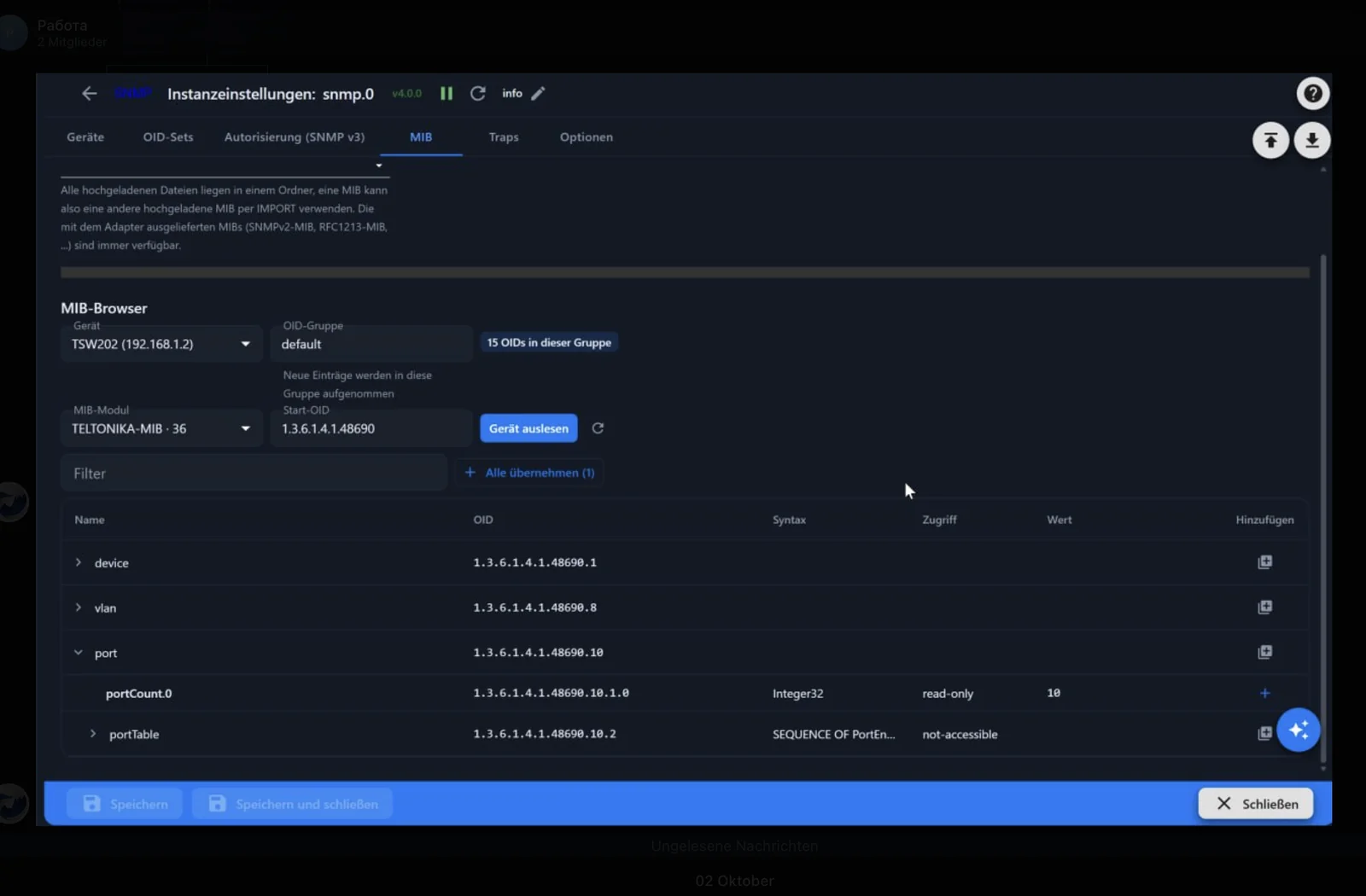
MIB browser:
- MIB files can be uploaded and searched; SNMPv2-MIB, RFC1213-MIB and others are included.
- The device is read live , layer by layer, and the result is labelled with the names from the MIB files.
- Individual values or an entire folder can be included in the OID group, the folder in one pass.
- New option "Use MIB names": the OID field will then also accept symbolic names such as
IF-MIB::ifDescr.1On. ⚠️ Switching changes the object IDs of existing OIDs.
Traps:
- The adapter can listen for SNMP traps and Informs of versions v1, v2c and v3.
- A received trap lands in
<Gerät>.trap.oid,.name,.jsonand.countThe counter is the data point that scripts reference. - The sender's address determines which device a trap belongs to.
Templates and small items:
- OID groups can be saved as templates and imported again, either supplementing or replacing existing ones. Templates are included for the system group, the first port of a switch, a computer, a printer, and a UPS.
- New setup wizard on the Devices tab, with live queries before any settings are saved.
- New option to write each request and each response as JSON to the log, for support purposes.
- New value format "Hexdump" for binary data
- The roles of the data points now follow the ioBroker role list.
ioBroker.tr-064 5.0.2 → 5.1.1
The FRITZ!Box adapter made one of its biggest leaps forward in September. The most noticeable change is a new tab: Mesh . It displays the topology of your network as a graphic, showing which device is connected to which access point, via LAN or which Wi-Fi band.
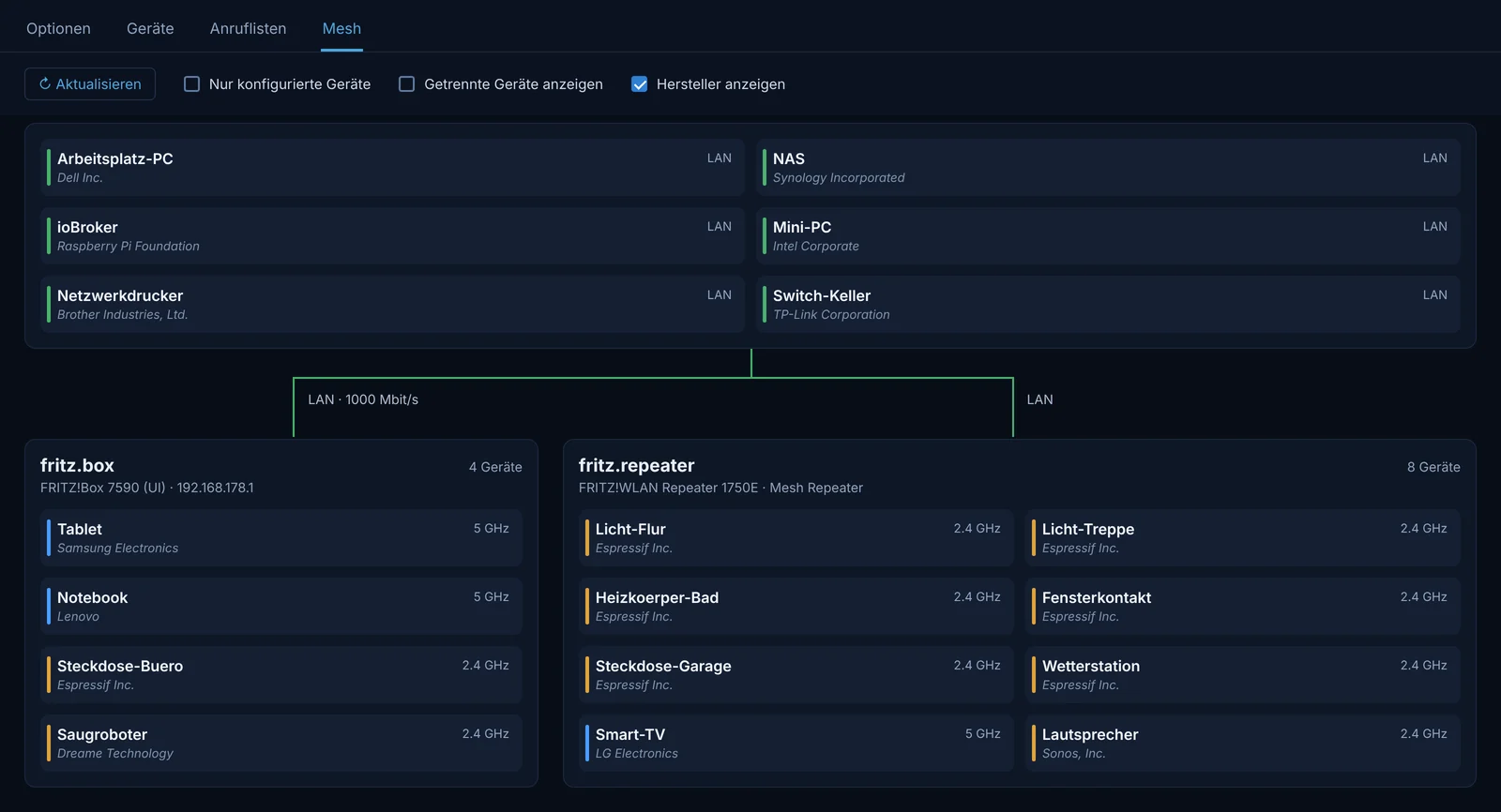
This aligns with two new data points per device: devices.xxx.accessPoint names the FRITZ!Box or the repeater it is connected to, devices.xxx.connection The band. Both come from the same mesh query. Anyone who has ever wanted to understand why a sensor at the other end of the house keeps dropping out now has an answer in ioBroker for the first time, instead of just in the user interface of the box.
Devices can be renamed directly. Clicking on the name in the mesh view prompts for the new name and allows you to enter it. X_AVM-DE_SetHostNameByMACAddress into the FRITZ!Box, which then uses it everywhere. Firmware that can't do this will say so. Note: The objects below... devices The names will follow the box name as long as the "Use configured names" option is disabled. The same applies to scripts, via the new message. sendTo('tr-064.0', 'setHostName', { mac, name }).
In addition, there are new widgets for vis-2 ("FRITZ!Box", "Mesh topology", "Presence") and for the device adapter, new states for the internet connection (wanAccessType, for example LTE It reports when the box switches to mobile network, including provider, maximum rates and 64-bit counter for the transferred volume) as well as statuses for the 6 GHz WLAN and a second 5 GHz band.
And a whole host of persistent bugs have been fixed: Call logs no longer stop updating after a few hours, and the call monitor no longer loses events when the box combines two of them into a single network packet. Device search now reads the list in a single request instead of one per device, which used to take longer than the button could hold for many devices.
⚠️ The Mesh tab requires Admin 8 .
ioBroker.modbus 9.1.1 → 9.2.0
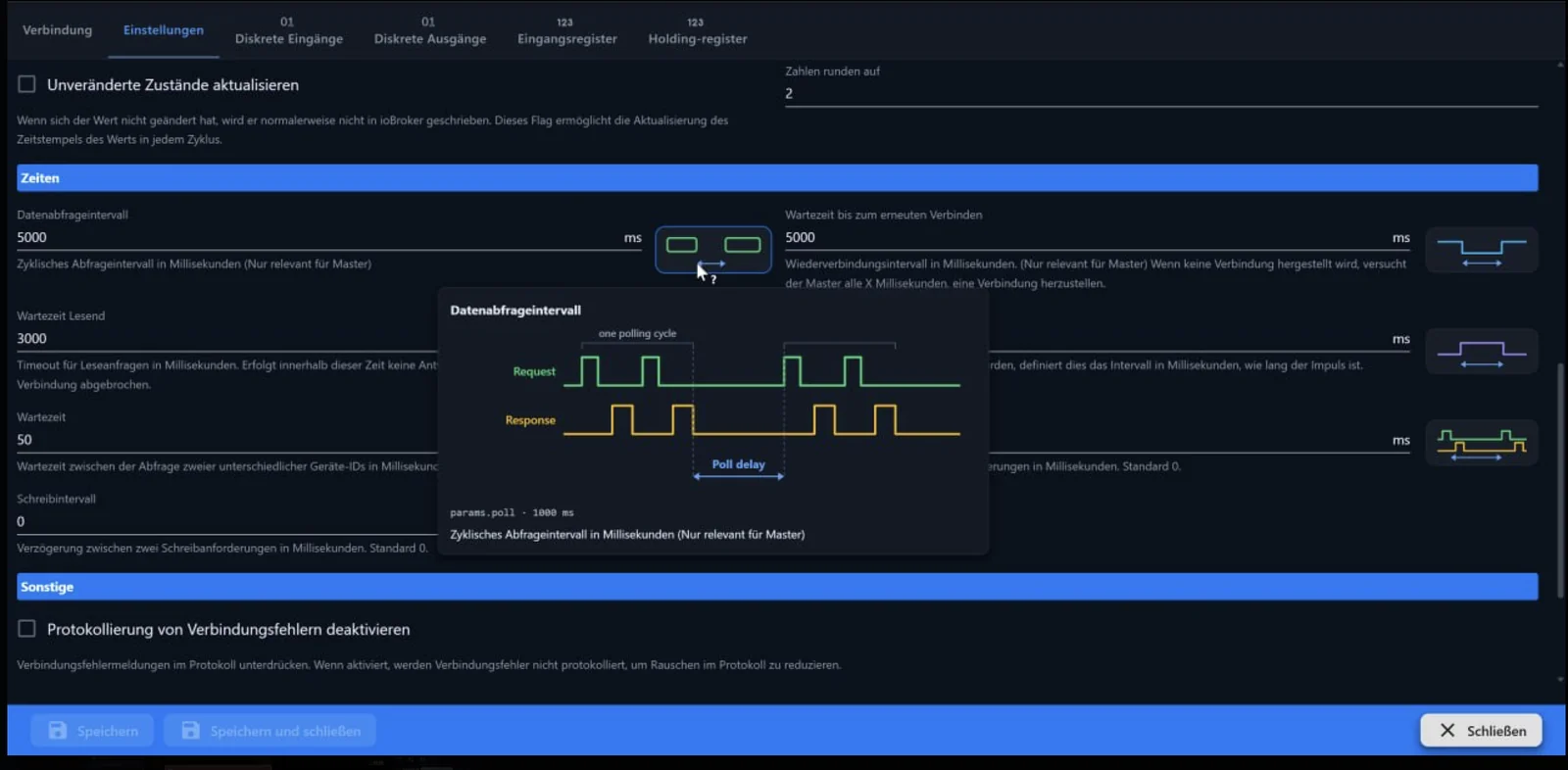
Modbus is powerful, and its timing parameters require explanation. Who knows offhand exactly what's between data query interval, read wait time, and wait time? Version 9.1.2 explains it directly in the interface : each timing setting now has a small diagram next to it. A click on it shows a detailed illustration of which part of the request and response process it refers to.
Version 9.2.0 introduces something that you only truly appreciate once you've used it: The adapter now informs the JS controller which resources it is actually using, specifically the serial interface in RTU mode and the port of a TCP slave or proxy. Before a port is opened, the protocol now names the instance that has already registered it, instead of simply reporting "Resource temporarily unavailable" or EADDRINUSE.
ioBroker.devices 4.2.0 → 4.2.2
The devices of this adapter are now accessible in the ioBroker Device Manager : each appears as a card with its name, icon, battery level, and availability. Only devices that can actually be switched have control buttons; a read-only device has no button at all. And a switch displays what the device is reporting, not what it was last told. Two new themes have also been added: Clean Light with white cards on a light gray background, and Tech Blue with almost black tiles and a blue outline.
ioBroker.iot 7.0.1 → 7.1.2
Remote access now responds to MCP requests from the cloud via MQTT . Furthermore, the cloud connection is now properly closed upon restart, so the cloud no longer reports duplicate connections. Only one connection attempt can be made at a time.
ioBroker.sql 4.1.5 → 4.2.0
Anyone who has been writing values to a database for years will almost certainly have data points that no longer exist. Previously, these had to be found using custom queries. Now there's a "Statistics" tab for this purpose.
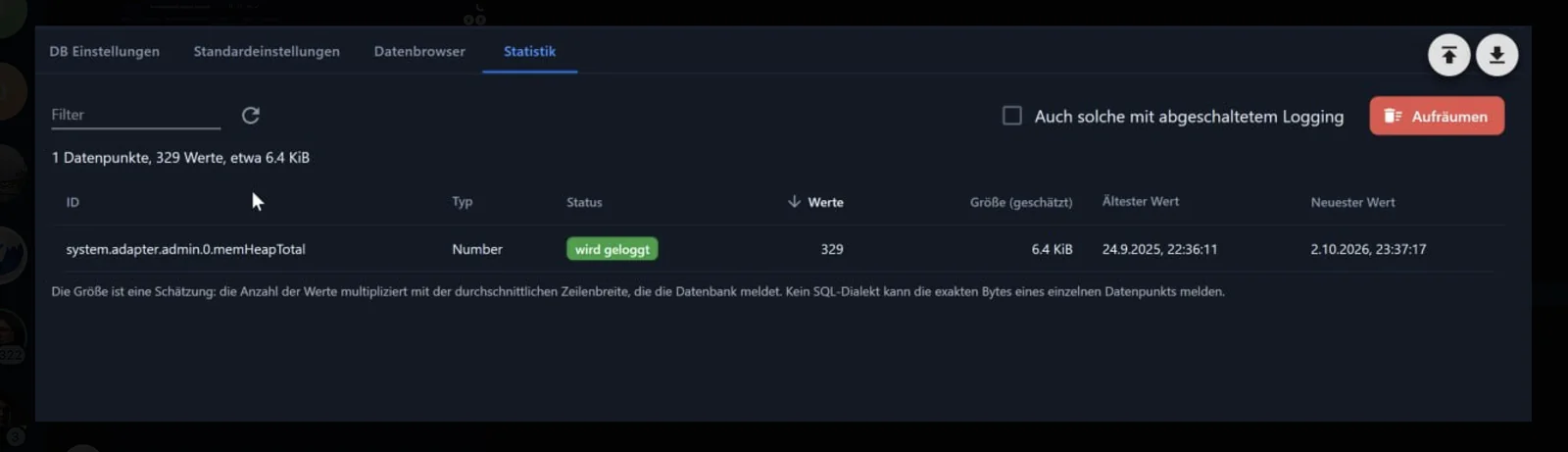
Each logged ID is listed there with its type, number of values, estimated size, and oldest and newest entries. The "Clean Up" button deletes data that is no longer logged, and optionally also data points with logging disabled. Before deletion, a dialog box displays what would be affected.
The size is deliberately described as an estimate: the number of values multiplied by the average row width as reported by the database. No SQL dialect can specify the exact number of bytes of a single data point.
In addition, there are corrections that aren't visible but are noticeable. Buffered values were lost when the adapter was stopped. The "Record changes only" option compared the timestamp instead of the value, which is why an alias with read conversion wrote a line for every source change. The connection test reported an error even though the settings were correct. And a connection strand closed by the server crashed the adapter instead of being replaced. Furthermore, MySQL can connect via a Unix socket, and PostgreSQL can connect directly without going through the maintenance database.
What we are currently working on
Three things are well advanced but not yet released. We'll mention them anyway so you know what's coming:
Sections in vis-2. A page in the grid layout will henceforth consist of sections, and sections are more than just a visual grouping: they have their own heading with title and icon, background, border, rounding, and spacing. A section can be collapsed, can start collapsed, and can open and close based on a condition. It can be shown only to specific user groups, only above a certain width, or only as long as a condition is met.
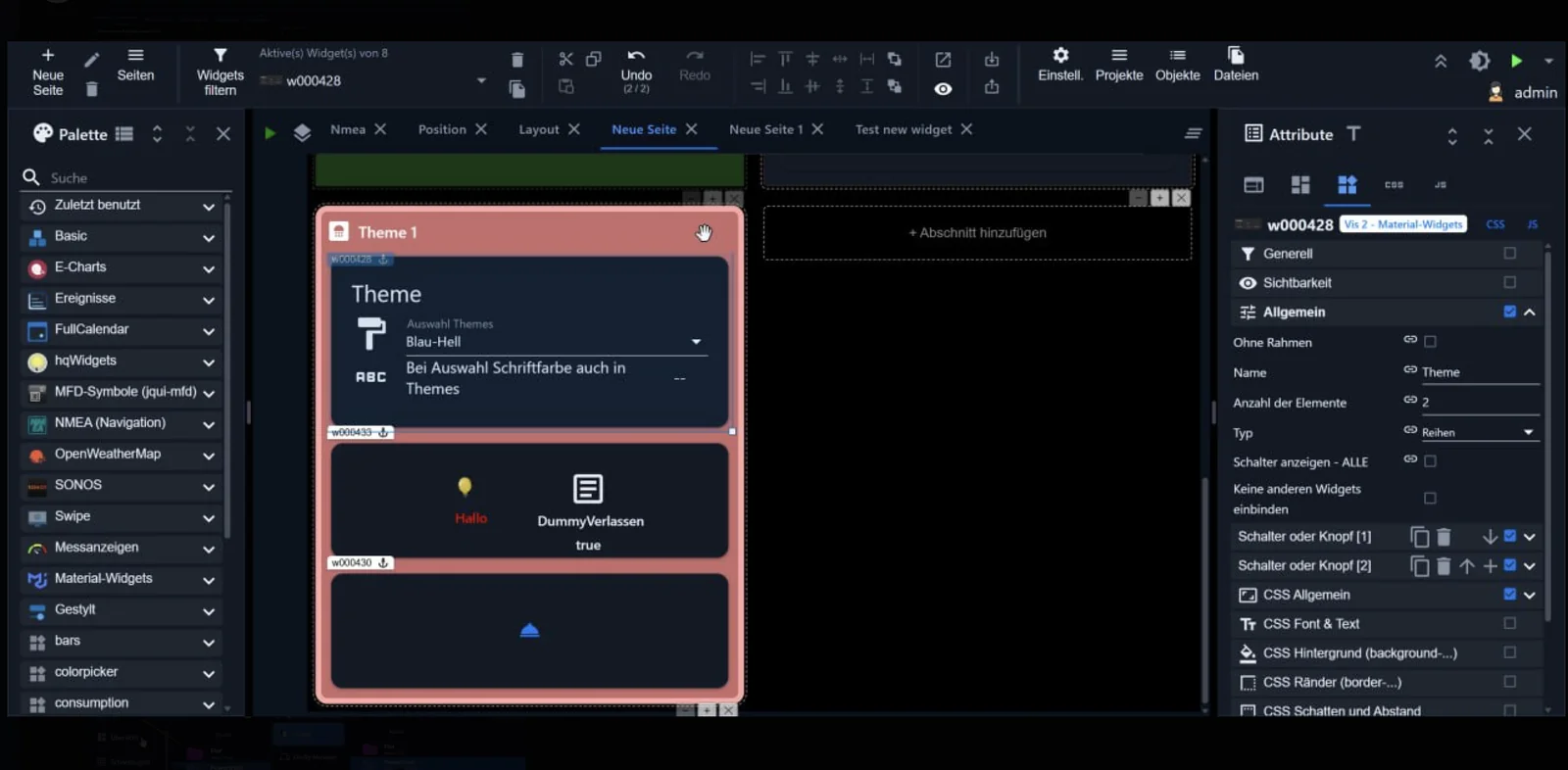
In addition, there are two custom widget sets for the devices in a house. Relative is a tile that fills its cell in the section. Absolute is a marker on a floor plan, no larger than a coin. And a page can be generated from the devices in the installation, sorted by room or by trade.
More security measures are being implemented in the admin area. We're working on the permissions system for the AI assistant and log search. We'll let you know here as soon as it's released.
Python adapter in the js-controller. The controller is currently learning to start adapters written in Python (common.platform: "Python" Furthermore, the minimum version of Node.js is increasing to 22.19 ; versions 22.0 through 22.18 will be dropped. Neither of these changes is yet in the [document/section/etc.]. latest, but plan for it.
New adapters in latest Testers wanted!
19 new adapters were added in September. latest They have been added to the repository. They can be installed in the admin panel via the adapter list once you have selected it there. latest You've switched over. Everyone appreciates feedback; most have their own test thread in the forum.
Garden: three robotic lawnmowers at once
ioBroker.navimow

Category: Garden Developer: TA2k
It controls and monitors the Segway Navimow robotic lawnmowers via the official Navimow SDK. With 244 installations, it's the most used new addition in this issue. It reached the top of the list in the same period. stable done.
Features:
- Login to the Navimow account via OAuth2; tokens are automatically renewed.
- Live status via MQTT, plus periodic polling as a fallback.
status.vehicleStatewith values such asisRunning,isDocked,isPaused,isDocking,isMapping,isLifted, including battery level, signal strength and events- Remote control via buttons: Start, Stop, Pause, Resume, Return to station, Update
- Position as
postureX,postureYandpostureThetain meters, relative to the charging station, no GPS - Optional live mowing map as PNG in the state
map, with adjustable track color, opacity and width, plus a sample script for display in vis
Special features:
- The registration process takes a detour: after logging in, the browser displays "Page not reachable", and this address with the
?code=...must be completely copied into the adapter - The status data via HTTP comes from a cloud cache and can be one to two minutes behind.
remote.stopIt only pauses. An ongoing task cannot be terminated via the public API; this can still only be done within the app.- The card is factory-installed and requires
@napi-rs/canvasWithout the appropriate package, everything else continues to run; there is only a warning. Each drawing action blocks the event loop for approximately 80 ms.
🔗 Adapter's GitHub page · Test thread
ioBroker.anthbot

Category: Garden Developer: raintonr, maintained by the iobroker-community-adapters
Connects Anthbot devices, primarily robotic lawnmowers, via their cloud. The unique feature is the zone planning: the adapter includes its own system that offers significantly more functionality than the app's.
Features:
- Status per device: Battery level, mode (charging, mowing, standby), last message including type
- Commands: stop all tasks, load, mow entire map, mow individual zones, edge mowing
- For each zone: last start, last end, estimated duration and estimated battery consumption
- Each zone uses a random cutting angle or a list of angles that is rotated after each successful mowing.
- Separate planning for each zone via
schedule_enabled,schedule_days_since_lastandschedule_priority, switched off at the factory
Special features:
- An Anthbot account is required; the login details are in the instance settings.
- Tested with M9 and Genie, other series may work
- The zone IDs do not correspond to the names in the app.
- Anyone using the adapter's scheduling feature should delete or disable the schedules in the app beforehand, otherwise the two schedules will work against each other.
ioBroker.sunseeker

Category: Garden Developers: TA2k and Lucky-ESA, maintained by the iobroker-community-adapters
For Sunseeker robotic lawnmowers, also sold under the names Adano, Brücke, and others. Of the three, this one offers the most settings.
Features:
- Login via OAuth2, plus MQTT for real-time status changes
- Supports both the old and new interfaces as well as the model classes S, X, V and V1
- Commands: Start, Pause, Return to station, Edge cut, Stop, Cancel task, Restart
- Customizable settings, including blade speed (2800 to 3000 rpm), cutting height (20 to 100 mm), rain delay, night mode, working speed and PIN.
- Weekly schedule with two time slots per day, which only starts with
setSchedulegoes to the cloud - Zones, backup maps and a live map drawn by the adapter as PNG files
- Event log with translated error codes in twelve language variants
Special features:
- A Sunseeker account requires the same login details as in the app, plus the choice of region and interface, old or new, depending on the model.
- The Live card is only available in the S and X models and it costs around 80 MB of RAM.
- The zone settings, the work log, and some settings of the V1 models are not yet writable.
- Very early version (0.0.2)
🔗 Adapter's GitHub page · Test thread
Car: two Škoda, two completely different things
Two adapters with similar names that are easily confused. In short: one checks the ordering system, the other communicates with the finished car.
ioBroker.skoda-public-api

Category: Vehicles Developer: tmarthy
It reads and controls approved Škoda vehicles via the official MyŠkoda Public API, using a key that you generate yourself within the app. The focus is on electric cars, especially the Enyaq.
Features:
- One object tree per VIN, which maps the interface response one-to-one. Objects are only created for what the vehicle actually delivers.
- Control per area via
enabledas a target state, in additionstartandstop - Charging limit writable in increments of 50 to 100 percent, charging mode writable, charging profiles editable via their profile ID
- Parking position as
lat;lonin a single data point, directly usable for maps in Vis - Adaptive polling interval: 15 minutes as the base interval, 5 minutes during charging or climate control. If the timestamp remains unchanged, the interval doubles up to a maximum of 60 minutes.
- Diagnosis with remaining quota per VIN, data age, last command including result and key expiry date, with warnings 14, 7 and 2 days prior.
Special features:
- ⚠️ The interface is limited to 20 requests per hour per vehicle . There are no push notifications and no status endpoint for commands. Therefore, real-time monitoring and continuous overcapacity control are not possible.
- The key is generated in the MyŠkoda app (from app version 8.16 onwards) and expires ; renewal is only possible manually.
- There is no vehicle list; each VIN must be entered manually.
- A confirmed message only means "accepted by the interface," not "the car did it." The result is only shown in the verification query approximately one minute later.
- An S-PIN only needs the auxiliary heater.
🔗 Adapter's GitHub page · Test thread
ioBroker.skoda-order-status

Category: Vehicles Developer: SentiQ
Tracks the status of an ongoing Škoda order, i.e., a new car that hasn't yet been delivered. An adapter for exactly one phase of its life cycle, but quite useful during that phase.
Features:
- Log in with your MyŠkoda account; all open orders will be automatically found.
- One device per order under the commission number
- Raw status
orderStatuswith the valuesORDER_CONFIRMED,IN_PRODUCTION,IN_DELIVERYandTO_HANDOVER, and a clear explanation inorderStatusLabel - Vehicle data of the order: model, equipment line, exterior and interior color, battery and power, dealer
- The dates of the four milestones, along with lists of those achieved and those still outstanding.
- Query interval from 15 minutes to 24 hours, default one hour
Special features:
- ⚠️ Uses an unofficial, replicated interface. No connection to Škoda.
- It works before a VIN exists, thus complementing adapters like
vw-connect, which only apply from the VIN onwards - The status designations are only available in English.
Household
ioBroker.liebherr

Category: Household Developer: Gaspode69
The counterpart to the previous one: Liebherr refrigerators and freezers via the official SmartDevice HomeAPI cloud interface.
Features:
- It automatically finds all devices that belong to the key.
- For each temperature zone, current, target, minimum and maximum temperatures including unit and increment.
- Writeable settings, provided the device reports it: target temperature, Night Mode, Party Mode, SuperCool, SuperFrost. The values are checked before being sent and only confirmed after being read back.
- Changes arrive in real time via server-sent events, along with polling for security.
- Unknown or future control types are processed without crashing and remain read-only.
Special features:
- Requires a HomeAPI key from the Liebherr app. It is only displayed once ; a new one invalidates the old one.
- ⚠️ According to the developers, the HomeAPI is a beta service and is subject to change. The local interface of the SmartModule is not supported.
- Very early version (0.0.4), requires js-controller 7.0.4 or newer
🔗 Adapter's GitHub page · Test thread
Weather
ioBroker.meteonomiqs

Category: Weather Developer: Schimi1983
Weather forecast from wetter.com via the Meteonomiqs Public Weather API: 14-day forecast, hourly values, and weather warnings. Useful for anyone looking for a German-language source.
Features:
- Daily forecast for 1 to 14 days including temperature, precipitation, wind, clouds, humidity, hours of sunshine and pressure, plus the time periods morning, afternoon, evening and night.
- Hourly values in the location's time zone. The folder
currentIt displays the current hour and is updated hourly without additional input. - Weather warnings with group, text and numerical severity level from 0 to 4
- Sun and moon with rising and setting, twilight, day length and moon phase, plus snow line, fresh snow and snowwater equivalent
- Ready-made JSON data points
forecast_jsonandhourly_jsonfor vis, jarvis and the material widgets, plus the weather symbols of the interface
Special features:
- ⚠️ Requires an API key from Meteonomiqs . According to the developer, the free plan includes 100 polling requests per month . The adapter is specifically configured for this: three fixed polling times per day, staggered by up to 15 minutes per installation, resulting in 93 polling requests in a 31-day month. If the limit is approaching, the evening polling request is the first to be dropped.
- The counter in the adapter is an estimate; the interface does not report a remaining quota. Only the error message when the limit is exceeded is reliable.
- All data groups come from the same request, so additional data only costs objects: approximately 380 for daily values only, and approximately 2430 when everything is enabled. On a Raspberry Pi, the developer recommends hourly values for just one day.
🔗 Adapter's GitHub page · Test thread
ioBroker.absolutehumidity

Category: Weather Developer: BenAhrdt
Calculate the absolute humidity and dew point from the temperature and relative humidity. It sounds like physics class, but it's the basis for the question that arises every day in summer: Will ventilating now help, or will I just bring more moisture into the house?
Features:
- Absolute humidity in g/m³ and dew point in °C, calculated according to Magnus with Sonntag coefficients
- Each measuring point requires a name and the selection of data points for temperature and relative humidity.
- Tile view in the admin panel: External values are green, internal values are blue, sorted from dry to humid. If green is at the top, ventilation is recommended.
- A page for manual calculations, with ventilation recommendations.
- Configuration backup and restore
Special features:
- Minor discrepancies with online calculators are normal, as they sometimes use different coefficients.
- Requires js-controller 6.0.11 and Admin 7.6.20 or newer.
- Still in the testing stage (0.1.x)
energy
ioBroker.bluetti

Category: Energy Developer: Percy2Live
Reads the telemetry data from BLUETTI power stations from the manufacturer's cloud: charge level, solar, grid, load.
Features:
- Battery with charge level, estimated remaining runtime and estimated charging time
- Power in watts for PV input, grid input, AC output and DC output, plus the status of AC, DC and ECO modes.
- Device data including serial number, model, online status and operating mode
- Login via OAuth in the browser, device selected from a list, token stored encrypted and automatically renewed
- Personal health status: suspected network outage, consecutive failed queries, failed login
Special features:
- Read-only; the adapter never writes to the device.
- Only the Elite 30 V2 has been tested so far. According to the developer, other models are likely compatible, but have not been tested.
- ⚠️ Cloud dependency: The adapter is not suitable as proof of a power outage; the developer recommends a local signal such as a ping or a Shelly for this purpose.
- The token is encrypted in a data point, but can be decrypted by any admin user via script.
🔗 Adapter's GitHub page · Test thread
Display and visualization
ioBroker.awtrix-ng

Category: IoT systems Developer: Matthias Kleine (klein0r)
For pixel watches with Awtrix NG firmware, such as the Ulanzi TC001 and TC002. Because their interface is fundamentally different from Awtrix 3, a separate adapter is deliberately provided instead of modifying the old one.
Features:
- Custom apps displayed, with placeholders
%sfor the value and%ufor the unit, plus the data points for on/off, sequence and immediate display for each app. - Expert apps where all properties, from the icon to the text, are set using scripts.
- One-time notifications via
sendTowith text, color, symbol, duration and repetition, plus a Blockly block - Tones and RTTTL melodies; on devices with the appropriate equipment, also internet radio and MP3 playback.
- One instance per device; settings can be copied from another instance.
- Each app has a lock time to prevent overly frequent updates; the default setting is three seconds.
Special features:
- ⚠️ Be careful when switching from Awtrix 3: Many data points have different names or use different units; existing scripts must be checked.
- Requires firmware 1.2.2 or later. Radio and MP3 playback are only available on compatible devices.
- Own apps only show confirmed values, i.e., those with
ack
🔗 Adapter's GitHub page · Test thread
ioBroker.cometvisu

Category: Visualization Developer: Florian Schirmer (joltcoke)
CometVisu delivers the visualization via the web adapter and connects it to ioBroker as a data source. Originally from the KNX world and configured in XML, CometVisu has a loyal following who previously had to take a detour to implement it.
Features:
- It installs itself as a web extension in the web adapter and is located under
http://<host>:<web-port>/cometvisu/accessible. No need for a dedicated web server. - The CometVisu version is selected from the official releases and downloaded and extracted when saving.
- Custom builds can be uploaded and managed simultaneously, each version in its own directory. Unused versions are removed upon startup.
- The adapter reports the connection to the background system via its own headers, so no configuration in CometVisu itself is necessary.
- The web adapter handles login, session, and socket connection.
Special features:
- Requires the Web Adapter version 7.0.3 or later; for charts, an additional History Adapter is needed.
- A newly created instance needs to be version-selected and saved before anything is available.
- The version list comes from GitHub. It will be missing if the project is locked due to too many requests; the dialog will indicate this.
- The configuration of CometVisu itself, i.e., the XML, is not part of the adapter.
- Does Admin need version 8.0.11 or newer?
Tools for your own system
ioBroker.ai-usage

Category: Infrastructure Developer: krobipd
Monitors usage, limits, and costs of AI accounts. Since the admin interface includes an assistant and the JavaScript adapter addresses language models, this is no longer a niche issue: Anyone using multiple services quickly loses track of when which quota is reset. This adapter even made it to the top in September. stable done.
Features:
- One object node per account with limit windows in percent, reset time, balance, costs and tokens, uniformly named across all providers.
- Totals across all accounts: total costs, highest occupancy and
limitReachedas a ready-made trigger for automations - Warning threshold per account, preset to 80 percent, with a one-time notification upon exceeding the threshold.
- Query interval from 60 to 3600 seconds with automatic downshifting when throttling occurs.
- Connection status per account with error message
Special features:
- Admin needs version 8.0.11 or newer because it uses the central access data management.
- ⚠️ The subscription interfaces of Claude, ChatGPT, and Google are not officially documented and are subject to change at any time.
- The developer is honest: So far, only Claude has been tested against a real account. The other providers were built according to reference documentation, but have not been tested.
- OpenAI and Anthropic reports require an organizational key; they do not provide a personal account.
🔗 Adapter's GitHub page · Test thread
ioBroker.autodoc

Category: General Developer: crunchip77
Generate documentation of your installation in HTML, Markdown, and JSON formats. This is for anyone who has ever tried to explain to a family member what their house actually does automatically.
Features:
- Searches adapters, hosts, rooms, functions, scripts, aliases, and user data.
- Three versions per run: Admin with instances, resources and diagnostics, user with rooms and devices in everyday language and onboarding for guests, with QR code
- Can be triggered manually, at startup, according to a schedule, or after an adapter change.
- Export to
/files/autodoc.<instanz>/, including checksums and an optional export to a directory in the file system - A section titled "Changes since the last run" and a chapter listing all automations, including cron jobs, schedules, and adapter restarts.
- Customizable via chapter order, custom Markdown chapters, Mermaid diagrams, and custom CSS
Special features:
- PDF export requires additional steps
puppeteerin the adapter directory, for Mermaid also as SVG@mermaid-js/mermaid-cli - A base address must be set for the guest links; otherwise, the QR code will point to a dead end.
- According to the developers, the text-based text model is explicitly optional and must be enabled.
🔗 Adapter's GitHub page · Test thread
ioBroker.xtreem-monitor

Category: Multimedia Developer: Christian Vidal (chrvidal)
Monitors the availability and account status of Xtream-compatible interfaces. A purely observational tool.
Features:
- Multiple endpoints in one instance, as a table with name, address, username and password
- Per server: online status, response time, active and maximum connections, expiry date, days remaining, last check and duration of the outage
- Errors are categorized as timeout, name resolution, HTTP error, invalid response, and inactive account.
- Summary below
info.*with number active, online and offline - Logging optionally only when switching between online and offline.
Special features:
- The adapter does not deliver, search for, or play media streams ; it only queries account and status data. The operator is responsible for the configured services.
- The password column is encrypted, the server list is protected from other adapters.
- js-controller requires version 7.0.7 or newer, which is more than the others here.
Technology and Industry
ioBroker.codesys-nvl

Category: Hardware Developer: Bannsaenger
Exchange Network Variable Lists with CODESYS controllers, i.e., programmable logic controllers (PLCs) such as those found in workshops, heating systems, and building automation. Previously, this required using OPC UA or Modbus.
Features:
- Importing a GVL file exported from the CODESYS editor, which is stored in the file area and displayed in the "Network Variable Lists" tab after a restart.
- Each list can be configured to send, receive, or deactivated.
- Each list contains an object tree with configuration, connection information, and variables including type and value.
- In send lists, values are transferred to the data points by writing them.
- The messages are transmitted via UDP.
Special features:
- Very early version (0.0.6)
- Only uncompressed lists are supported. If a list exceeds 256 bytes, it would have to be split across multiple telegrams, which the adapter currently cannot do.
- Long and condensed lists are still on the to-do list.
ioBroker.fujitsu-airstage

Category: Climate control Developer: Stefan Bott (stefan5232)
Controls Fujitsu Airstage series air conditioners locally on the network , without going through the manufacturer's cloud.
Features:
- Adjustable settings: On/Off, target temperature from 16 to 30 °C, operating mode (automatic, cooling, heating, dehumidifying, ventilating) and fan speed
- Other switches: Swivel horizontally and vertically, Powerful, Economy, energy-saving fan, quiet outdoor operation, Wi-Fi indicator and frost protection
- Read-only: Room and outdoor temperature, cumulative energy consumption in Wh, air directions, presence detection and accessibility
- Any number of devices in a table consisting of name, IP address, and device ID
- Query interval adjustable, preset 30 seconds
Special features:
- Requires a system with a Wi-Fi module on your own network. The device ID is the module's MAC address (without colons), found in the FGLair app, on your router, or on the sticker.
- A fixed address via DHCP reservation is recommended.
- Which models are supported is not documented. Unofficial, without reference to Fujitsu.
And then these three
ioBroker.tractive-next

Category: Geopositioning Developer: Fraese73
Integrates Tractive GPS trackers, which can be used to locate dogs and cats.
Features:
- Log in with your Tractive account; tokens will be automatically renewed.
- Tracker list, hardware, location, activity and health overview, plus the location history of the last 24 hours.
- Ready-made alarm data points for automations: Tracker offline, low battery, no current position, minutes since last sign of life
- Geofences as JSON and as individual data points
- Optional commands for live tracking, LED and buzzer, which must first be activated.
- A dedicated tab in the admin panel with a map, daily schedule as a heatmap and time slider, plus a ready-made Vis 2 project.
Special features:
- ⚠️ Uses an unofficial interface; Tractive does not have a public API.
- In the quiet zone, the cloud often accepts commands but does not execute them on the device.
- Query interval 30 to 3600 seconds, preset 60
🔗 Adapter's GitHub page · Test thread
ioBroker.waip-web

Category: Alerting Developer: rnc11
The most unusual adapter in this issue. It connects to a WAIP web monitor, an alarm monitor like the ones fire departments and rescue services have in their stations. Incidents, feedback, and routes are then converted into data points. Firefighters who want to trigger lights, gates, or announcements in response to an alarm no longer need an open web browser.
Features:
- Connection via Socket.IO with its own reconnection and session management
- Current deployment under
einsatzAktuell.*including keyword, location, alert status and alerted forces, plus JSON lists for deployment, feedback, routes and recent deployments - Feedback counter summarized by role and qualification
- Plain text for the keyword from a separate table
- The voice announcement as a playable MP3 file, optionally with a deployment map as a PNG file made from OpenStreetMap tiles.
- Optional dashboard for multiple simultaneous deployments
Special features:
- ⚠️ The adapter connects without registration and only sees what an anonymous visitor sees in their browser. The developer strongly recommends clarifying with the control center before continuous operation whether a permanent automatic connection is desired.
- Independent community project with no connection to the WAIP web project
- Only the most recently active deployment is displayed; multiple deployments simultaneously can only be viewed via the dashboard.
- There is a German description in the repository.
ioBroker.esmobil

Category: Date and Time Developer: beabel
It retrieves timetables, homework assignments, comments, and grades from the school software and saves them as data points. This allows, for example, the announcement in the morning of which class is cancelled.
Features:
- Weekly schedule from Monday to Friday with hour, times, subject, teacher, room and a marker to indicate when something has changed.
- Homework, optionally combined with deadlines from the personal Moodle calendar
- Comments and grades for each subject, with average as a number and as a grade, as well as overall average.
- New entries are detected on each retrieval, triggering custom notifications. The adapter itself does not send any notifications.
- Retrieval at startup and then every 30 minutes
Special features:
- ⚠️ Only for four specific schools. The server addresses are fixed and not configurable. This is explicitly not a general adapter for VpMobil or Indiware.
- At one of the four schools, the address was derived from a template and never confirmed.
- Requires the school's login details and the child's personal login.
- Independent community project with no connection to the operators of the school software
New adapters in stable
Only one adapter was newly introduced in September. stable -Repository arrived without having been introduced here beforehand. But it's a fully grown one.
ioBroker.sigenergy

Category: Energy Developer: ssbingo, with contributions from MMeinhardt1
Connect Sigenergy solar systems locally via Modbus, specifically SigenStor and Sigen Hybrid with inverters, batteries, and charging stations. No cloud, no intermediary. With version 3.3.4, this is no longer a new product, but a mature adapter.
Features:
- Modbus TCP and Modbus RTU over RS485, according to the Sigenergy protocol version 2.9
- Data points for the system (grid power, PV, battery charge level and power, operating status) and the inverter (battery health and temperature, phase voltage, grid frequency)
- Optional components: AC charging station, DC charging station, power station switch, PV insulation detection, battery preheating, and microinverters with search function.
- Write access to the control registers, protected against registers that the respective device does not even know about.
- Calculated values: Time until full, remaining battery life, self-consumption rate, degree of self-sufficiency and household consumption
- Emergency shutdown: If the system goes into island mode, the adapter shuts down up to four external devices, such as a balcony power plant via a Shelly relay. It will only switch back on after a grid stability period, preset to ten minutes, optionally with a notification via Telegram.
Special features:
- One instance per Modbus endpoint; a SigenStor with micro-inverters belongs in the same instance.
- Which registers a device provides depends on the model and protocol version. Anything the device reports as invalid will not appear as a measured value.
- The seven vis widgets are located in their own adapter.
vis-2-widgets-sigenergy - The emergency shutdown is intended as a safety measure and does not replace a professional electrical installation.
Old acquaintances, new in stable
Seventeen adapters from the July/August review made the leap into September. stable -Repository completed. You can now proceed without switching to... latest Installable. Detailed information can be found in the July/August 2026 monthly review .
- agent-dvr (alerting) · anker-solix (power) · creality (hardware)
- eebus-go (IoT systems) · electrolux-aeg (household) · goodwe , goodwe-pv and goodwe-sems (energy)
- husqvarna-automower-connect (garden) · metermaster (general) · midas-aquatemp (climate control)
- nut2 (hardware) · siku (climate control) · sunenergyxt500 (energy) · zeptrion (household)
- vis-mapwidgets and vis2-materialdesign (visualization widgets)
Two adapters have the latest I only noticed in passing: navimow and ai-usage were added to both repositories in the same month. Both are listed at the top with their detailed descriptions.
From the latest Flot , Intesishome , Pixelit , Stockmarket , and Web-Speedy have disappeared. Anyone using one of these should look for an alternative, as they will no longer receive updates.
Forum discussions and exciting test threads
A few topics that dominated September:
- [Concept] "ioBroker OS" for Raspberry Pi, interested? With 77 posts, this is the most active thread of the month. It's about a ready-made system image for the Raspberry Pi with ioBroker already installed. If you have an opinion on what such an image should be able to do, this is the place to be.
- Node.js 24 is now officially recommended. The recommendation was renewed on September 29th. No need to rush, but a good reason to plan the switch.
- Test Adapter skoda-public-api With 48 posts, this is the most active test thread. Drivers of models other than the Enyaq are particularly sought after, as the Enyaq has been the main model tested so far.
- Test adapter nuki-local: Nuki without cloud, with an MQTT broker directly integrated into the adapter. The adapter itself was only introduced in October.
latestIt's arrived, but the thread has been running since the beginning of September. - Information regarding account reconciliation and name changes. This applies to everyone who has an account on iobroker.net or iobroker.pro. Please read this before you get confused.
In addition, here are the test threads for the adapters presented above: navimow , sunseeker , meteonomiqs , bluetti , liebherr and tractive-next .
Take a look, test it out, and give the developers feedback. That's what this project thrives on!
Do you want to join us next time?
We now automatically find new adapters via the repositories; you don't need to do anything for that. However, there are two things we'll miss if you don't tell us:
New features in existing adapters. A new adapter stands out, a new feature in a familiar adapter doesn't. If you've built something you're proud of, add it to docs/en/history/history.md either post it or write it in the forum.
Your own description. What we write here is based on the README and the... io-package.json Anyone who contributes two sentences will have exactly the words they consider appropriate included in their post.
Community: Share your thoughts!
Did you know that ioBroker has an active Discord server in addition to its forum ? There you'll find thematically organized channels for discussions, questions, ideas, and mutual support. Particularly useful is the dedicated beta adapter testing and feedback area with channels for many individual adapters, where you can speak directly with the developers and test new versions.
For those who prefer Telegram : Some ioBroker Telegram groups are synchronized with Discord. So it doesn't matter which platform you use to write messages; they will arrive everywhere.
Furthermore, an online meetup takes place on Discord every first Monday of the month at 8:30 pm . Everyone is welcome to drop in, listen, or join the discussion. A great opportunity to get to know the community personally!
There is also a developer meeting every third Wednesday of the month . This is primarily aimed at adapter developers, but anyone who is curious is also welcome to drop in and experience the development firsthand.
Whether you're a beginner or a pro, drop by, ask questions, share your projects and help others in the community!
Join Discord: https://discord.gg/HwUCwsH
Online meet-up (every 1st Monday of the month): https://discord.gg/yC65zjr5uq
Developer meeting (every 3rd Wednesday of the month): https://forum.iobroker.net/category/119/entwickler-meetings
Facebook group: https://www.facebook.com/groups/440499112958264
Forum: https://forum.iobroker.net
Thank you for your support
Twenty adapters, three of them for robotic lawnmowers, one for a fire department alarm monitor, and one that pulls the timetable from the school software. The community continues to integrate everything with an interface into ioBroker, including some things that make you wonder who would ever come up with them. That's precisely what makes it so appealing.
Essentially, September was the month of explanations. Modbus now explains the meaning of its time parameters, access credentials reveal which script is associated with a key, SNMP has gained a MIB browser, and tr-064 maps the network. And the function blocks in the JavaScript adapter are the kind of innovation you try once and then never want to go back.
Please note two things during the update: The new Mesh tab in tr-064 requires Admin 8 , and Node.js 22.19 will soon be the minimum version for the js-controller. Anyone switching anyway should go ahead and use Node.js 24, which has been the official recommendation since the end of September.
A heartfelt thank you to all the developers who continue to advance ioBroker with their dedication and creativity.
Since ioBroker is a completely open-source project , we rely on your support. If you like ioBroker and would like to support its further development, we would appreciate a donation. Every contribution goes directly towards infrastructure, development, and community work.
Our donation link: https://www.paypal.com/donate?campaign_id=MJBDJ9TGBQ7GN
Stay smart!
Your ioBroker team