
ioBroker.dreame
Этот адаптер использует библиотеки Sentry для автоматического сообщения разработчикам об исключениях и ошибках в коде. Более подробную информацию, а также инструкции по отключению отправки сообщений об ошибках см. в документации Sentry-Plugin ! Система отчетности Sentry используется начиная с js-controller 3.0.
Адаптер Dreame для ioBroker
Адаптер для роботов-пылесосов и роботов-газонокосилок Dreame и MOVA.
Поддерживаемые бренды: Dreame, MOVA (выберите в настройках адаптера)
Протестировано с моделями: L10, L20, X40, A2 1200 (газонокосилка), MOVA 600, MOVA 1000.
Установка
Через административную панель ioBroker (рекомендуется)
- Убедитесь, что репозиторий «Последние» активен в разделе «Администрирование» → «Настройки» → «Репозитории».
- Перейдите на вкладку «Адаптеры» и найдите «dreame».
- Нажмите «Установить»
В настоящее время адаптер доступен в репозитории Latest . Запрос на включение в стабильный репозиторий был отправлен (см. статус по адресу https://github.com/ioBroker/ioBroker.repositories/pull/6200 ).
Через командную строку
iobroker install dreame@latest
Для разработки адаптеров
Если вы хотите внести свой вклад в разработку самого кода адаптера (а не просто использовать его):
git clone https://github.com/TA2k/ioBroker.dreame.git
cd ioBroker.dreame
npm install
npm link
Конфигурация
| Параметр | Описание |
|---|---|
| Облачный сервис | Выберите Dreame или MOVA в зависимости от вашего приложения. |
| Приложение Электронная почта | Адрес электронной почты для входа в приложение Dreame/MOVA. |
| Пароль приложения | Пароль от вашего приложения Dreame/MOVA |
| Получить карту | Получает карту из облака при запуске адаптера и каждые несколько минут после обновления ; также сохраняет названия помещений и сохраненные изображения карты. Требуется для виджета карты ниже. |
| Интервал обновления | Цикл (в минутах), в течение которого адаптер активно опрашивает облако — получение карты и общее состояние устройства (заряд батареи, состояние очистки и т. д.). Более высокие значения уменьшают количество запросов к облаку, но задерживают оба процесса. |
Устройства MOVA (600, 1000) используют ту же облачную инфраструктуру, что и Dreame, но с другими доменами. Выберите MOVA, если вы используете приложение MOVA.
Пылесос (L10, L20, X40, ...)
Адаптер создает состояния для роботов-пылесосов отложенно — в дереве объектов отображаются только те свойства, которые фактически сообщает ваше устройство. Состояния заполняются постепенно после запуска адаптера и после первого цикла опроса. В таблицах ниже показаны все известные возможные состояния; ваше устройство может сообщать только их часть.
Состояние вакуума
| Состояние | Описание |
|---|---|
| состояние | Состояние робота (1=Уборка, 2=Ожидание, 3=Пауза, 5=Возвращение, 6=Зарядка, 7=Влажная уборка, 8=Сушка, 9=Стирка, ...) |
| ошибка | Код ошибки |
| уровень заряда батареи | Уровень заряда батареи |
| состояние зарядки | 1=Зарядка, 2=Не заряжается, 3=Завершено, 5=Вернуть на зарядку |
| статус | Статус уборки (0=Неактивно, 1=Приостановлено, 2=Уборка, 3=Вернуться на базу, 6=Зарядка, 18=Сегмент, 19=Зона, 20=Точечная уборка, 21=Картирование) |
| время уборки | Текущее время уборки (мин) |
| очищенная область | Текущая площадь очищенной поверхности (м²) |
| ход уборки | Прогресс очистки (%) |
| процесс сушки | Прогресс сушки (%) |
| статус задачи | Задача (0=Выполнено, 1=Автоматически, 2=Зона, 3=Сегмент, 4=Точечно, 5=Картирование) |
| тип задачи | Тип задачи |
| серийный номер | Серийный номер |
| ошибки | Подробности неисправности |
| статус предупреждения | Статус предупреждения |
| резервуар для воды | 0 = Не установлено, 1 = Установлено, 10 = Швабра установлена |
| статус базы самоочистки | Состояние базы самообслуживания |
| станция для мытья полов | Швабра на станции |
| установленная насадка для швабры | Установлена насадка для швабры |
| состояние водосбора | Состояние дренажной системы |
| возможности устройства | Флаги возможностей устройства |
Расходные материалы
| Состояние | Описание |
|---|---|
| главная кисть слева | Срок службы основной щетки (%) |
| оставшееся время для основной кисти | Осталось времени основной кисти (ч) |
| боковая щетка слева | Срок службы боковой щетки (%) |
| оставшееся время для боковой щетки | Осталось времени работы боковой щетки (ч) |
| фильтр-левый | Срок службы фильтра (%) |
| оставшееся время фильтрации | Осталось времени фильтрации (ч) |
| датчик-грязный-левый | Срок службы датчика (%) |
| оставшееся время срабатывания датчика загрязнения | Осталось времени работы датчика (ч) |
| грязное левое колесо | Срок службы колеса (%) |
Статус станции
| Состояние | Описание |
|---|---|
| состояние резервуара для чистой воды | 0 = Установлено, 1 = Не установлено, 2 = Низкий уровень воды |
| состояние резервуара с грязной водой | 0 = Установлено, 1 = Не установлено или не заполнено |
| статус пылесборника | 0 = Установлено, 1 = Не установлено, 2 = Проверить |
| моющее средство-статус | Статус моющего средства |
| статус горячей воды | Состояние горячей воды |
Статистика
| Состояние | Описание |
|---|---|
| дата первой уборки | Дата первой очистки (метка времени Unix) |
| общее время уборки | Общее время уборки (мин) |
| количество уборки | Общее количество уборок |
| общая очищенная площадь | Общая площадь очищенной поверхности (м²) |
Автоматическое переключение разобранных значений
Эти данные извлекаются из auto-switch-settings JSON, доступен в виде отдельных состояний:
| Состояние | Описание |
|---|---|
| автоматическая сушка | Автоматическая сушка: 0 = выключено, 1 = включено |
| предотвращение столкновений | Система предотвращения столкновений: 0 = выключена, 1 = включена. |
| заполняющий свет | Подсветка в темноте: 0 = выключено, 1 = включено |
| избегание пятен | Предотвращение появления пятен: 0 = выключено, 1 = включено |
| шваброй | 0 = Ежедневно, 1 = Точно, 2 = Глубоко |
| чистый гений | CleanGenius: 0 = Выкл., 1 = Обычная чистка, 2 = Глубокая чистка |
| маршрут очистки | 1=Стандартный, 2=Интенсивный, 3=Глубокий, 4=Быстрый |
| более широкий угол | Зона покрытия в углах: 0 = Выкл., 1 = Высокая частота, -7 = Низкая частота |
| направление пола | Направление уборки пола: 0 = выключено, 1 = включено |
| ориентированный на домашних животных | Уборка с учетом потребностей животных: 0 = выключено, 1 = включено |
| максимальное всасывание | Максимальная мощность всасывания: 0 = выключено, 1 = включено |
| стирка горячей водой | Горячая стирка: 0 = выключено, 1 = включено |
| УФ-стерилизация | УФ-стерилизация: 0 = выключено, 1 = включено |
| ультрачистый режим | Режим сверхчистой очистки: 0 = выключено, 1 = включено |
| удлинение швабры | Выдвижение швабры: 0 = выключено, 1 = включено |
| интеллектуальная зарядка | Интеллектуальная зарядка: 0 = выключено, 1 = включено |
Пульт дистанционного управления пылесосом
| Состояние | Описание |
|---|---|
| уровень всасывания | 0 = Тихий, 1 = Стандартный, 2 = Мощный, 3 = Турбо |
| объем воды | 1 = Низкий, 2 = Средний, 3 = Высокий |
| режим очистки | 0 = Подметание, 1 = Мытье полов, 2 = Подметание + Мытье полов, 3 = Мытье полов после подметания |
| усиление ковра | Включение/выключение усиления ковра |
| избегание препятствий | Включение/выключение функции обхода препятствий |
| обнаружение ИИ | Битовое поле для обнаружения ИИ |
| блокировка от детей | Включение/выключение блокировки от детей |
| чувствительность ковра | 1 = Низкий, 2 = Средний, 3 = Высокий |
| распознавание ковров | Распознавание ковра включено/выключено |
| чистка ковров | 0 = Избегать, 1 = Адаптироваться, 2 = Игнорировать |
| самоочистка | Включение/выключение самоочистки |
| время сушки | 2=2 ч, 3=3 ч, 4=4 ч |
| автоматическая установка швабры | Автоматическое включение/выключение швабры |
| уровень мытья шваброй | Уровень мытья шваброй |
| автоматическое пополнение воды | Автоматическое пополнение запасов воды (вкл/выкл) |
| автоматическое добавление моющего средства | Автоматическое включение/выключение добавления моющего средства |
| dnd-enable | Не беспокоить (вкл/выкл) |
| dnd-start / dnd-end | Диапазон времени ДНД |
| объем | Уровень громкости |
| автоматический пылеуловитель | Автоматическое включение/выключение пылеудаления |
| автоматическая пустая частота | Частота автоматического отключения |
| уровень влажности | Уровень влажности (1–32) |
| cleangenius-mode | 0 = Выкл., 1 = Обычный режим, 2 = Глубокий режим |
| температура воды | 0 = Холодно, 1 = Тепло, 2 = Горячо, 3 = Кипито |
| бесшумная сушка | Бесшумная сушка (вкл/выкл) |
| компрессия волос | Включение/выключение компрессии волос |
| мытье полов с использованием моющего средства | Мытье полов с использованием моющего средства (вкл/выкл). |
Команды установки автопереключателя
Эти данные записываются непосредственно в настройки автоматического переключения устройства (свойство 4-50):
| Состояние | Описание |
|---|---|
| установить автоматическую сушку | Настройка автоматической сушки: 0 = выключено, 1 = включено |
| set-collision-avoidance | Настройка системы предотвращения столкновений: 0 = выключено, 1 = включено. |
| установить заполняющий свет | Настройка заполняющего света: 0 = выключено, 1 = включено |
| избегание пятен | Настройка защиты от пятен: 0 = выключено, 1 = включено |
| set-mopping-type | Установите тип влажной уборки: 0 = Ежедневная, 1 = Точная, 2 = Глубокая. |
| set-clean-genius | Настройка CleanGenius: 0 = Выкл., 1 = Обычная очистка, 2 = Глубокая очистка |
| set-cleaning-route | Задать маршрут уборки: 1 = Стандартный, 2 = Интенсивный, 3 = Глубокая, 4 = Быстрая |
| set-wider-corn | Установить более широкий угол: 0 = Выкл., 1 = Высокая частота, -7 = Низкая частота |
| set-floor-direction | Настройка направления движения пола: 0 = выключено, 1 = включено |
| set-pet-focused | Установить приоритет питомца: 0 = выключено, 1 = включено |
| set-smart-charging | Настройка интеллектуальной зарядки: 0 = выключено, 1 = включено |
| стиральная машина с подогревом | Настройка режима стирки при высокой температуре: 0 = выключено, 1 = включено. |
| УФ-стерилизация | Настройка УФ-стерилизации: 0 = выключено, 1 = включено |
| set-max-suction | Установите максимальную мощность всасывания: 0 = выключено, 1 = включено. |
| set-ultra-clean | Настройка сверхчистоты: 0 = выключено, 1 = включено |
| set-mop-extend | Настройка режима работы швабры: 0 = выключено, 1 = включено. |
| set-smart-drying | Настройка интеллектуальной сушки: 0 = выключено, 1 = включено |
| установить частоту самоочистки | 0 = за номер, 1 = стандартный, 2 = высокий |
| интенсивный набор-ковров | Настройка интенсивности коврового покрытия: 0 = выключено, 1 = включено |
| set-gap-cleaning | Настройка расширения для очистки зазоров: 0 = выключено, 1 = включено |
| уборка под мебелью | Включить влажную уборку под мебелью: 0 = выключено, 1 = включено. |
| set-custom-mopping | Установить пользовательский режим влажной уборки: 0 = выключено, 1 = включено |
Действия
Критическое изменение с версии 0.3.18: Состояние действия (
start-clean,stop,pause,return-to-dock,locate,start-washing,start-auto-empty,clear-warning(и все кнопки сброса) теперь имеют тип логической кнопки / кнопки роли . НаписатьtrueДля их запуска необходимо обновить скрипты или виджеты Vis, которые ранее записывали строковое значение.
| Состояние | Описание |
|---|---|
| start-clean | Начать очистку (кнопка) |
| пауза | Приостановить очистку (кнопка) |
| останавливаться | Остановить уборку (кнопка) |
| возврат на док | Вернуться на док-станцию (кнопка) |
| start-custom-clean | Начать пользовательскую очистку (значение: JSON с парами piid/значение) |
| начать стирку | Начать мытьё шваброй (кнопка) |
| start-auto-empty | Запустить автоматическое опорожнение (кнопка) |
| найти | Найдите робота / воспроизведите звук (кнопка) |
| ясное предупреждение | Скрыть предупреждение (кнопка) |
| сброс основной кисти | Сбросить расходный материал основной щетки (кнопка) |
| сброс боковой щетки | Сбросить расходную боковую щетку (кнопка) |
| сброс фильтра | Сброс расходного фильтра (кнопка) |
| сброс датчика | Сброс расходного материала датчика (кнопка) |
| fetchMap | Получить карту с устройства (кнопка) |
| пользовательская команда | Отправка пользовательской команды MIoT (JSON) |
Уборка номера
dreame.0.XXXX.remote.start-custom-clean
[
  { "piid": 1, "value": 18 },
  { "piid": 10, "value": "{\"selects\":[[X,1,3,2,1]]}" }
]
X = ID комнаты. Несколько комнат: {\"selects\":[[X,1,3,2,1],[Y,1,3,2,1]]}
Карта переключения
dreame.0.XXXXXXX.remote.customCommand:
{ "siid": 6, "aiid": 2, "in": [{ "piid": 4, "value": "{\"sm\":{},\"mapid\":X}" }] }
X = mapId (см. dreame.0.XXXX.status.map-list)
Уборка номеров на заказ
Функция «Индивидуальная уборка комнат» позволяет выбрать отдельные комнаты и отправить робота только в эти комнаты, вместо того чтобы убирать весь этаж. Уровень всасывания и объем воды применяются ко всем выбранным комнатам.
Пошаговое руководство
а) Дайте название вашей карте (необязательно, рекомендуется для многоэтажных домов).
Когда карта впервые обнаруживается, map.maps.<id>.mapName создается с использованием значения-заполнителя. "Map <id>" (например "Map 1" Это состояние можно напрямую записывать — изменить значение в дереве объектов ioBroker на что-то осмысленное, например, с "Map 1" к "Ground Floor" Название канала map.maps.<id> Обновление происходит автоматически сразу после сохранения нового значения. Перезагрузка адаптера не требуется.
б) Установите активную карту
Укажите идентификатор карты (например) 1) к remote.custom-room-cleaning.active-map При нажатии кнопки «Старт» роботу будут отправлены только комнаты, относящиеся к указанной карте. Указанная карта из шага (а) поможет вам определить, какой идентификатор соответствует какому этажу.
c) Выберите номера
Под remote.custom-room-cleaning.map-<id>/ Каждая распознанная комната отображается как логическое состояние. Названия каналов и состояний показывают переведенное название комнаты с карты (например, kitchen, living-room, bathroom Установите желаемые комнаты на true.
d) Отрегулируйте уровень всасывания и объем воды (опционально)
remote.suction-level и remote.water-volume Применить ко всем выбранным комнатам. Установите их перед запуском, если хотите использовать значения, отличные от значений по умолчанию. Это те же состояния, которые используются для обычной уборки.
e) Начать цикл очистки
Набор remote.custom-room-cleaning.start к true Адаптер формирует выбор комнаты на основе флажков на активной карте, отправляет его роботу и сбрасывает настройки. start государство к false автоматически.
Расширенные настройки: прямой customCommand редактирование
remote.custom-room-cleaning.customCommand Содержит исходные данные выбора в виде строки JSON. При желании вы можете записать их напрямую:
{"selects":[[roomId, repeats, suctionLevel, waterVolume, index], ...]}
Пример — кухня (ID 4), один раз при сильном всасывании, средний расход воды:
{"selects":[[4, 1, 2, 2, 1]]}
Он customCommand Флажки для выбора комнаты синхронизированы в обоих направлениях : редактирование одного из них автоматически обновляет другой. customCommand Обновляет флажки на активной карте напрямую; установка флажка приводит к перестроению карты. customCommand Оба пути эквивалентны.
Известные ограничения
- Глобальные настройки всасывания/подачи воды — уровень всасывания и объем воды устанавливаются одинаково для всех выбранных комнат. Настройки для каждой комнаты (как показано на рисунке)
map.cleanset.*) не поддерживаются данной функцией. - Многоэтажная система протестирована с одной картой — структура с несколькими картами (одна группа каналов на карту) полностью реализована, но на реальном оборудовании было проведено всестороннее тестирование только работы с одной картой. Многоэтажные дома с двумя и более картами должны работать, но их работа еще не проверена от начала до конца.
Быстрые команды для пылесоса
Ярлыки (быстрые команды, созданные в приложении Dreame) анализируются на основе свойства 4-48 (имена, закодированные в base64). Каждому ярлыку присваивается свой собственный канал. deviceId.shortcuts.{id}:
| Состояние | Описание |
|---|---|
| имя | Расшифрованное название ярлыка |
| бег | Запущен ли в данный момент ярлык |
| начинать | Кнопка для запуска ярлыка |
Каналы автоматически перестраиваются при запуске адаптера (а не только при следующем изменении на стороне приложения) и автоматически удаляются при удалении ярлыка в приложении.
Расписания
Расписания, созданные в приложении Dreame (объект 8-2), распределяются по одному каналу на каждую запись расписания. deviceId.schedule.{id}:
| Состояние | Описание |
|---|---|
| включено | Активно ли расписание — доступно для записи, переключает расписание непосредственно на роботе. |
| время | Время суток, когда срабатывает расписание (HH:MM) |
| будние дни | Расписание работает по будням (в настоящее время всегда на немецком языке, например...). Mo,Mi,Fr или täglich) |
| тип | Тип расписания: уборка номеров, уборка всех номеров или сокращенный вариант. |
| комнаты | (Только для графиков уборки номеров) Массив JSON, по одной записи на номер с указанием режима/мощности всасывания/маршрута/циклов/влажности и переведенным названием номера. |
| параметры | (Только для расписаний всех комнат) JSON-объект с параметрами режима/силы всасывания/маршрута/циклов/влажности, применяемыми ко всему этажу. |
| shortcutId | (только для расписаний ярлыков) числовой идентификатор связанного ярлыка |
| сирота | (только для сокращенных расписаний) true если связанный ярлык больше не существует (удален в приложении) —enabled В данном случае на это полагаться не следует. |
Каналы расписания автоматически перестраиваются при запуске адаптера и автоматически удаляются при удалении расписания в приложении, аналогично ярлыкам, описанным выше.
Интерактивная карта
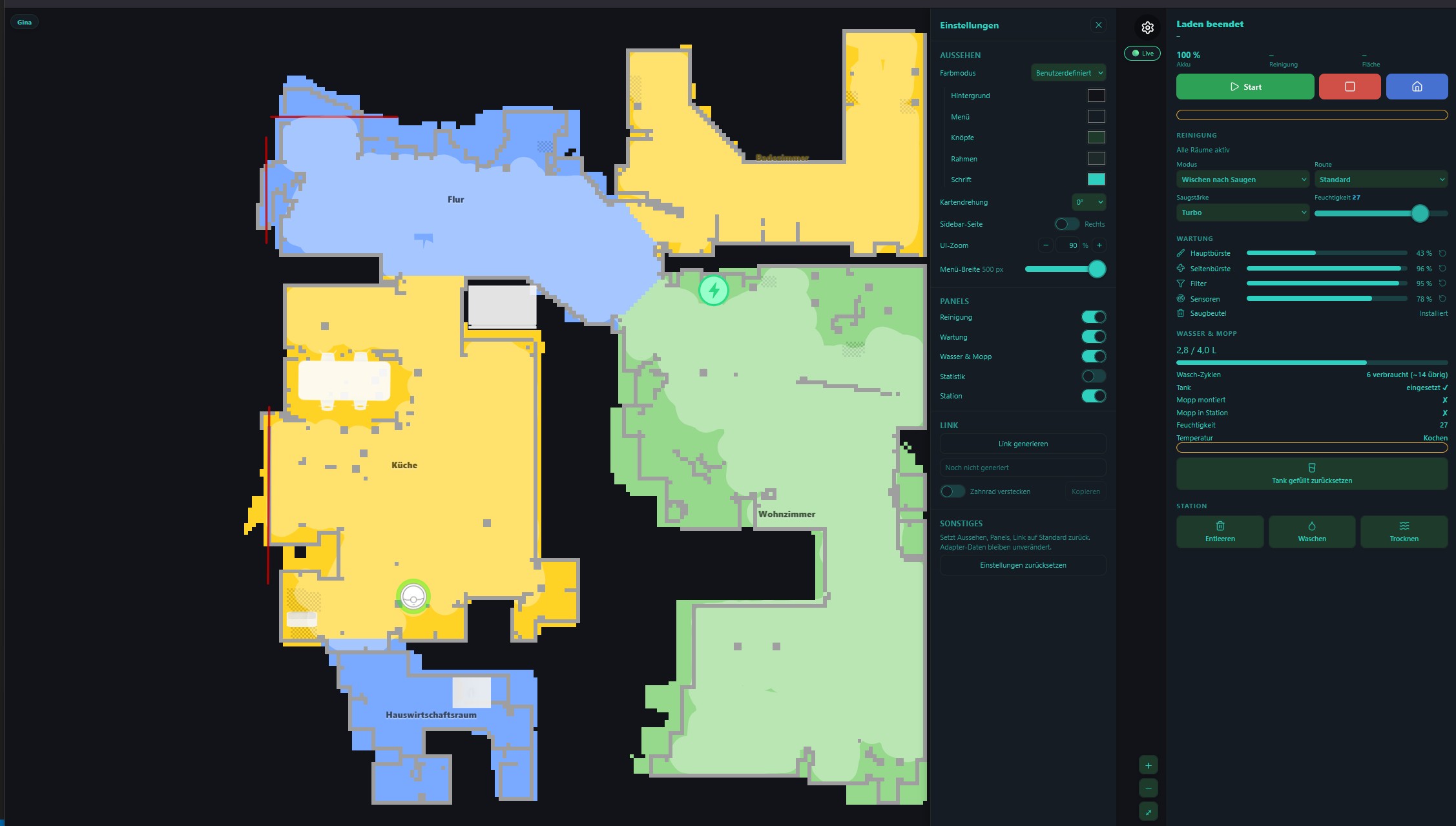
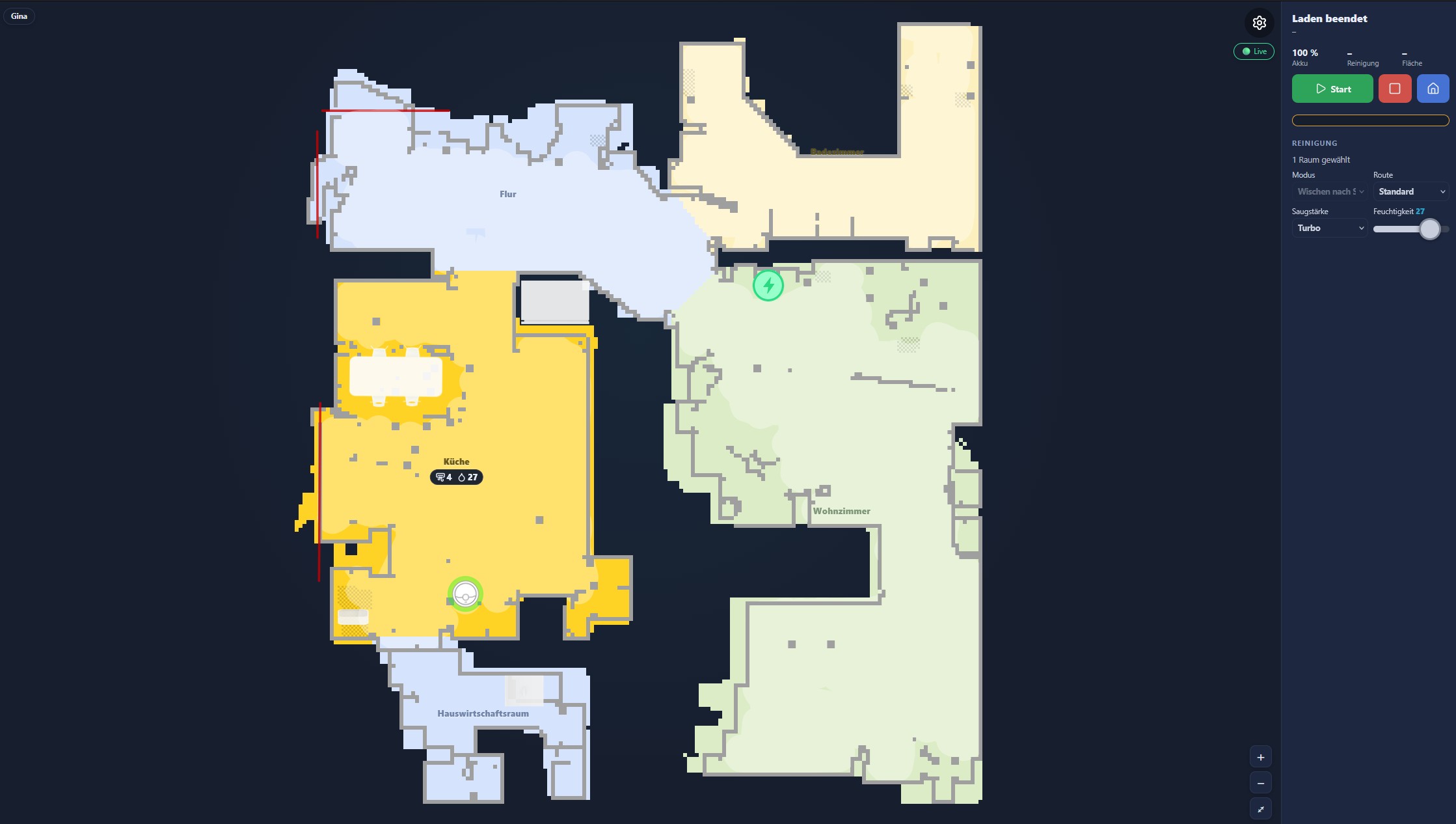
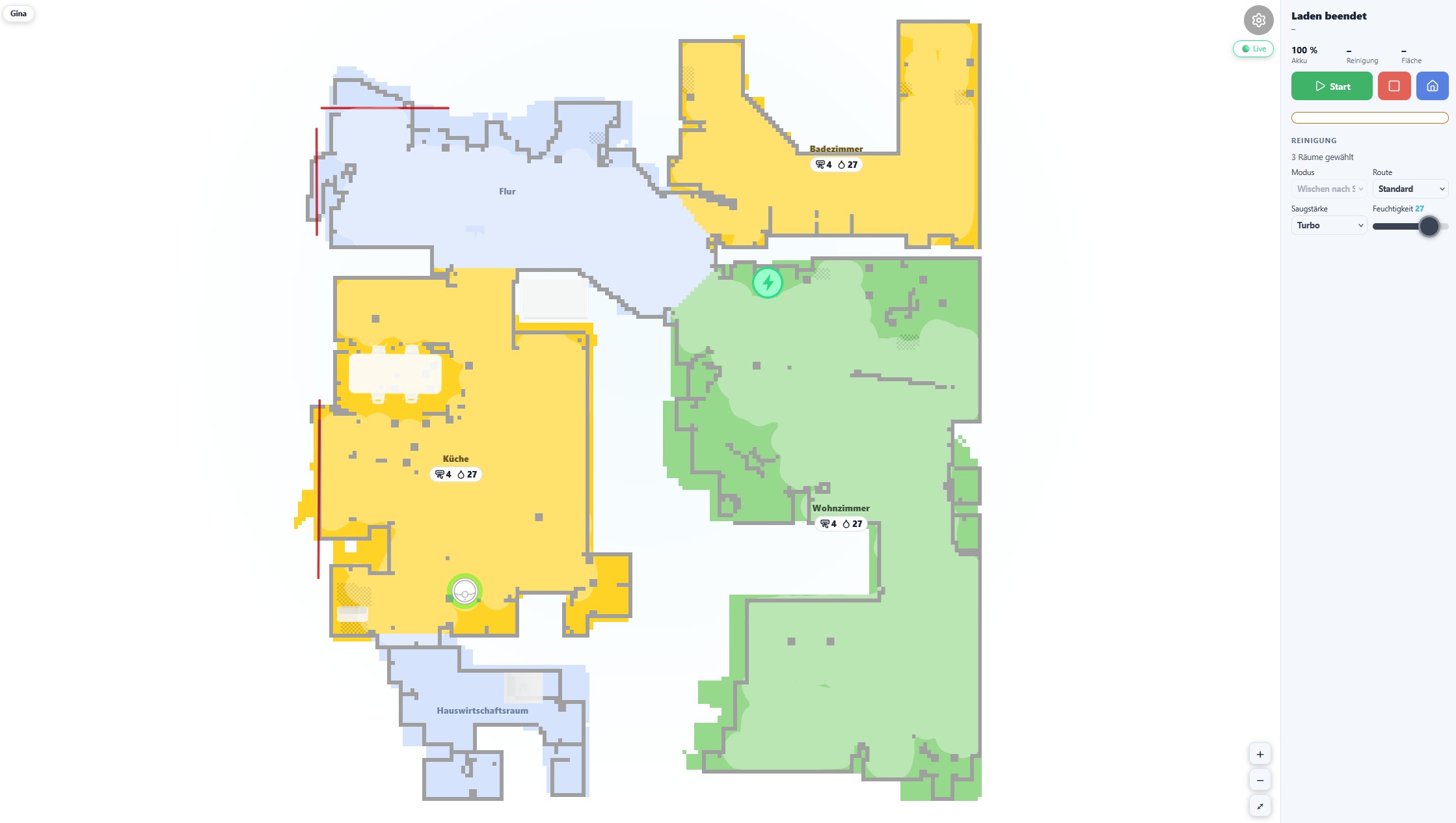
Адаптер предоставляет собственную карту в реальном времени: положение и направление робота, маршрут уборки, комнаты, зоны, мебель и ковры, обновляющуюся в режиме реального времени во время уборки роботом, со всеми элементами управления робота рядом. Один и тот же вид отображается в четырех местах, созданных на основе одного и того же кода:
| Где | Как его открыть |
|---|---|
| веб-страница | %web_protocol%://%ip%:%web_port%/dreame/ например http://<your-iobroker>:8082/dreame/ - обслуживается веб- адаптером. Готовая ссылка ("Dreame-Map") находится на стартовой странице ioBroker и рядом с этим экземпляром в списке адаптеров. Готова к встраиванию в качестве iframe в vis, Grafana или любую панель мониторинга. |
| Вкладка "Администратор" | «Мечта» в левом меню административной панели. |
| Приложение для устройств | Плитка "Робот мечты" для ioBroker.devices: статус или карта на плитке, полное отображение в диалоговом окне. |
| вис-2 | Виджет "Робот мечты": отображение статуса или карты в полном виде в диалоговом окне или в полном виде в самом виджете. |
Настраивать
- Необходимо включить функцию «Получить карту» (см. раздел «Конфигурация» ) — без неё карта не будет отображаться.
- Если карта еще не отображается, запустите адаптер один раз, пока робот находится в док-станции, чтобы загрузить первую полную карту.
- Несколько роботов: в заголовке отображается переключатель устройств, или выберите один из них.
?did=<did>Ещё один экземпляр адаптера:?instance=1. - Открытая с другого устройства страница — файл на планшете — обнаруживает ioBroker с
?iob=http://<your-iobroker>:8082; браузер это запоминает.
Роботы с камерами/VSLAM-системами не поддерживаются. Устройства, использующие камеру для навигации вместо лидара (например, Mijia 1C/1T, Dreame F9), не покрываются картой — она разработана и протестирована только для лидарных роботов. Адаптер выдает предупреждение, и карта остается пустой для таких устройств.
Функции
- Двумерная и трехмерная карта; селектор этажей для роботов с несколькими сохраненными картами.
- Выберите комнаты, нажав на них; кнопка «Старт» выполнит уборку только этих комнат, в противном случае — всего дома. Порядок уборки также можно задать, нажав на соответствующую кнопку.
- Робот и док-станция взаимодействуют с иконками и индикаторами состояния Home Assistant; робот движется по заданному маршруту, а не переключается между обновлениями карты.
- Запретные зоны и зоны, где нельзя мыть полы, виртуальные стены, шторы, мебель и ковры на карте.
- Панели: статус, неисправности, уборка, порядок, станция, вода и влажная уборка, ярлыки, расписание, техническое обслуживание, статистика — для газонокосилки отображается только то, что к ней относится.
- 11 языков, в соответствии с системным языком ioBroker.
Настройки
За шестерней, хранящейся для каждого робота в <did>.config.widget — поэтому они применяются везде, где показан робот:
- Поворот карты, боковая панель слева или справа, масштабирование интерфейса, ширина боковой панели.
- Каждая панель может быть включена или выключена, а внутри них — отдельные ряды или кнопки; ярлыки скрыты, и взгляд на них находится рядом, когда открыты настройки.
- На веб-странице также представлены цвета в четырех режимах:
| Режим | Описание |
|---|---|
| Свет | Тема с фиксированным освещением |
| Темный | Исправлена темная тема (по умолчанию) |
| Основной цвет | Выберите один базовый цвет; боковая панель, границы и текст будут автоматически определяться на его основе с проверкой контрастности, чтобы текст всегда оставался читаемым. |
| Обычай | Пять индивидуально выбираемых цветов (фон, боковая панель, кнопки, границы, текст) для полного контроля. |
 |
 |
Пример киоска/iframe
Настройки веб-страницы могут задать текущий внешний вид ссылки (?cfg=<blob>); ?gear=0 скрывает значок шестеренки для дисплеев только для чтения, таких как настенные планшеты:
http://<your-iobroker>:8082/dreame/?gear=0&cfg=<blob>
Ссылка влияет только на эту вкладку браузера или встроенный элемент — она никогда не перезаписывает настройки, сохраненные для робота. Ссылки, созданные с помощью предыдущего веб-интерфейса, продолжают работать.
Газонокосилка (A2, A2 1200, ...)
Адаптер поддерживает роботизированные газонокосилки Dreame с выделенными состояниями и отрисовкой карт. Состояния создаются лениво — в дереве объектов отображаются только те свойства, которые фактически были переданы вашим устройством.
Состояние газонокосилки
| Состояние | Описание |
|---|---|
| статус | Состояние газонокосилки (1=Кошение, 2=В режиме ожидания, 3=Приостановлено, 5=Возобновлено, 6=Зарядка, 11=Картирование, 13=Заряжено, 14=Обновление) |
| вина | Код ошибки |
| уровень заряда батареи | Уровень заряда батареи |
| состояние зарядки | Состояние зарядки |
| рабочий режим | Текущий режим работы |
| время кошения | Текущее время кошения (мин) |
| зона скашивания | Текущая площадь скашивания (м²) |
| статус задачи | Статус задачи |
| ошибки | Подробности неисправности |
| статус предупреждения | Статус предупреждения |
| обновление настроек | Изменение настроек через MQTT (2-51). Значение: [en,hours] =Дождь, 0/1 =Мороз, [en,start,end] =НизкаяСкорость |
| статус зоны | Состояние скашивания по зонам в зависимости от участка |
| препятствия для ИИ | Искусственный интеллект обнаружил препятствия |
| самопроверка | Результат самодиагностики |
| общее время кошения | Общее время кошения (мин) |
| общее количество скошенной травы | Общее количество скошенных травинок |
| общая площадь скашивания | Общая площадь скошенной травы (м²) |
| защита от дождя | Настройки защиты от дождя (WRP): [enabled, wait_hours, sensitivity] |
| защита от мороза | Защита от замерзания (FDP): 0 = выключено, 1 = включено |
| низкая скорость | Низкоскоростной ночной режим (LOW): [enabled, start_min, end_min] |
| настройки dnd | Настройки режима «Не беспокоить» (DND): [enabled, start_min, end_min] |
| конфигурация батареи | Конфигурация батареи (BAT): [return%, max%, charge_en, ?, start, end] |
| объем | Громкость (VOL): 0-100 |
| child-lock-cfg | Блокировка от детей (CLS): 0 = выключено, 1 = включено |
| ai-obstacle-cfg | Система предотвращения столкновений с препятствиями (AOP) на основе искусственного интеллекта: 0 = выключено, 1 = включено. |
| противокражный | Противоугонная система (STUN): 0 = выключено, 1 = включено |
| фара | Настройки фар (LIT): [enabled, start, end, l1, l2, l3, l4] |
| защита травы | Защита газона (PROT): 0 = выключено, 1 = включено |
| моточасов | Наработка лопастей (максимум 100 часов) |
| здоровье лезвия | Состояние лезвия 0-100% |
| часы работы кисти | Время работы щетки (максимум 500 часов) |
| здоровье кисти | Состояние щетки 0-100% |
| часы обслуживания роботов | Время технического обслуживания робота (максимум 60 часов) |
| робот-обслуживание-здоровье | Состояние здоровья робота (техническое обслуживание): 0-100% |
| предотвращение столкновений | Система предотвращения столкновений (AutoSwitch LessColl): 0 = выключено, 1 = включено |
| заполняющий свет | Подсветка салона (AutoSwitch FillinLight): 0 = выключено, 1 = включено |
| чистый гений | CleanGenius (AutoSwitch SmartHost): 0 = Выкл., 1 = Обычная, 2 = Глубокая |
| маршрут очистки | Маршрут очистки (AutoSwitch CleanRoute): 1=Стандартный, 2=Интенсивный, 3=Глубокий, 4=Быстрый |
| более широкий угол | Более широкий угол обзора (AutoSwitch MeticulousTwist): 0 = Выкл., 1 = Высокая частота, 7 = Низкая частота |
| направление пола | Очистка в направлении пола (AutoSwitch MaterialDirectionClean): 0 = выключено, 1 = включено |
| ориентированный на домашних животных | Уборка с учетом потребностей животных (AutoSwitch PetPartClean): 0 = выключено, 1 = включено |
| автоматическая зарядка | Автоматическая зарядка (AutoSwitch SmartCharge): 0 = выключено, 1 = включено |
| высота среза | Высота среза в мм (PRE) |
| obstacle-distance-cfg | Расстояние до препятствия в мм (PRE) |
| режим кошения | Режим кошения (PRE): 0 = Стандартный, 1 = Эффективный |
| изменение направления | Изменение направления (PRE): 0 = авто, 1 = выключено |
| скашивание краев | Скашивание краев газона (PRE): 0 = выключено, 1 = включено |
| обнаружение границ | Обнаружение границ (PRE): 0 = выключено, 1 = включено |
Данные о местоположении и задании (бинарный протокол, в реальном времени)
Эти состояния заполняются из двоичных сообщений MQTT и создаются лениво — они появляются только после того, как газонокосилка отправит первое двоичное обновление.
Из пакета данных о положении робота (siid 1-5):
| Состояние | Описание |
|---|---|
| положение робота | Текущее положение робота в формате JSON: {"x":..., "y":..., "angle":...} |
| ход кошения | Текущий прогресс выполнения задачи (%) |
| скошенная площадь | Площадь, занятая в рамках текущей задачи (м²) |
| задача по очистке общей площади скашивания | Общая запланированная площадь для выполнения текущей задачи (м²) |
| задача покоса | Полные данные задания в формате JSON: {regionId, taskId, percent, total, finish} |
Из пакета телеметрии устройства (siid 1-1):
| Состояние | Описание |
|---|---|
| позиция причала | JSON-данные о положении док-станции/зарядного устройства: {"x":..., "y":..., "angle":...} (обновляется при стыковке) |
| состояние стыковки | ВХОД НА СТАНЦИЮ / ВЫХОД СО СТАНЦИИ / ПАУЗА ПРИ ШТАБИРОВАНИИ / ЗАВЕРШЕНИЕ ШТАБИРОВАНИЯ / НЕУДАЧНАЯ ШТАБИРОВАНИЕ / ШТАБИРОВАНИЕ НА БАЗЕ |
| местоположение-состояние | Местоположение (0–3) |
| уровень заряда батареи в реальном времени | Уровень заряда батареи в реальном времени (%) по данным бинарной телеметрии. |
| зарядка-жизнь | Зарядка в процессе: 0 = Не заряжается, 1 = Заряжается |
| wifi-rssi | Уровень сигнала Wi-Fi (дБм) |
| lte-rssi | Уровень сигнала LTE (дБм) |
| бле-рсси | Уровень сигнала Bluetooth (дБм) |
| код ошибки двоичный | Исходный код ошибки из бинарной телеметрии |
| состояние вывода | Состояние контакта (0/1) |
| отстыковка | Флаг отстыковки (0/1) |
| состояние камеры | Состояние камеры |
Пульт дистанционного управления газонокосилкой
| Состояние | Описание |
|---|---|
| начать-косить | Начать кошение (кнопка) |
| остановить косить | Остановить кошение (кнопка) |
| пауза-кошение | Приостановить кошение (кнопка) |
| стартовый заряд | Вернуться на док-станцию (кнопка) |
| start-mow-ext | Запуск пользовательской стрижки (очистка зон/сегментов с заданными параметрами) |
| ясное предупреждение | Сбросить состояние предупреждения/ошибки (кнопка) |
| избегание препятствий | Включение/выключение функции обхода препятствий |
| обнаружение ИИ | Включение/выключение обнаружения ИИ |
| блокировка от детей | Включение/выключение блокировки от детей |
| dnd-enable | Не беспокоить (вкл/выкл) |
| dnd-start / dnd-end | Диапазон времени ДНД |
| расписание | график кошения |
| установленная защита от дождя | Настройте защиту от дождя: {"value":1,"time":8,"sen":0} или {"value":0} |
| set-frost-protect | Настройка защиты от замерзания: 0 = выключено, 1 = включено |
| установить низкую скорость | Установите низкую скорость в ночное время: {"value":1,"time":[1200,480]} или {"value":0} |
| set-dnd | Установите режим «Не беспокоить»: {"value":1,"time":[1200,480]} или {"value":0} |
| set-child-lock | Установить блокировку от детей: 0 = выключено, 1 = включено |
| установить громкость | Регулировка громкости: 0-100 |
| set-ai-obstacle | Настройка системы предотвращения столкновений с препятствиями: 0 = выключено, 1 = включено. |
| установить противоугонный | Настройка защиты от кражи: 0 = выключено, 1 = включено |
| установить фару | Настроить фару: {"value":1,"time":[480,1200],"light":[1,1,1,1]} |
| set-path-display | Настройка отображения пути: 0 = выключено, 1 = включено |
| защита от засорения травы | Настройка защиты газона: 0 = выключено, 1 = включено |
| сброс расходных материалов | Сбросить расходные материалы: {"value":[0,brush,robot]} |
| найти-робота | Найти робота (воспроизвести звук, нажать кнопку) |
| блок-робот | Заблокировать робота (кнопка) |
| fetchMap | Получить карту с устройства (кнопка) |
| generate-3dmap | Создать 3D-карту LIDAR (кнопка) |
| пользовательская команда | Отправьте пользовательскую команду MIoT |
| set-collision-avoidance | Настройка системы предотвращения столкновений (AutoSwitch): 0 = выключено, 1 = включено |
| set-fill-light | Настройка подсветки (автоматическое переключение): 0 = выключено, 1 = включено |
| set-clean-genius | Настройка CleanGenius (автоматическое переключение): 0 = Выкл., 1 = Обычная, 2 = Глубокая |
| set-cleaning-route | Задать маршрут очистки (автоматическое переключение): 1=Стандартный, 2=Интенсивный, 3=Глубокий, 4=Быстрый |
| установить автоматическую зарядку | Настройка автоматической зарядки (AutoSwitch): 0 = выключено, 1 = включено |
| установить высоту среза | Установите высоту среза в мм (PRE) |
| set-mow-mode | Установить режим кошения (PRE): 0 = Стандартный, 1 = Эффективный |
| скашивание краев | Настройка режима скашивания краев (PRE): 0 = выключено, 1 = включено. |
| обнаружение края установки | Настройка обнаружения границ (PRE): 0 = выключено, 1 = включено |
| установить-направление-изменение | Настройка изменения направления (PRE): 0 = авто, 1 = выключено |
| косить всю | Скосить все участки (кнопка, o=100) |
| зона скашивания | Скосить в отдельных зонах — CSV "1,3" или JSON "[1,3]" (o=102) |
| план кошения | Начать кошение согласно сохраненному плану (кнопка, o=104) |
| сканирование препятствий для кошения | Забег с распознаванием препятствий (кнопка, o=105) |
| край газонокосилки | Контур скашивания: JSON {"edge":[[x,y],...]} (o=101) |
| место для кошения | Область скашивания: JSON {"area":{...}} (o=103) |
| карта изменений скашивания | Переключить активную карту (число, индекс от 0, o=200) |
Покос в определенных зонах
Каждая зона скашивания, определенная на карте, отображается как отдельный канал в рамках dreame.0.<did>.mower.map.slot<X>.zone<zoneId> Откройте обозреватель объектов ioBroker, перейдите к своей газонокосилке, а затем к mower.map и вы увидите один slot0, slot1... для каждой сохраненной карты. Каждый слот содержит одну zone<N> канал на каждую зону скашивания — например slot0.zone1, slot0.zone3 Внутри каждой зоны вы найдете name (как показано в приложении), area (м²), time, и path.
**Числовая часть после zone ** это идентификатор зоны, в которую вы записываете данные. remote.mow-zone Итак, если дерево выглядит так:
dreame.0.<did>.mower.map.slot0.zone1     name = "Front lawn"
dreame.0.<did>.mower.map.slot0.zone3     name = "Back lawn"
dreame.0.<did>.mower.map.slot0.zone5     name = "Side strip"
затем:
Однозонная стрижка: "Передний газон":
dreame.0.<did>.remote.mow-zone = "1"
Несколько зон — стрижка газона: "Передний газон" + "Задний газон" + "Боковая полоса":
dreame.0.<did>.remote.mow-zone = "1,3,5"
Формат JSON тоже работает — это удобно при использовании Blockly или JavaScript-скриптов:
dreame.0.<did>.remote.mow-zone = "[1,3,5]"
Пример использования Blockly / JavaScript-адаптера:
setState('dreame.0.' + did + '.remote.mow-zone', '1,3', false);
Газонокосилка обрабатывает список, начинает косить выбранные зоны и возвращается на станцию по завершении работы. Чтобы остановить косилку во время работы, нажмите кнопку. stop-mow (o=2) или pause-mow (o=4). Сначала переключение карт (mow-change-map) требуется, если целевые зоны находятся на другой карте — в противном случае идентификаторы зон не будут разрешены.
Переключение активной карты
Если у газонокосилки несколько карт, выберите активную карту перед записью идентификаторов зон:
dreame.0.<did>.remote.mow-change-map = 0   // first map
dreame.0.<did>.remote.mow-change-map = 1   // second map
Быстрые способы стрижки газонокосилки
Сокращения определяются по свойству 4-48 (имена, закодированные в base64). Каждому сокращению присваивается свой собственный канал. deviceId.shortcuts.{id}:
| Состояние | Описание |
|---|---|
| имя | Расшифрованное название ярлыка |
| бег | Запущен ли в данный момент ярлык |
| начинать | Кнопка для запуска ярлыка |
История газонокосилок
История уборки загружается из облачного API (последние 20 сеансов кошения).
| Состояние | Описание |
|---|---|
| дата последнего скашивания | Дата последнего сеанса кошения. |
| продолжительность последнего скашивания | Продолжительность последнего сеанса (мин) |
| зона последней стрижки | Площадь, скошенная за последний сеанс (м²) |
| последняя завершенная стрижка | Успешно ли завершилась последняя сессия? |
| история-json | JSON-массив последних 20 сессий |
Схема газонокосилки
Данные карты получаются через API Dreame iotuserdata (а не через MQTT, как у пылесосов).
| Состояние | Описание |
|---|---|
| mapImage | Карта отображается в формате PNG (URL-адрес данных base64). |
| slot0.zone_X | Данные по зонам (название, площадь, время кошения) |
| mowingPath | Исходные координаты траектории скашивания |
| настройки | Настройки кошения для каждой зоны |
| расписание | график покоса |
| 3dmap-url | Ссылка для скачивания 3D-карты LIDAR (предварительно подписана) |
| 3dmap-progress | Ход генерации 3D-карты (0-100%) |
Опрос карты: Карта загружается при запуске адаптера и через fetchMap Кнопка. Во время активной стрижки (статус 1, 3, 5, 11) карта автоматически опрашивается каждые 30 секунд для отслеживания траектории стрижки.
Отображение карты: Требуется дополнительный модуль. canvas Пакет npm. На карте показаны зоны (зеленый цвет), контуры (белые линии), траектория скашивания (желтый цвет), запрещенные зоны (красный цвет) и препятствия (красные круги).
3D-карта LIDAR: Нажмите generate-3dmap Для запуска сканирования и загрузки трехмерной карты облака точек газонокосилкой. Загруженный файл представляет собой файл PCD (Point Cloud Data), который можно просмотреть с помощью таких инструментов, как CloudCompare или MeshLab. Прогресс отслеживается в 3dmap-progress После завершения процесса предварительно подписанная ссылка для скачивания записывается в файл. 3dmap-url Этот URL-адрес является временным и истекает через несколько часов.
Пользовательские команды для газонокосилки
С помощью dreame.0.XXXXXX.remote.customCommand:
{
  "siid": 5,
  "aiid": 9,
  "in": [{ "order": 4, "region": [1], "type": "order" }]
}
Известные ограничения
Дерево объектов заполняется постепенно (ленивое создание состояний). Состояния появляются только после того, как устройство хотя бы раз сообщит о соответствующем свойстве. После чистой установки или перезагрузки адаптера дерево может выглядеть неполным в течение нескольких минут — это ожидаемое поведение.
L40s Pro Ultra и аналогичные устройства: некоторые состояния появляются только после активного использования. Свойства в группе SIID 4 (cleaning-mode 4-23, suction-level 4-4, water-volume 4-5) и SIID 28 (wetness-level Состояния 28-1) могут передаваться устройством только после активного сеанса очистки, а не во время простоя при опросе. Эти состояния не появятся до тех пор, пока не завершится хотя бы один цикл очистки после установки или перезапуска адаптера.
** cleaning-mode На некоторых** устройствах, включая L40s Pro Ultra, в версиях до 0.3.18 могли отображаться необработанные составные значения (например, 5120, 5121, 5122) вместо задокументированного диапазона 0–3. Это было вызвано тем, что адаптер не декодировал составное значение, объединяющее режим, площадь и влажность в одно целое число. Начиная с версии 0.3.18, декодирование выполняется корректно. Если после обновления вы по-прежнему видите необработанные значения выше 1000, пожалуйста, создайте заявку с указанием вашей модели и наблюдаемого необработанного значения.
Переводы
Названия и описания штатов доступны на 11 языках: английском, немецком, русском, португальском, голландском, французском, итальянском, испанском, польском, украинском и китайском (упрощенном).
lib/i18n/en.json является авторитетным источником. Все остальные языки создаются на его основе посредством npm run translate Исправления к переводам на другие языки следует направлять в виде запросов на исправление (PR) в соответствии с соответствующими требованиями. lib/i18n/<lang>.json файл.
Кредиты
- TA2k — владелец репозитория и автор оригинального адаптера.
- RicardoHipp — оригинальный инструмент для отображения карт, на основе которого создан этот виджет (лицензия MIT).
- Sefina-DS (Дэвид) — соавтор, переработка виджета, тестирование в реальных условиях.
- Сообщество — krobipd, flapman, volvodani и все остальные, кто сообщает о проблемах и тестирует устройства.
Changelog
WORK IN PROGRESS
- Live map widget: fix "no connection" when the web adapter is configured for pure WebSockets (ioBroker.ws) instead of socket.io. Under
/socket.io/socket.io.jsthe web adapter serves one of two different client libraries depending on its instance configuration: the real socket.io client, which exports a callableio(url, opts), or the shim from@iobroker/ws-server-library, which only exposesio.connect(url, opts). The widget calledio(...)unconditionally, so on a ws setup it died with "io is not a function" before the first request — and becauseverbinden()swallowed that error without logging it, the only visible symptom was the generic "Is the web adapter running?" message, pointing the user at an adapter that was working fine. The data layer (www/js/core/daten.js) now picks whichever entry point the loaded client actually offers, additionally listens for the shim'serrorevent alongside socket.io'sconnect_error, and logs the real cause to the browser console. Everything above the connection is unaffected — both setups speak the same command set from@iobroker/socket-classes, sogetState/getStates/getObject/getObjects/setState/subscribeand thestateChangeevent work unchanged. - New admin tab (foundation): the adapter now registers an admin tab (
common.adminTab), so Dreame appears in the ioBroker admin's left-hand sidebar alongside the existing web-adapter widget, which is untouched and keeps working. This first step lays the groundwork rather than replacing anything: a React/TypeScript/Vite project undersrc-tab/that builds intoadmin/tab.html, a narrow seven-method connection interface over the admin's own socket (so views can be tested without a socket, an admin or a browser), device discovery frominfo.deviceswith the same selection rules the widget uses, a typed decoder for themap.mergedCloudpackage, and a pure floor renderer that reproduces the Home Assistant colour scheme — including the exact order its colour rules are applied in, which decides what a room hidden during a running job looks like. The decoder and the renderer return plain data rather than drawing anything, so the planned 3D view can reuse both as-is. 59 tests cover the decoder, the renderer and the device list. Build withnpm run tab:build. - Admin tab: room labels on the map, using the same three-step naming rule as the widget and Home Assistant's
set_name()— a room type chosen in the app wins and is numbered from the second room of that type onwards, otherwise the free-text name from the app, otherwise "Room ". Unlike the widget, whose room-type table is hard-coded German regardless of the user's language, the types are translatable here. The tab also reports when the map raster holds several blocks that sit far apart, which is what a robot with more than one stored map looks like when all of it is drawn at once. - Admin tab: the driven path is drawn, as the two trails Home Assistant uses — a thin vacuum line and a wide, semi-transparent mopping band, with a section that does both appearing in each, which is what makes a vacuum-and-mop run recognisable. The line lifts at every repositioning instead of dashing straight across the home. The world-to-image conversion follows Home Assistant's exact term rather than the shorter-looking one that puts every point about a cell off. The playhead animation and the mask that clips the mopping band to room areas, both present in the widget, are refinements on top of these paths and are not ported yet.
- Admin tab: status header with the robot's current state, battery, cleaned area and run time, plus Start, Stop and Return-to-dock. The 70 status codes and their texts are the widget's own table, reused so both views name the same state identically and the existing translations in all 11 languages apply; a code the table does not know shows as a bare number rather than a guessed label, so it can be quoted in an issue. Commands are state writes to the same triggers the widget uses, and a write that fails now says so instead of leaving a button that appears to do nothing.
- Admin tab: the sidebar panels — cleaning (mode, route, suction, wetness), station (empty, wash, dry), water and mop, maintenance and lifetime statistics. The route list narrows with the mode, because intensive and deep are mopping intensities the robot ignores while it is only vacuuming; offering them would offer a setting that does nothing. A panel whose states the device does not report renders nothing at all rather than a heading over empty rows, so a mower or a basic model shows a shorter column. Wear parts can be reset after a replacement, from a deliberately small control — it changes nothing physical, and doing it by accident quietly costs the user the warning they were relying on. Every panel's labels reuse the widget's existing translation keys, and a test pins that each key named actually exists in the language files, since a missing one would render as the key itself in all 11 languages.
- Admin tab: shortcuts and schedules. Shortcuts run from one button each, with a running one disabled so a second run cannot be queued on top of the first. Schedules are listed by time with their rooms and settings, and each has a switch; one pointing at a shortcut that no longer exists is shown with its switch locked, because arming a schedule that cannot run helps nobody. The kind of a schedule is worked out from which fields the adapter created, not from its
typestate: that state arrives already translated, so branching on it works in German and silently fails everywhere else — the same trap the widget documents having fallen into. Moisture is printed as the level it is, 1 to 32, rather than as a percentage it is not. - Admin tab: fault list and cleaning sequence. Faults and warnings sit at the top of the sidebar and render nothing at all when there is nothing wrong — a panel that is usually empty is read at a glance, whereas one that always says something has to be read properly every time. The four conditions Home Assistant suppresses are suppressed here too, including a low battery while charging, which is what charging is for. An error code the 136-entry table does not know is shown as a bare number rather than a guessed label, so it can be quoted in an issue. The cleaning sequence is edited on the map: tapping a room selects it and appends it to the order, tapping it again removes it, and the numbered badges show the order. A tap writes the new order and changes nothing locally, so what is drawn is always what the adapter holds — the same state can be written by a script or a second browser tab.
- Admin tab: fix three commands whose state ids were missing their device — starting a shortcut, switching a schedule and writing the cleaning sequence all wrote to a malformed id and therefore did nothing. The commands that build an id themselves, rather than going through the shared trigger helper, are now each pinned by a test.
- Admin tab: zoom and pan on the map — mouse wheel, drag, and buttons for in, out and fit, bottom right where the widget puts them. Zooming holds the point under the cursor still, so zooming into a corner does not walk it off the screen, and panning stops at the map's own edges instead of letting it drift into empty space. Room labels and sequence badges keep a constant size on screen, so zooming in shows more map rather than larger words. A press that barely moves still counts as a tap on a room, which is what makes editing the cleaning sequence workable on a touch screen. Switching to a different map returns to the fitted view rather than leaving the user in a corner of a floor they have not seen.
- Admin tab: 3D map view, switchable from a 2D/3D toggle beside the device name. The floor is the same bitmap the 2D canvas draws, used directly as a texture; the walls are extruded from the occupancy grid; furniture stands at its measured footprint and angle; no-go and no-mop zones lie flat on the floor because they are rules about the floor rather than objects in the room, and virtual walls stand up because they are barriers. Nothing extra is fetched — it is the same map package the 2D view already decodes, so switching costs the robot and the adapter nothing. Wall cells are merged into rectangles before extrusion rather than drawn one cube per cell: a 200 m² flat holds thousands of wall cells, and per-cell extrusion is both slow and reads as gravel instead of as a wall. Heights are the one thing not measured — the robot is a floor-level lidar and reports outlines, never elevations — so the furniture heights are ordinary real-world ones, chosen to make the view readable, and the wall height is the robot app's own 500 mm rather than a real wall. Furniture is drawn as bodies rather than models: the app's models sit inside the app package, and shipping them would mean redistributing Dreame's assets. three.js loads in a chunk of its own on the first switch, so an admin session that only ever opens the 2D map does not download it.
- Admin tab: fix washed-out room colours in 3D and draw the cleaning path on the 3D floor. The colours were a colour-space slip, not a lighting problem: three.js renders to sRGB, and a texture that does not declare its own space is treated as linear and brightened a second time on the way out. The floor texture is now composed on a canvas — the room bitmap with the same path strokes the 2D view draws over it, from the same path data, so the two views cannot disagree about where the robot has been.
- Admin tab: 3D framing, orientation and room labels. The camera now looks at the map straight on rather than from a corner, so it keeps the left-to-right orientation it has in 2D and the same flat is recognisable when switching between the two; a corner view looks more three-dimensional and makes that harder. Framing is computed from the actual window shape on every resize instead of once at startup, since a tall narrow window and a wide short one need very different distances for the same map — but only until the user first orbits, after which the camera is theirs and a resize no longer snatches it back. Rooms are labelled in 3D as well, as sprites that face the camera from every angle, and both views now take their names from one place so they cannot drift apart.
- Admin tab: furniture in 3D is drawn from parts instead of a single block — a bed is a mattress with a headboard and pillows, a table is a top on four legs, a sofa has a back and two arms, a plant is foliage over a pot. All 30 furniture types the map can report have a shape, and a type without one still appears as a block at the measured size rather than not at all. What stays measured is the footprint, the position and the angle, all from the robot; what each piece looks like is drawn from scratch here, which is a deliberately weaker claim. No model files from the Dreame app are used — those live inside the app package, and shipping them would mean redistributing Dreame's assets. The parts of every piece are pooled into two instanced meshes, so a flat of thirty pieces is two draw calls rather than hundreds of objects.
- Admin tab: fix the blurred cleaning path in 3D. The floor texture held one texel per map cell, so the vacuum line — 1.1 cells wide — was a single texel, and on a floor seen at an angle the GPU averaged it into the room colour behind it; the 2D view, drawing the same line as a vector at screen resolution, showed it crisp. The texture is now drawn at up to eight texels per cell, bounded by the GPU's largest texture and a memory budget so a large flat on a phone does not ask for hundreds of megabytes, and it uses anisotropic filtering, which keeps thin lines thin on a surface seen at a slant. The rooms are enlarged without smoothing, so their cell edges stay as hard as before.
- Admin tab: floor selector for robots with more than one stored map. The robot's own floor is shown live — rooms, path, sequence, 2D and 3D — while any other floor is shown as the picture the adapter stores under
map.maps.<id>.image; only the floor the robot is on arrives as raw map data, so the others cannot be drawn, rotated or clicked, and the 3D switch is disabled for them with a tooltip saying why. The adapter draws those pictures when it starts, so a change made in the app to a floor the robot is not on appears after its next start. The map header's floor id and charger position are now decoded as well; the floor id is what tells which stored map the robot is on. - New widgets for the devices app (ioBroker.devices) and for vis-2, both built from the same views as the admin tab. The devices tile shows the robot's status on the small sizes and its map on a 2x2 tile — or whichever of the two is picked in its settings — together with the floor the map should show; a click opens the full view in a dialog, 2D or 3D with the floor selector and every panel. The vis-2 widget offers the same two displays and a third that puts the full view straight into the widget, without a dialog, for a view built around the robot. All of them lay themselves out by the size of the widget rather than of the screen, so a narrow widget stacks what a wide one puts side by side, and the dialog goes full screen on a phone. Robot and floor are picked from drop-down lists of the robots and floors there are, under the names the Dreame app gives them, rather than from the object browser, which offers every object of the installation; changing the robot clears the floor, which belonged to the old one. In the devices app these lists are json-config custom fields served from the tile's own bundle. Both widgets are captioned — a devices tile at the bottom, where the app's own tiles put their name, a vis-2 widget at the top, where a card's title sits and where the full view names the robot; in vis-2 this replaces the usual title field, which only knew a text of the user's: automatically with the robot's name — and the floor's, where the map is pinned to one, so two tiles of two floors can be told apart — or with a text of the user's, or not at all; a custom caption also titles the dialog. On a map the caption sits beside the map rather than over it, so it hides no room. Without a robot picked, they show the first robot of
dreame.0, so a widget works the moment it is placed. In the vis-2 editor the widget is inert, so it can be moved and resized without zooming the map or opening dialogs. Build withnpm run build; the bundles go toadmin/dm-widgetsandwidgets/dreame. The words of the widgets' own settings are translated into German; the other nine languages show English for now. - The web page at
/dreame/is now the same view as the admin tab and the widgets, built from the same code; the old page inwww/is gone, andwww/now holds only the build of the new one. Everything the old page could do is there - compared feature by feature, and what was missing was added to the shared view first, so the admin tab and both widgets gained it too. Its addresses and parameters keep working:?did=,?gear=0for kiosk displays,?cfg=links made with the old page, and?iob=for a page opened from elsewhere. It connects through the web adapter whether that speaks socket.io or pure websockets, and loads nothing of the admin's app frame: only the connection and the translations are taken from gui-components, which keeps the page some 500 KB lighter. The translations moved fromwww/i18ntosrc-tab/i18n. - Map: rooms are picked by tapping them, through the adapter's
remote.custom-room-cleaningswitches, and Start then cleans just those - or, with none picked, the whole home, as before. The selection is the adapter's, not the page's: a tap writes the room's switch, and the map shows the pick when it comes back, so a script, the old page and a second browser all see one selection. The pick is cleared only after the adapter has acknowledged the start, which is when it has read it; the old page cleared it straight after sending, racing the adapter. The switches of the map the robot is on are used, andactive-mapis pointed there before a start, so a pick made on one floor never starts rooms of another. Editing the cleaning order now picks the rooms with it, since the adapter follows an order only for a pick of exactly its rooms, and the order panel says so when the two part. Rooms are drawn as the old page drew them - strong colours, paled where a partial pick leaves them out - and their names in the text colour outlined in the background, readable on every room colour and in both themes. - Map: robot and dock are drawn with Home Assistant's icons, sized by the map, the robot turned to its heading, each with its status badge - cleaning, charging, sleeping or a fault on the robot; emptying, washing, drying or drying the dust bag on the dock, hot where the water is. The robot drives along its trail instead of jumping every few seconds: each new piece of trail is played back over the time until the next map arrives, the trail growing only behind the robot, which faces the way it drives and turns to its reported heading at the end; without a trail, as on the way home, it glides between reported positions and faces backwards where it reverses. Where the system asks for reduced motion, it moves at once.
- Map: no-go and no-mop zones, virtual walls, curtains, furniture pictures and carpets on the 2D map, drawn as Home Assistant draws them, including the widget's corrections for pixel-exact zone outlines and the half-grid origin of carpets; carpets as HA's checkerboard, the mopping band clipped to the rooms so it no longer spills over walls. Rooms picked for the next start, or cleaned by the running job, carry a badge with the suction level and water amount.
- Panels: the header shows battery, cleaning progress and area, the last two only while a job runs - the robot keeps no "last cleaning" figures, and a stale 29 m² read like a result - and the drying progress while the mop dries. The cleaning panel says which rooms the next start covers, locks the mode during a job, puts the route back to standard when a new mode has no place for it, and shows no route field on a robot that reports none. The station offers only what it has - no station buttons on a robot without a station - with pause and resume for a wash, and a tooltip on every greyed-out button saying why. Water & mop shows the tank as the adapter counts it, coloured and warned by its status, the tank, mop, wetness, detergent and water temperature rows, and a button to reset the counter after a refill. Maintenance turns orange at 20 % and red at 10 %, and a missing dust bag red. Schedules show their type. The connection to the Dreame cloud shows as Live, Offline or Connecting. On a mower the panels that do not apply stay away. The line between panels is no longer drawn twice where a panel has nothing to show.
- Settings behind the gear, in every view: map rotation, sidebar left or right, UI zoom, sidebar width, each panel on or off and single rows or buttons inside it - shortcuts with an eye beside each while the settings are open - and, on the web page, the four colour modes, the share link and a reset that asks twice. Stored per robot in
config.widget, in the old page's format and migration, so settings made there carry over. - Map: fix the trail, the rooms and the markers drifting apart from the floor under them wherever the map was drawn in a box of another shape - a wide, short window, or a widget sized by hand. The floor is a canvas and everything on top is an overlay, and the two were sized by different rules:
aspect-ratiowithmax-heightdoes not keep a ratio, so the browser shortened the box and left its width, the canvas stretched with it, and the overlay kept the map's true shape. The map now measures the space it is given and takes both its sides in pixels, at its own ratio, and the overlay follows the box exactly - so the two cannot disagree, and the map is never stretched. - vis-2 widget: fix a crash while rendering ("Cannot read properties of undefined (reading 'length')"). vis-2 hands a widget set its own React and MUI, but only under their bare names - and the icon package reaches for the deep path
@mui/material/SvgIcon, which that does not cover. A second MUI came into the bundle with it, and an icon given ansxwas then worked out by this bundle's MUI against the theme of vis-2's: where the two versions differ, that throws, since an older theme has nobreakpoints.internal_mediaKeys. The icons now take theirSvgIconfrom the one MUI vis-2 provides, so nothing of the widget styles against a foreign theme any more - and about 70 KB of duplicated MUI leave the bundle.@mui/systemis declared as a dependency as well, which is how a widget set tells vis-2 to share it. - vis-2 widget: captioned automatically as well - the robot's name, and the floor's where the map is pinned to one - or with a text of the user's, or not at all. The option "without card" is now called "without frame", since "card" read as the map in German.
0.4.12 (2026-09-17)
- Fix Issue #138: three robustness/functionality fixes for map handling on newer models with AES-encrypted map payloads (r2253c/w and similar). 1) A silent crash in the room-name fallback path (main.js): when the map file request failed, an unhandled TypeError showed up only as a generic error; now an early return with a clear debug message. 2) A model without an AES-IV table entry can never load its base map — this is now a persistent, recognizable condition (unsupportedMapModel) instead of the generic please-restart-the-adapter hint. 3) The old_map_data (piid 13) property, pushed specifically during active cleaning, could carry the same object_name-plus-AES-key format as the already-working piid 3 path, but was previously only logged as unimplemented and discarded; it now reuses the existing, already-verified decrypt pipeline (confirmed against the Home Assistant reference implementation), with a Debug-level log that masks the key material so it is safe to share in a public issue. Thanks to @luckyheiko for the detailed reports that made all three fixes possible.
0.4.11 (2026-09-17)
- Fix Issue #119: sync REMAP'd common metadata (name, states) to existing state objects at adapter start. In v0.4.8 the REMAP change for SIID 4/PIID 6 was correctly written to the in-memory spec but not to the persisted ioBroker objects, because _lazyCreateState only updates common.states when the cloud sends a get_properties response for that property — which may never happen for infrequently-changing properties. The frischwasser widget's mop-pad-presence detection then fell back to the pulse-only source and displayed permanent not-installed even on REMAP'd devices. A new one-time-per-device migration (_syncRemapObjectMetadata, marker .info.remapMetaSyncV2) now rebuilds the state objects with the correct metadata at adapter start. Thanks to @SilentM1978 for the diagnostic widget test that isolated the root cause to metadata persistence rather than the REMAP logic itself.
0.4.10 (2026-09-12)
- Fix: axios bumped to 1.20.0 for upstream security fixes; Node.js built-in requires now use the node: prefix (lib/haDecode.js, lib/mapMerge.js)
0.4.9 (2026-09-12)
- Fix: map.cover type-mismatch log flood during cleaning runs (#141)
0.4.8 (2026-09-12)
- Fix Issue #119 for Dreame L40s / X40 Ultra (r9419*): SIID 4 PIID 6 is remapped to reflect mop-pad presence 1:1, same as r6001a in v0.4.7, based on an isolated pad-remove/reinstall test on an r9419h device in this development cycle. Generalize the mop-in-station / mop-pad-installed fixes from v0.4.7 across all vacuum models: the permanently-0 mop-in-station property is now removed from every vacuum device's object tree at spec load time, and mop-pad-installed is renamed to mop-handling-pulse since it only emits ~1s pulses during mechanical mop handling (state id unchanged so existing user scripts keep working). The frischwasser widget's Mopp-montiert indicator now uses the mop-pad-presence state on models where the REMAP is active — visible after the first cloud poll cycle following the update. Also completes missing UI translations (Issue #122). Thanks to @SilentM1978 and @ralfheitz for confirming the pulse behavior on their devices.
0.4.7 (2026-09-06)
- New tap-to-sequence widget for custom cleaning order directly on the map with room badges, plus a fresh-water/detergent widget for L20 Ultra. Fix Issue #126: clean-water-tank-status bit-mask handling and derived Boolean states for r2253* (L20 Ultra) models. Fix Issue #119: correct mop-pad status on Dreame X60 Pro Ultra Complete (r6001a) via a new model-override layer — removes the dead mop-in-station property, renames the mop-handling pulse, and remaps SIID 4 PIID 6 to actual mop-pad presence on r6001*. Adds status codes 116/117/121/122 (Installing mop, Removing mop, Entering dock, Exiting dock) globally for all vacuum models. Thanks to @SilentM1978 for the detailed live traces that made the r6001a fix possible.
0.4.6 (2026-08-29)
- Attempted fix for issue #124 layer 4 (missing pixel raster on r2253c/r2253w): map background, walls, and room fills were not rendered even though overlays and metadata came through correctly. Adds a fallback to combined_pixel_type when the base pixel raster is empty (matching Home Assistant's renderer), and introduces permanent [MERGE-DEBUG] info-level logging (dimensions, pixel counts, wall/segment counts) so this failure mode is instantly diagnosable if it returns. Models whose base raster is already populated (e.g. r9419h) are unchanged. Thanks to luckyheiko for the pinpoint analysis.
0.4.5 (2026-08-28)
- Fix for issue #124 (Layer 3): map rendering could crash on the frontend when the device reported detected carpets with an invalid polygon field (null or malformed). Adds a filter in lib/mapMerge.js so invalid carpets never reach the frontend, a defensive guard in the carpet drawing routine in www/js/karte/merger.js, and a generic try/catch around overlay drawing so a single bad overlay never breaks the whole map rendering. The unreferenced legacy widget page www/legacy.html, which carried the same bug, is removed. Combined with 0.4.3 (comma-truncation) and 0.4.4 (AES decryption), this closes the full end-to-end map path for r2253c/r2253w. Thanks to luckyheiko for identifying the root cause and proposing the fix approach.
0.4.4 (2026-08-28)
- Fix for issue #124 (Layer 2): map payload for r2253c, r2253w and similar newer Dreame models is AES-256-CBC encrypted; the adapter now derives the AES key from the object_name comma suffix (SHA256, first 32 hex chars as UTF-8), uses a model-specific IV, and decrypts the payload before zlib inflation. Combined with the 0.4.3 comma-truncation fix, this closes the full end-to-end map download path for r2253 models. Also fixes a long-standing bug in lib/dreame.js where the persistent MAP_LIST path used an empty IV instead of the model-specific one. Models without a comma suffix in the object_name (e.g. r9419h/L40s) are unchanged. Thanks to luckyheiko and ralfheitz for the diagnostic logs.
0.4.3 (2026-08-28)
- Fix for issue #124 (HTTP 404 on map download for r2253c, r2253w and similar newer Dreame models where the Dreame backend returns an object_name with a comma suffix that the OSS storage does not resolve): the adapter now transparently retries with the object_name truncated at the first comma. Models without a comma in the object_name (e.g. r9419h/L40s) are unchanged. Diagnostic [MAP-DIAG] logging from 0.4.2 remains but only fires when the fallback also fails; new [MAP-DIAG-2] captures the retry outcome for future analysis.
0.4.2 (2026-08-27)
- Diagnostic release for issue #124 (HTTP 404 on r2253c/L20 Ultra map download): adds temporary [MAP-DIAG] logging on HTTP errors during fresh map downloads (model, did, object_name, download_url, HTTP status, timing, content-type, response body head) to distinguish race, region and object-name-format hypotheses. No functional changes; fallback to persistent MAP_LIST map unchanged. Diagnostic will be reverted in 0.4.3 together with the actual fix.
0.4.1 (2026-08-03)
- Added Schedules: schedules created in the Dreame app are now parsed into
schedule.<id>.*states (time, weekdays, type, enabled toggle, per-room or whole-floor settings with translated room names and enum values, linked shortcut for shortcut-type schedules). See Schedules. - Widget: added a Schedules panel/button showing all schedules in a table with an on/off switch each; schedules pointing at a deleted shortcut show a locked switch instead of silently failing.
- Widget: added a Shortcuts panel — one tile per app shortcut, tap to start it directly.
- Fixed app shortcuts being unavailable on vacuums (previously mower-only); shortcut channels are now rebuilt on adapter restart and cleaned up when deleted in the app.
- Widget: full German/English translation of every panel (Cleaning, Shortcuts, Schedules, Station, Maintenance, Water & Mop, Statistics, Kopf/Fehler status and error text), following the ioBroker system language.
- Widget: individual rows/tiles within a panel can now be hidden, not just whole panels (e.g. hide suction level or moisture on the Cleaning panel).
- Widget: menu width control changed from a slider (which visibly drifted under the pointer while dragging) to a number field with −/+ buttons, matching the existing UI zoom control.
- Widget: fixed a label/input association bug where clicking the "UI zoom"/"Menu width" caption activated the adjacent minus button instead of focusing the field (#104, thanks RicardoHipp).
- Widget: the cleaning-mode tile is no longer locked as soon as any room is selected — testing showed the robot does honour the globally set mode for room cleaning except for the combined vacuum+mop mode (#103, thanks RicardoHipp).
- Widget: removed the unused, never-wired-up Mopp panel placeholder;
configVersionbumped 5→6 to clean up any leftoverpanels.moppconfig entry. - Retyped six MIoT settings from
booleantonumber(auto-dust-collecting, auto-lds-coverage, clean-carpets-first, silent-drying, hair-compression, mopping-with-detergent) — devices reporting a value outside 0/1 had those silently rejected before. Thanks to krobipd for the analysis. - Fixed several
map.*states logging "has no existing object" on first creation (missingawaitbefore the object was created). - Named 13 previously raw/unnamed status datapoints (mop pad and dirty water tank consumables, firmware/MCU version, cleaning-related flags, camera light, current city, cleaning mode) after cross-checking them against another adapter on the same hardware. Thanks to krobipd.
- Decoded
status.error(previously a raw numeric code) into readable, translated text for 98 error codes, cross-checked against two independent sources. Thanks to krobipd. - Added a fallback so
status.state/status.battery-levelstill populate on models whose regular status poll omits them (e.g. Aqua10 Ultra / r95475). Thanks to krobipd. - Added
remote.go-to-point(x/y/use-current-position/start): send the robot to a stored map coordinate to look around, without cleaning on the way. Thanks to krobipd. - Added per-device
info.onlinereachability state with one log line per online/offline transition, replacing silent timeout logging. - Bumped
pako(map data compression) from 2.x to 3.x.
0.4.0 (2026-07-31)
- Modular widget rebuild: customizable appearance (light/dark/main-color/custom themes), configurable panels, kiosk mode with URL-based configuration sharing, robot switcher for multi-device setups.
0.3.26 (2026-07-20)
- Fixed stream-status (siid 10001 piid 1) type warning: the value is a streaming-session object, not a number - state declaration corrected to type string / role json, matching the convention used for dnd-task, task-info and zone-status (#82). The boolean type mismatch reported by flapman on remote.auto-dust-collecting, mopping-with-detergent, hair-compression, silent-drying, auto-lds-coverage and clean-carpets-first is already covered by the boolean coercion added in 0.3.25 - please update. Thanks to krobipd for reporting the exact device payload and preparing the fix.
0.3.25 (2026-07-20)
- Fixed room-specific cleaning settings being written to the wrong room (cleanset used RoomOrder instead of the real room id) (#95). Fixed boolean switches being rejected by the device - values are now sent as 1/0 (#94). Fixed adapter reboot loop on devices without a generated map, e.g. MOVA Z70 (#83). Fixed multi-room cleaning only cleaning the first selected room on 5th gen devices. Fixed swapped cleaning modes (vacuum/vacuum+mop) on devices with liftable mop pads. Fixed stream-status type warning (#82). German translation: renamed dining hall segment from Speisesaal to Esszimmer. Thanks to RicardoHipp for reporting and analyzing several of these issues.
0.3.24 (2026-07-01)
- Fixed custom room cleaning bug where switching active-map without touching a checkbox left customCommand holding room IDs from the previously selected map, causing the robot to clean the wrong room (room segment IDs are not unique across maps). customCommand is now rebuilt automatically whenever active-map changes, and is recomputed fresh from the active map's checkboxes immediately before every start as a final safeguard. Start is now aborted with a warning if no room is selected for the active map.
License
MIT License
Copyright (c) 2024-2026 TA2k tombox2020@gmail.com
Permission is hereby granted, free of charge, to any person obtaining a copy of this software and associated documentation files (the "Software"), to deal in the Software without restriction, including without limitation the rights to use, copy, modify, merge, publish, distribute, sublicense, and/or sell copies of the Software, and to permit persons to whom the Software is furnished to do so, subject to the following conditions:
The above copyright notice and this permission notice shall be included in all copies or substantial portions of the Software.
THE SOFTWARE IS PROVIDED "AS IS", WITHOUT WARRANTY OF ANY KIND, EXPRESS OR IMPLIED, INCLUDING BUT NOT LIMITED TO THE WARRANTIES OF MERCHANTABILITY, FITNESS FOR A PARTICULAR PURPOSE AND NONINFRINGEMENT. IN NO EVENT SHALL THE AUTHORS OR COPYRIGHT HOLDERS BE LIABLE FOR ANY CLAIM, DAMAGES OR OTHER LIABILITY, WHETHER IN AN ACTION OF CONTRACT, TORT OR OTHERWISE, ARISING FROM, OUT OF OR IN CONNECTION WITH THE SOFTWARE OR THE USE OR OTHER DEALINGS IN THE SOFTWARE.