In October, the latest repository grew from 812 to 835 adapters, and the stable repository now contains 693. We'll introduce you to 39 of these adapters in this issue, along with eleven familiar ones that have made the jump to the stable repository. However, the real story of the month is something else entirely: Rarely have so many adapters been updated to the stable repository at once as in October.
Who stable Users of Node.js will currently see an unusually high number of updates in the admin panel, many of them with a new major version number. 131 adapters received a new stable version in October , including socketio, mqtt, history, influxdb, shelly, and the js-controller. Almost all of them now require Node.js 22 , many even 22.19 . What you should know before clicking "Update" is explained below under "The Big Stable Wave ".
The new additions offer something for everyone: an adapter that identifies washing machines and dryers based solely on their power consumption curves, one that sorts Alexa's shopping list according to the route taken in the supermarket, and one that measures radon in the basement. And with esphome, one of the most widely used adapters has finally reached version 1.0.0 after more than five years, thus making its way into the... stable found.
Furthermore, this edition delivers what we announced in September under "What we are currently working on ": The sections in vis-2 are there, as is the security in the admin.
Core updates
⚠️ First: Node.js 22.19
In September, this space still said "plans it." Now it's happening, albeit in a different way than expected. The js-controller itself doesn't yet require the new minimum version, but the current versions of admin, javascript, devices, iot, cloud, and socketio do: They require Node.js 22.19 or later , and this also applies to their new features. stable Versions 8.1.0 and later, and JavaScript versions 10.4.0 and later, also require js-controller 7.2.5 .
So the order is: first update Node.js, then the js-controller, then the adapters. iob diag shows you which version is currently running.
js-controller 7.2.5
Two versions in October; since October 16th, version 7.2.5 has also been available in the stable (formerly 7.2.2).
- Version 7.2.4 supports Node.js 26. Additionally, sessions are now saved correctly again, fixing unexpected logouts in Admin and Web.
info.connectionAn instance is reset when it goes offline. - 7.2.5 writes at
sendTowhich user sent the message. This sounds insignificant, but it's the basis for permission checks in admin and JavaScript, see below.
ioBroker.admin 8.0.21 → 8.3.6
More security, as announced. Since Admin 8.1.0, the AI assistant works with the rights of the user asking the question. Endpoint, permissions, and confirmations are no longer inherited from the request. The log search and the info dialog of the MCP server require the necessary permissions. execute This information came from two external security researchers, thank you! The same hardening is included in JavaScript 10.4.0 and vis-2 2.20.
Single Sign-On. Starting with version 8.0.22, the administrator has a dedicated tab for Single Sign-On with issuer, client ID, and scopes. ⚠️ With version 8.3.5, login via this method has become more secure: Tokens are no longer displayed in the address bar and therefore no longer in the browser history. Users who had Single Sign-On enabled with an administrator account prior to version 8.3.4 should check the Users page to ensure that each link belongs to the correct account.
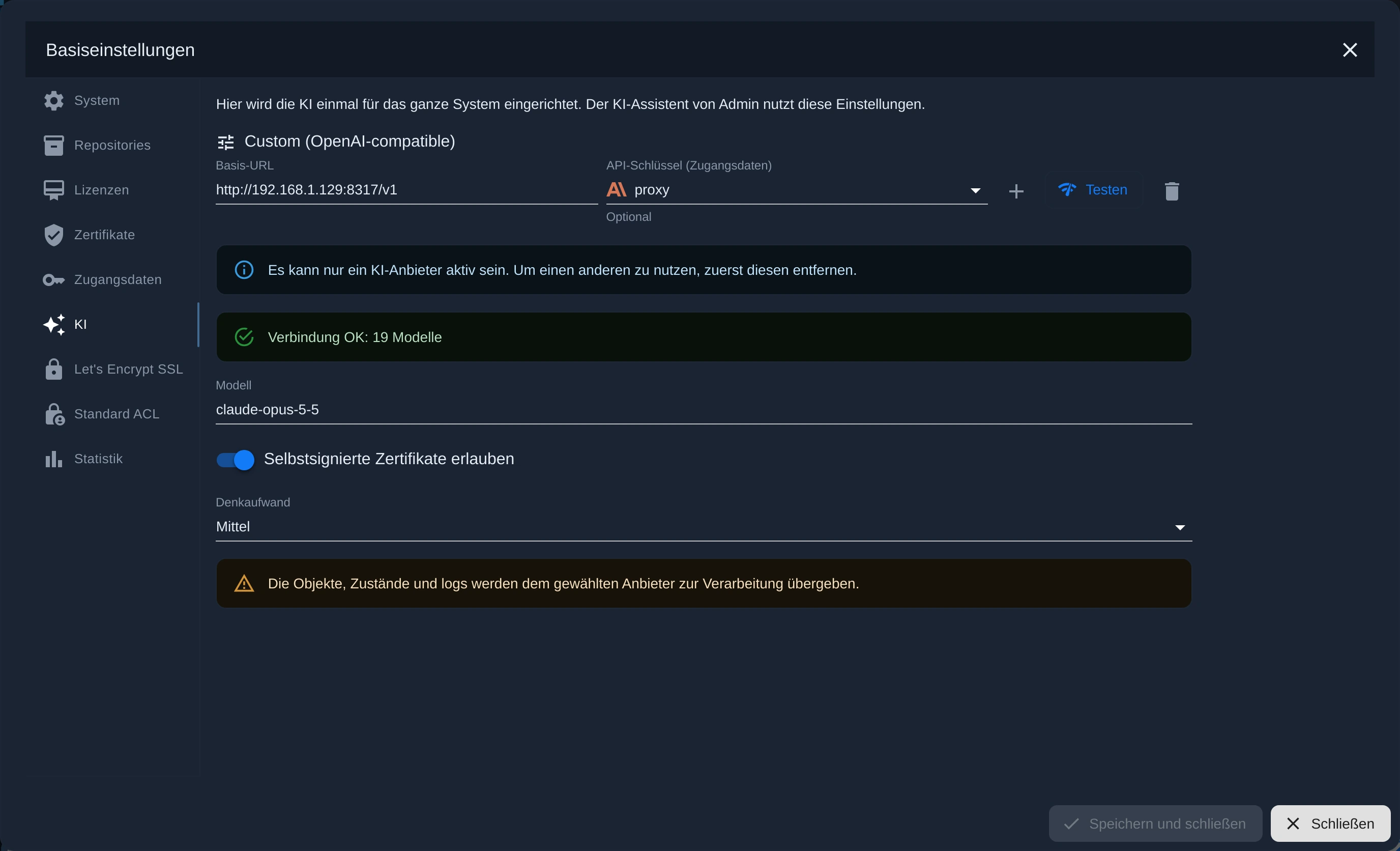
One AI setting for everyone. A new AI tab has been added to the system settings, allowing you to select providers, API keys, and models. The AI Assistant in the Admin panel uses this tab, as does the AI Chat in the JavaScript adapter (from version 10.4.8 onwards). OpenRouter is also available from version 8.3.6, and users with a local model can simply enter an OpenAI-compatible server.
Our new video shows how the AI assistant helps administrators in their daily work:
Also new to the admin team:
- Remote access via ioBroker.pro: The administrator recognizes when the page has been opened remotely and redirects links on the quick access page, in the instance list, and in the tabs accordingly. Pages that are only accessible from the home network are grayed out and explained.
- Adapter tabs via the admin port: Tabs like xterm now run via the admin port itself, without their own port, and are only for administrators.
- Faster: Admin and configuration pages are loaded from the browser cache; the Instances and Adapter tabs load noticeably faster.
- Small things with a big impact: "Edit name" (Alt+9) in the object browser's context menu even without expert mode, Ctrl+Enter confirms its dialogs, an older repository version can be reinstalled with one click, and instances whose adapter is missing on the host (for example, after a restore) are marked.
- Resource diagram on the overview with any recorded data points, including those from InfluxDB or SQL
ioBroker.vis-2 2.15.8 → 2.20.5 (only) latest)
The biggest new feature in this edition, and one we already announced in September. Important note: vis-2 2.20 is currently only available in the latest. In the stable It says 2.15.8.
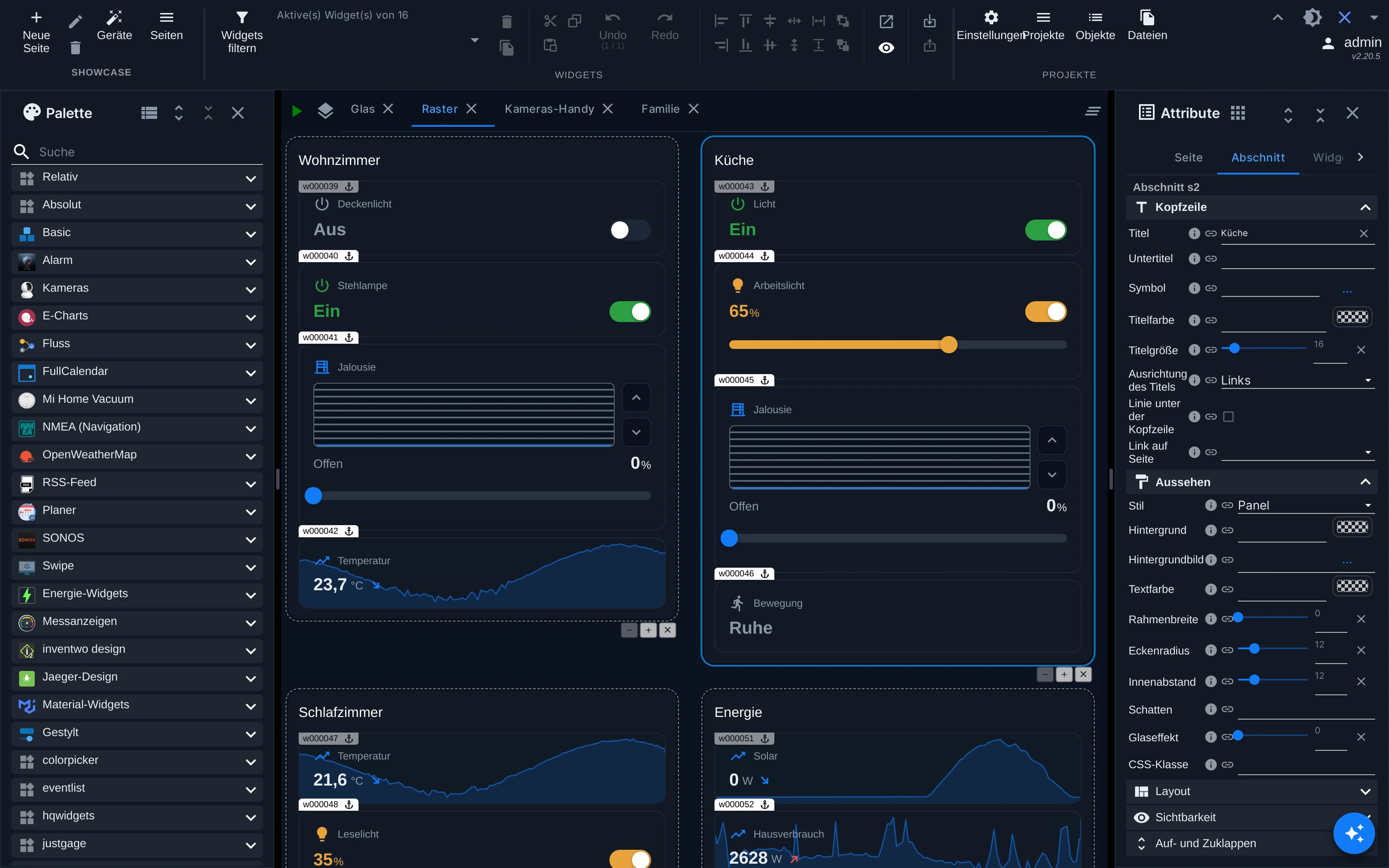
Sections. A page in grid layout now consists of sections. Each has its own header with a title, subtitle, and icon, as well as a background, border, rounded corners, and optionally a glass effect. A section can be collapsed, even via a state, and the browser remembers the choice. It can be shown only to specific user groups, only above a certain width, or only while a state meets a condition. All properties can be bound to data points, and you can easily move sections with the mouse.
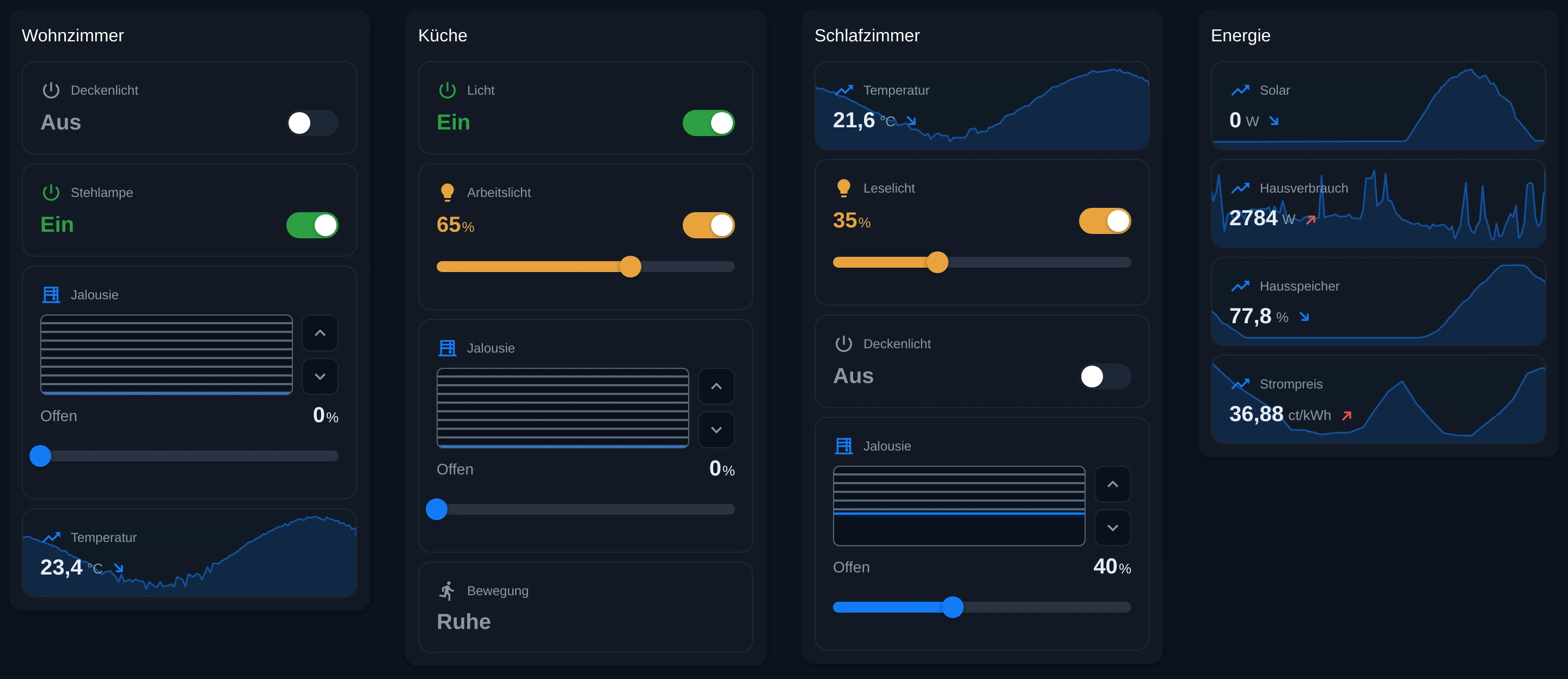
Two new sets of widgets for devices. Relative is a tile that fills its cell in the section. Absolute is a coin-sized marker for the floor plan, with a ring in the color of the state. Switches, Meters, and Shutters are the first to be introduced. Here's what a page with four sections and Relative tiles looks like:
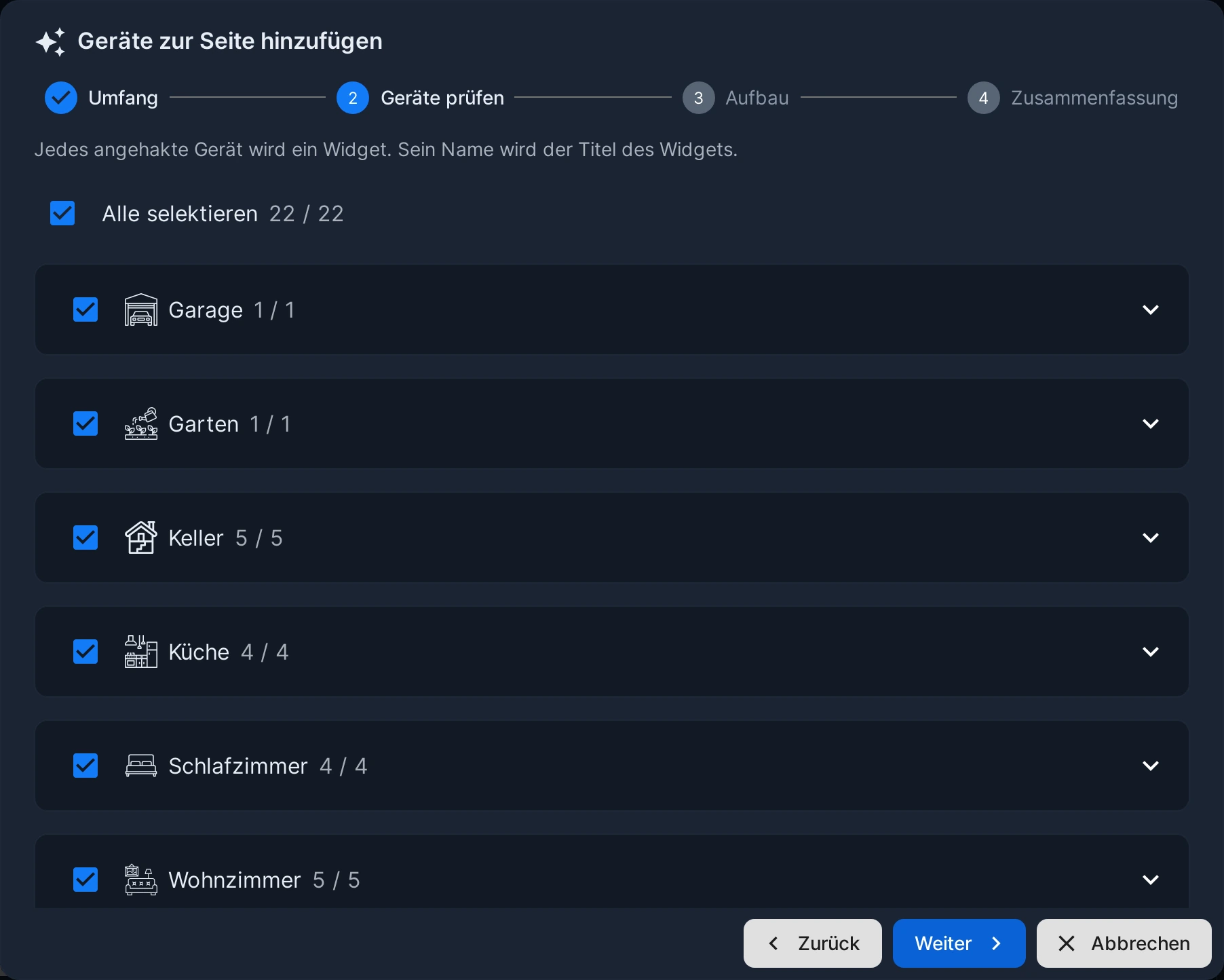
Pages from devices. One click on "Devices" in the editor's toolbar, and vis-2 builds a complete page from the devices in your installation, sorted by room or trade. In four steps, you select which devices should be included and how the page should be structured. Each selected device becomes a widget, each room a section.
In addition, there are several things you notice in everyday life:
- The runtime starts significantly faster; in a large project with 760 widgets on a tablet, it starts in 9 seconds instead of 23.
- The editor can be operated with a finger: selecting, moving and scaling widgets now also works on tablets.
- New Themes
modernDarkandmodernLight - New runtime options: return to a specific page after a period of inactivity, reload after the device wakes up, and a shortcut on the home screen opens the correct project.
⚠️ Before switching to version 2.20:
- vis-2 now runs on React 19 and MUI 9. Widget sets built for an older version of React are detected, skipped, and displayed in a dialog box. Instructions for developers on how to switch are available.
- Scripts embedded in the HTML of the widgets "HTML", "HTML navigation", and "Link" run again, as in vis-1, whenever a value changes. Anyone starting a timer within these scripts must manually stop the previous one.
- For projects with spaces in their name, the data point is assigned
vis-2.0.datapoints.<Projekt>a new ID, spaces and periods become_
Anyone in stable Update: With the update to version 2.15.8, the old vis-1 widgets from vis-inventwo ("i-vis-…") no longer work in vis-2. The vis-2 widgets from inventwo continue to work there in version 1.10.0; more information can be found in the vis-inventwo thread .
Installer and Fixer with new interface
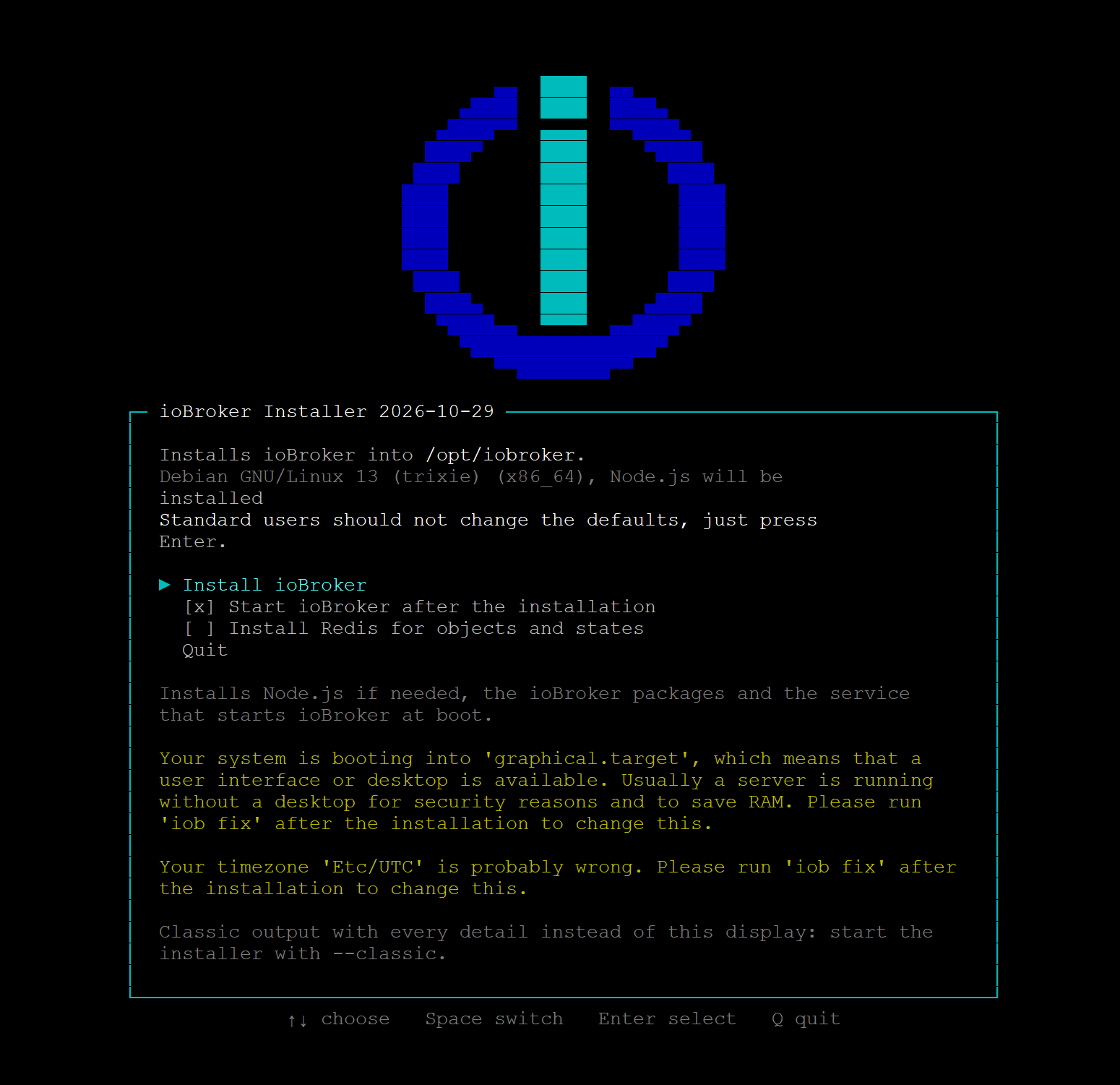
Anyone installing ioBroker for the first time or iob fix Since the end of October, users who start the program see a terminal interface instead of endless text output: a start screen with system information, a progress indicator showing all steps, and dialog boxes for the fixer's questions. Regular users simply press Enter; the default settings are correct. The complete output is saved to... ~/iobroker-install.log or ~/iobroker-fix.log And this file is exactly what helps in the forum when something goes wrong. Those who prefer the old version can get it with... --classic.
Also new is the command iob docker It shows at a glance whether Docker is installed and running, and whether ioBroker is allowed to access it, and installs it if desired. To clarify, since the question came up in the forum: You don't need Docker for ioBroker itself. A few adapters, such as frigate or influxdb, offer the option of installing their external software as containers. This is an option, not a requirement.
The iPhone app is here.
Apple released the new, native ioBroker visualization for the iPhone on October 3rd. It replaces the previous app. The test thread received over 150 feedback reports in October alone. Please report any bugs as an issue under ioBroker/Android-And-iPhone-Apps .
The great stable wave
In October, 131 adapters received a new stable received the -version, a large part of it in the week of October 12th to 19th. Many had in latest New features have been accumulating for a long time, and now they're all hitting everyone at once. That's why there are so many jumps in version numbers.
⚠️ Read before updating
With these adapters, you need to do something or at least know something during the update:
- ring 6.4.0 → 7.0.2: The refresh token must be re-entered once; it is now stored encrypted. Devices previously running under
unknown_<id>laydoorbell_<id>orstickup_<id>Newly created. The old objects remain and can be deleted manually. - SolarEdge 1.4.1 → 2.0.0: SolarEdge deactivated the old interface on November 1st . Version 2.0.0 uses the new API v2, for which you need a new API key from the SolarEdge developer portal. The energy flow (
currentPowerFlowRequires a Business Pro or Enterprise subscription or login via OAuth2 Site Access. More information in the test thread. - cul 2.2.0 → 3.0.3: Data points have been renamed:
batterywillbatteryLowandbatteryState,windowandisopentoopen,valvepositiontovalvePositionPlease adjust scripts, visualizations, and aliases. The installation no longer requires build tools. - sonoff 3.3.0 → 5.1.1: The roles of the objects have changed,
Switch1untilSwitch28are now only readable. Anyone assigning aliases, voice assistants, or visualizations via roles should check. The adapter logs the data points created by version 3.3.0 with incorrectly shortened names at startup; these can be deleted. - shelly 10.6.1 → 12.0.0: Requires js-controller 7.2.2 and Admin 8.0.11 . Timer, transition, and boost times are now displayed in milliseconds. This was previously the case on some Gen3 and Pro devices.
Relay0.SwitchA firmware bug caused inversion, which the adapter now corrects. Anyone who has compensated for this in scripts should check their work. The PLUG_UI functions are disabled due to hardware issues. - Scenes 4.0.4 → 5.1.0: The new "Only on change" option is enabled by default for triggers. If a trigger with the same value is written again, the scene will no longer start. Users who need the old behavior can disable the option for each trigger. A new feature is protection against infinite loops, which deactivates a scene that has been triggered too often.
- Frigate 1.4.0 → 3.2.2: All ON/OFF data points are now true Boolean values. Requires js-controller 7.1.0 and Admin 7.8.28
- vis-2-widgets-energy 1.0.2 → 2.0.1: The comparison widget no longer automatically converts from W to Wh or kW to kWh. Users who wish to scale the widget should use the "factor" field.
- InfluxDB 4.0.2 → 5.1.8: With version 5.1.6, some users experienced a log file filling up with the error message "invalid float value for field 'q'". This was caused by data from version 4 in the buffer. Version 5.1.7 converts this data.
stableVersion 5.1.8 is now available. Anyone still on 5.1.6 should simply update.
Minor points to be aware of: MQTT no longer stores binary messages in data points; instead, there's the "Binary topics" option. OpenWeatherMap now provides daily rainfall and snowfall as a total instead of an average. hm-rpc displays the color temperature. WHITE from lamps connected to the CCU Lighting Gateway in Kelvin. Telegram has lost its polling interval setting and can now run via a proxy. IoT 7.1.6 re-registers roller shutters with Alexa; existing Alexa routines involving roller shutters need to be edited once. And with the mcp adapter, tools now run with the logged-in user's privileges.
What they all have in common
- Node.js 22 is mandatory ; 17 of the major adapters require 22.19 or newer. Furthermore, s7 only runs up to Node.js 24.
- js-controller 6.0.11 is the new minimum; shelly and mihome-vacuum want 7.2.2.
- Admin version 7.6.20 or newer is required almost everywhere. With the current version...
stable(js-controller 7.2.5, Admin 8.3.5) is all of this fulfilled?
Anyone still using Node.js 20 or an early version of 22 should therefore update Node.js first and only then the adapters. And as always: make a backup beforehand, and in case of problems, any version can be reinstalled via the administrator account.
What new things does the wave bring?
Besides the mandatory points, there's a lot that's worthwhile:
- MQTT 8: MQTT 5.0 in server and client mode, authentication with SCRAM-SHA-256, and configurable how received values are interpreted.
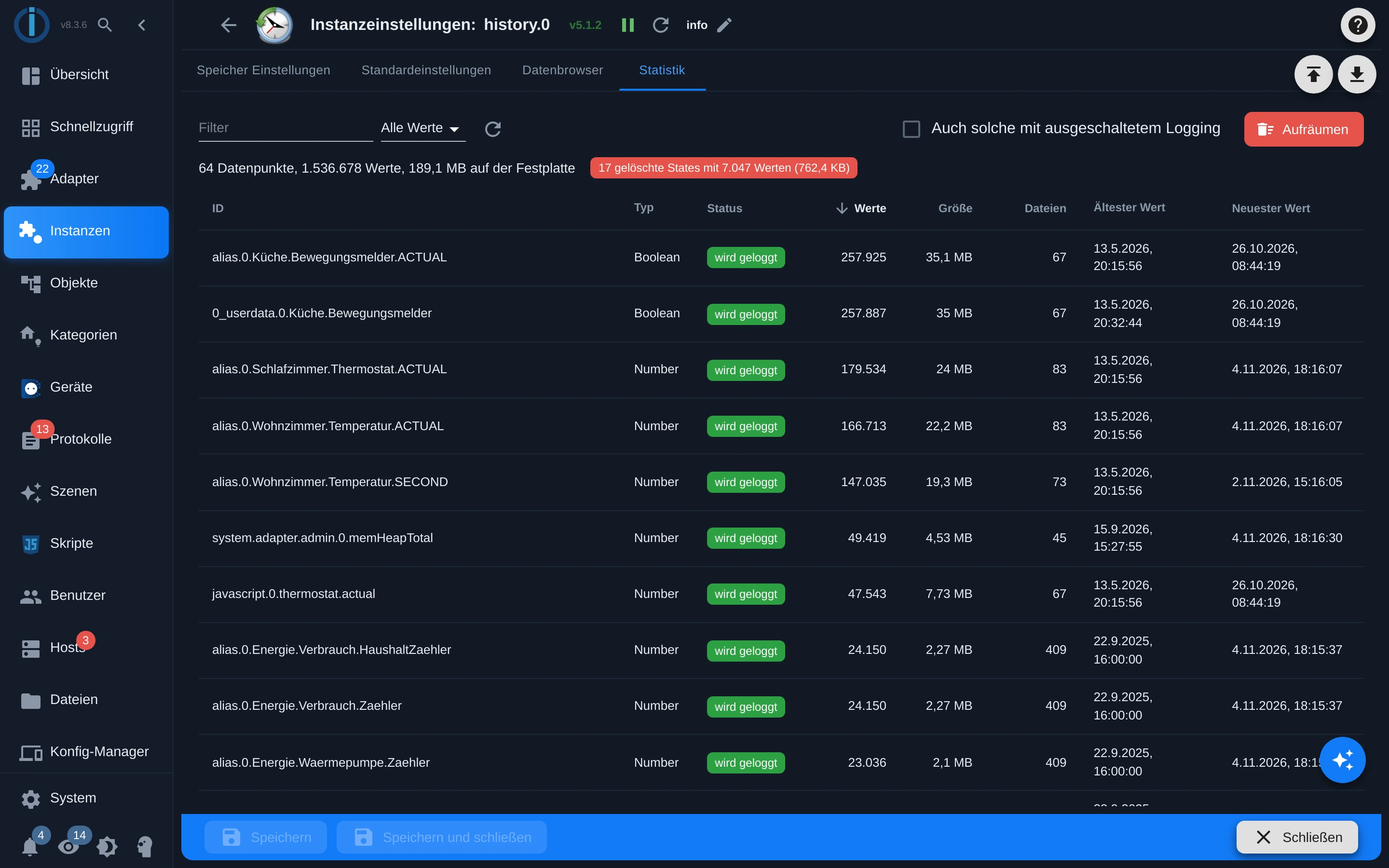
- History 5 and InfluxDB 5: a data browser in the instance configuration for viewing, editing, and deleting values, plus a statistics tab with storage usage and cleanup options. InfluxDB can optionally start InfluxDB and Grafana as containers and can write custom tags for each data point.
- shelly 12: Device management with control and setup of new devices, a Bluetooth map and many new devices, including the Gen4 series
- Sonoff 5: Bridge mode to an external MQTT broker and firmware updates for Tasmota devices directly from the device management.
- echarts 5: logarithmic axis, smoothing per line, calendar weeks, and range selection within the chart. Note that some adjustments may change the appearance of existing bar charts.
- xterm 4: multiple terminal sessions that survive a reload or connection interruption
- MCP 1.5: Login via OAuth for MCP clients and ready-made instructions for ChatGPT and Claude
- Frigate 3: Manage Frigate as a container from the adapter, license plate and face names as data points
- ping 3.1: optional TCP check, for example for LXC containers, and a notification if the host is not allowed to send ICMP at all.
- LGTV 3: Support for webOS 26 and a remote control as a tab in the settings.
- Modbus 9.2: Modbus/UDP as master, import and export of register tables as CSV or JSON, and a proxy mode.
- devices 4.2: Connection to the ioBroker Device Manager and finally a widget for TVs with remote control
This is what the new Statistics tab in history looks like. It shows at a glance which data points are taking up how much space, and with one click, you can remove what is no longer being logged. This means that all three adapters for data recording now have the same tab: history, influxdb, and sql, which received it back in September.
Important adapter updates
ioBroker.javascript 10.4.0 → 10.4.8
The execute The message used to execute a script with a full ioBroker interface now checks who is sending it. If the js-controller includes the user (from version 7.2.5 onwards), that user needs permission for host commands. The AI endpoint now only comes from the configuration, so a proxy in front of OpenAI must be entered there.
The AI chat in the editor now reliably delivers long answers, can be maximized, and recognizes an open Blockly script as context. Here are some important fixes: An uncaught error... setStateAsync was able to terminate the entire adapter, onObject() with * never responded, and stopScript() The script didn't actually stop. stable The version is now 10.4.4.
ioBroker.assistant 1.0.2 → 1.3.0
The Smart Assistant, which we presented in detail in the article "AI in ioBroker ," saw seven versions in October alone. It has been available since October 19th. stable.
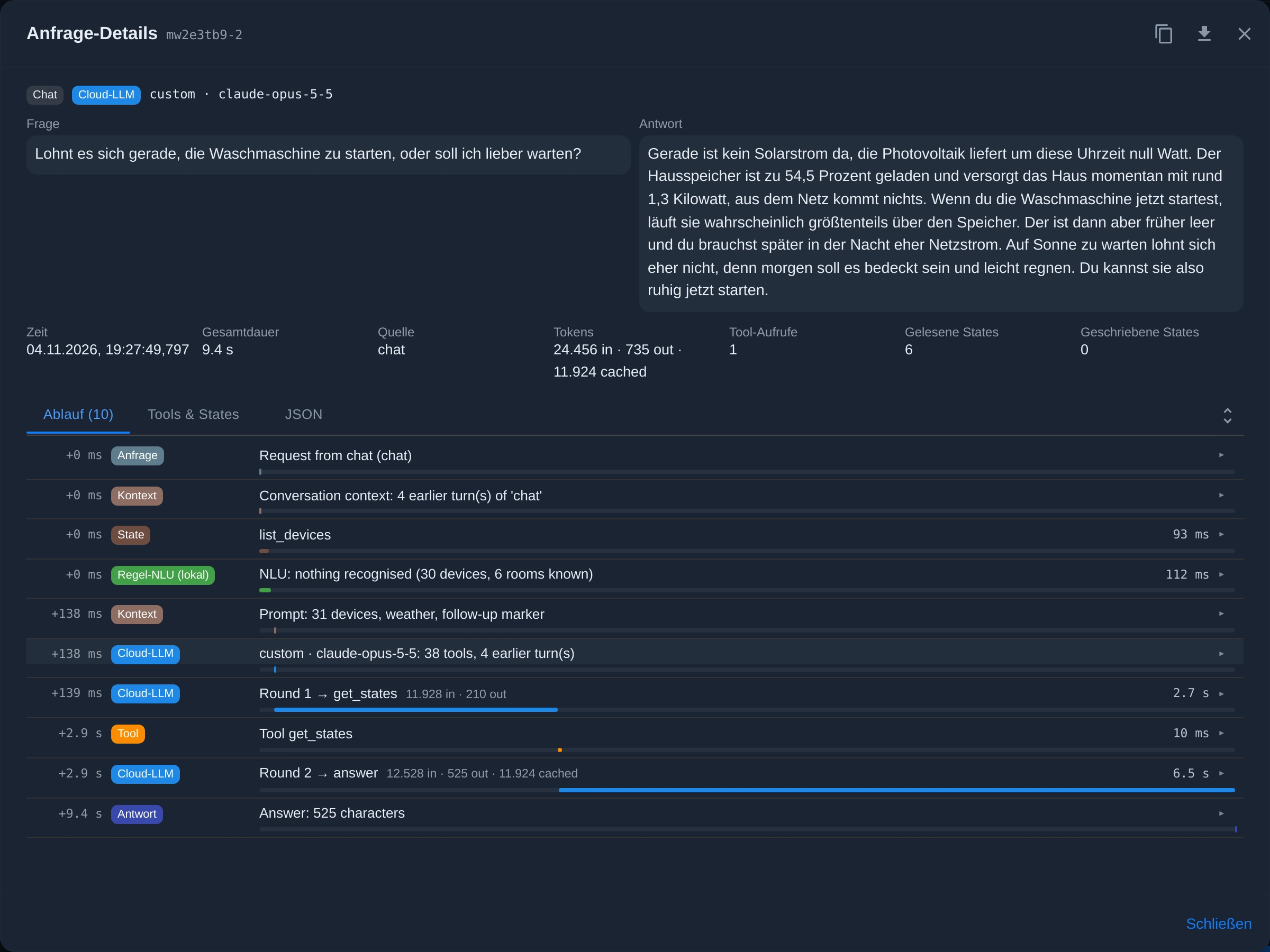
What actually happened during a request? Clicking on a response in the Chat tab opens the request details : question and answer, duration, tokens used, data points read and written, and below that, the complete step-by-step process. You can see whether the local rule recognition understood the question, which tools the language model called, and where the time went. In the example below, the local recognition couldn't categorize the question, the language model read six data points in one round, and responded after 9.4 seconds. If you want to know why the assistant didn't understand something or understood it incorrectly, you can find the answer here.
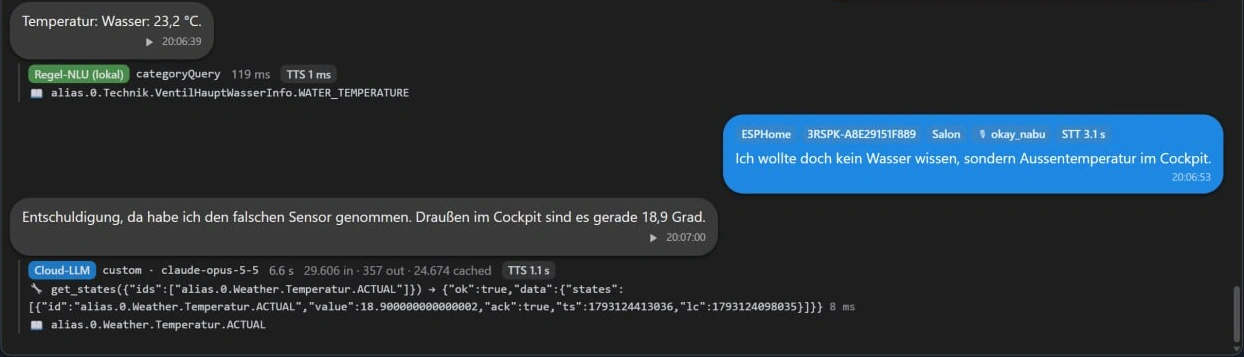
A conversation instead of individual commands. The assistant remembers what was just discussed. In the example below, the temperature was requested via voice command through an ESPHome speaker, and the local rule detection incorrectly selected the wrong sensor – the water temperature. The correction, "I didn't want to know the water temperature, but the outside temperature in the cockpit," is sent to the voice model. It remembers the previous steps, apologizes, reads the correct sensor, and responds after 6.6 seconds, without the question needing to be repeated.
Also new in October:
- Custom wake words for ESPHome satellites: A microWakeWord model is uploaded in the settings, and the device retrieves it automatically. We are currently collecting votes for this feature for "ioBroker"; see the " From the Blog" section below.
- Commands for later: "Turn off the lights in two hours" or "Set blinds to 50% at 10 pm" are entered as appointments in the calendar of the fullcalendar adapter, instead of being executed immediately.
- The administrator's AI settings are the default for new instances. Once a provider has been entered there, no further configuration is required in the wizard. OpenRouter and the pi-agent adapter are also new providers.
- The local language model takes over if the cloud model does not respond.
- “Louder”, “quieter” and “Volume 5” apply to the speaker that heard the command, and “What will the weather be like tomorrow?” is answered by the assistant directly from the weather adapter, without a voice model.
ioBroker.iot 7.1.2 → 7.1.6
⚠️ Starting with version 7.1.6 , the adapter registers roller shutters with Alexa as actual roller shutters, so "Alexa, open the roller shutter" works as expected. Alexa will need to rediscover the devices once, and existing routines involving roller shutters will need to be edited : remove the roller shutter from the routine, add it again, and save. Alexa also now recognizes thermostats more accurately.
ioBroker.cloud 6.2.11
New buttons check if the apps are running and accessible, and the loading of the configuration via ioBroker.pro has been fixed. stable It went directly from 6.0.1 to 6.2.11.
What we are currently working on
js-controller 8. The pre-release versions are running; alpha.4 through alpha.9 were released in October. Included are adapters written in Python , Node.js 22.19 as the minimum requirement, and a directory of used resources. Ports, serial interfaces, and USB devices are centrally registered, and two instances requesting the same port receive a clear message instead of an EADDRINUSE error. Many adapters already register their resources; this becomes visible with js-controller 8. The alpha versions are intended for developers, not for home use.
New adapters in latest Testers wanted!
21 new adapters were added in October. latest -repository and not yet in stable They can be installed in the admin panel via the adapter list, once you have selected it there. latest You've switched over. Almost everyone has their own test thread in the forum and welcomes feedback.
energy
ioBroker.openwb2

Category: Energy Developer: seaspotter
Connects an openWB-2 charging controller: Charging points, meters, battery, PV system, and consumers are transmitted live via MQTT, and controlled via the openWB's simple API. This is ideal for anyone wanting to integrate PV surplus charging and household consumption within ioBroker.
Features:
- Each charging point provides information on power, phase values, car charge level, plug status and RFID.
- Control of charging mode, lock, instant charging, PV charging, vehicle and
maxPriceEco - Battery control via
batModeandbatPowerReserve - Totals for PV and charging points as well as a calculated household consumption
- Component search; new devices are suggested as disabled.
Special features:
- OpenWB version 2.3 and later requires an MQTT broker and HTTP access.
- Purely local, MQTT without TLS
- Not an official openWB product
🔗 Adapter's GitHub page · Test thread
ioBroker.energypriceforecast

Category: Energy Developer: BackupBaTTerY
Electricity price and CO2 forecasts for 34 European bidding zones, extending beyond day-ahead prices for up to 120 hours. Those with a dynamic tariff can use this to plan their car, storage, or dishwasher for the cheapest hours of the day after tomorrow.
Features:
- Current price and CO2 intensity, indicating whether the value is from the day-ahead price or from the forecast.
- Cheapest and greenest time slot, with a freely selectable length of 1 to 24 hours, with
active-Flag and remaining minutes - Price range in 15-minute increments as JSON
- Estimated household price, in Germany by postcode including network charges, or own tariff via factor and surcharge
- Forecast accuracy of the last 30 days
Special features:
- Use the service energypriceforecast.eu; no API key is required for up to 48 hours, after that a key is required.
- Prices ex-works as wholesale prices
- According to README, still in the testing phase
🔗 Adapter's GitHub page · Test thread
ioBroker.sehybrid

Category: Energy Developer: heresiarch
Reads PV, battery, and meter data from SolarEdge hybrid inverters (Home Hub) locally via Modbus TCP and makes the control block for the storage system writable. Ideal for anyone who wants to control their storage system themselves via script. Especially useful since SolarEdge has discontinued its old cloud interface.
Features:
- Inverter with AC and DC values, energy and status
- SunSpec meter and battery with charge level, power, temperature and status
- The StorEdge control block is readable and writable: storage mode, AC charging strategy, emergency power reserve, remote control mode, charge and discharge limits
- Range check before every write access
- Full registry reference in README
Special features:
- Modbus TCP must be enabled on the Home Hub (port 502 or 1502)
- For remote control mode, the StorEdge profile must be manually deactivated in the SolarEdge portal.
- No built-in automation; the logic comes from your own script.
🔗 Adapter's GitHub page · Test thread
Laundry room, kitchen and shopping
ioBroker.laundrylens

Category: General Developer: backfisch88
Arguably the smartest new addition in this issue. LaundryLens uses the power curve of a smart plug to determine which program your washing machine or dryer is currently running, estimates the remaining time, and notifies you when the laundry is finished. No manufacturer cloud and no pre-configured profiles: the adapter learns your appliance's settings. With 81 installations, it's the most widely used new product in this issue. latest.
Features:
- It recognizes start, run, pause and end and assigns the program by comparing curves, with a hit rate that increases over several runs.
- Each program is learned on the individual device; three to five passes are recommended.
- Remaining time based on previous runtime and current performance, plus progress, phase and energy of the last run.
- A dedicated tab in the admin panel includes a cycle list and performance graph; records can be shortened and shared.
- Notifications via Telegram, Pushover, Signal, WhatsApp, Matrix, email and others, with placeholders for any data points.
Special features:
- Each device requires a measuring socket and its own instance.
- Still Alpha, tested with a Siemens washing machine and dryer; other brands may need fine-tuning.
🔗 Adapter's GitHub page · Test thread
ioBroker.miele-local

Category: Household Developer: Smart Home Electronics Technician
Connects Miele@Home devices directly in the home network via Miele's own protocol, operating without cloud and without the interface for third-party providers.
Features:
- Status, program, phase, remaining time, expected end, temperatures, door and error signals in plain text
- Energy and water consumption according to the device; optionally, the actual consumption via a measuring socket.
- Statistics of completed programs by week, month, year and total
- Start, Stop, Pause, On, Off and Light, provided MobileStart is active on the device
- Detection via mDNS or fixed IP list, optionally a time server for devices without internet access
Special features:
- A one-time login with a Miele account is required to obtain the group key; after that, everything works offline. The setup process is a bit fiddly.
- Docker in a bridge network does not provide detection or push functionality.
- Most cooling devices are only readable; some firmwares reject write commands.
🔗 Adapter's GitHub page · Test thread
ioBroker.shoppingroute
Category: Logic Developer: RaviniZib
Alexa sorts your shopping list by store, product category, and your usual route through the shop. Users who select items from the list using voice commands will find them in the correct order in the store and avoid making multiple trips to the refrigerated section.
Features:
- Markets with their own route, product groups with sequence, preferred and alternative markets per product
- Stores with only a few items will be skipped upon request; "Lidl milk" takes priority.
- Learning product catalog with quantity recognition and checklist for unknowns
- Dedicated administration page in the admin panel with drag and drop functionality, also available on tablets.
- Since version 0.6.0, an optional bridge to Bring!
Special features:
- Requires a working alexa2 instance and a list sorted alphabetically in the Alexa app.
- Requires js-controller 7.1.0 and Admin 8
- A new sorting process can take up to five minutes.
🔗 Adapter's GitHub page · Test thread
Climate and air
ioBroker.faikout

Category: Climate control Developer: Smart home electronics technician
For Daikin air conditioners using the open ESP32 module faikout instead of the original Wi-Fi module. Runs purely locally via MQTT and provides significantly more data than using the Daikin adapter.
Features:
- The adapter uses its own MQTT broker on port 1888, so it does not conflict with an existing one.
- Room humidity, energy meter for heating and cooling, current power consumption, compressor and fan speed, refrigerant temperature
- Control of mode, target temperature, fan, swing, Econo, Powerful, Comfort, Streamer, Quiet and more
- Data points are generated depending on what the device reports.
Special features:
- Hardware required: the fairout module on the indoor unit
- Without
livestatusFeedback from the module may be delayed by up to 60 seconds.
🔗 Adapter's GitHub page · Test thread
ioBroker.remko

Category: Climate control Developer: mrdimixx
Reads and controls REMKO heat pumps with Smart-Web or Smart-Control locally via MQTT, without cloud and without an additional broker.
Features:
- It reads access data and the complete register database with approximately 2,150 registers directly from the heat pump's web interface; nothing is hard-coded.
- Creates only the data points that actually exist in the system, sorted as in the menu.
- Quick retrieval of overview values plus regular complete updates
- Three-level write protection: off, user menu, all parameters
Special features:
- Requires Smart Web firmware version 4.26 or newer
- Tested with WKF 100, feedback on other models is expressly welcome.
- Unofficial, not supported by REMKO
🔗 Adapter's GitHub page · Test thread
ioBroker.ecosense

Category: Climate control Developer: mrdimixx
An adapter that you'll hopefully rarely need: It reads the radon concentration from EcoQube measuring devices. This allows you, for example, to switch on a basement fan as soon as it's needed.
Features:
- Radon in Bq/m³ and pCi/L per device
- Traffic light with adjustable thresholds, preset to 100 Bq/m³ according to the WHO and 300 Bq/m³ according to the German reference value.
- Online status, last measurement, firmware
- Email, IP address, Wi-Fi name and location from the cloud response are discarded.
Special features:
- Requires the EcoSense cloud and an account; two-factor authentication is not supported.
- No official interface; may fail if the app is changed.
🔗 Adapter's GitHub page · Test thread
Music and screens
ioBroker.wiim

Category: Multimedia Developer: KaiIOB
It controls streamers and amplifiers with Linkplay technology, including WiiM, Arylic, Audiocast, August, Audio Pro, and Müzo, including multiroom groups. The adapter has been available for some time; it has now been added to the repository.
Features:
- Title, artist, album, cover, source, sampling rate and bit depth
- Playback, volume, repeat, shuffle, presets from the app, input selection, sleep timer
- Own streams via
play_URL, warning tones and announcements aboutplayPromptUrl - Multiroom: Set master, dissolve groups, adjust the volume of individual devices
Special features:
- Purely local
- Announcements about
playPromptUrlonly with Arylic from firmware 4.6.415145 onwards
🔗 Adapter's GitHub page · Test thread
ioBroker.apple

Category: Multimedia Developer: Musashi1965
It finds Apple media devices on the home network and controls the Apple TV.
Features:
- Detection via AirPlay and Companion Link; devices remain the same even with a new IP address.
- Pairing via PIN directly in the configuration; access data is stored encrypted.
- Connection status, power on/off status, current track, app status and volume are all sent via push notification.
- Navigation, playback, wake-up, sleep mode, launch of individual apps and universal links
Special features:
- Admin requires version 8 and js-controller version 7.2.2.
- The HomePod control is a preview and, according to the README, has not yet been tested on actual hardware.
- No audio streaming, no multiroom, no Apple Music
ioBroker.samsung-mdc

Category: Multimedia Developer: AlanSRU
Controls professional Samsung displays for digital signage via the MDC protocol: power on, power off, input, volume, and mute. Intended for office, shop, or clubhouse use, not for a Samsung TV in the living room.
Features:
- One instance can control any number of displays; a failed display does not block the others.
- Inputs HDMI1, HDMI2, DisplayPort and MagicInfo
- Search for displays in IP ranges, even across subnets.
- Optional Wake-on-LAN before power-on and a default volume level
Special features:
- “Network Standby” must be switched on on the display.
- After switching on, the display does not respond for about 30 seconds.
🔗 Adapter's GitHub page · Test thread
Door, location and car
ioBroker.nuki-local
Category: Hardware Developer: helfi9999
He was already in the forum section in September, now he's in the latest: Nuki locks locally via MQTT, with an MQTT broker directly in the adapter.
Features:
- Built-in MQTT broker, no separate broker needed, states persist after a restart
- Lock, door sensor, batteries for lock, keypad and door sensor, firmware and online status
- Commands: Lock, Unlock, Open, Lock'n'Go and Full Lock
- Who opened the door with which keypad code or fingerprint; PIN codes are not stored.
- Optionally, the Nuki Web API adds names and activities.
Special features:
- The lock must be set to the adapter's broker in the Nuki app.
- The README does not specify which models support MQTT.
🔗 Adapter's GitHub page · Test thread
ioBroker.googlefindmydevice

Category: Geopositioning Developer: beabel
Retrieves the locations of Bluetooth trackers from Google's "Find My Device," such as those from Chipolo or Pebblebee. This allows ioBroker to know where your bike or keys are currently located.
Features:
- Tracker list with manufacturer, model and approvals
- Decoded location reports with coordinates, accuracy, time and map link
- "Locate now" for each tracker, individually activatable, starting every five minutes
- Complete setup on the configuration page, without any external program.
Special features:
- ⚠️ No official interface, may fail if Google makes changes
- The setup requires some manual configuration in the browser and the PIN from a phone's screen lock.
- Trackers only, no phones or tablets. Active tracking drains the tracker's battery.
🔗 Adapter's GitHub page · Test thread
ioBroker.zeekr

Category: Vehicles Developer: solderer-de
Connects Zeekr electric cars to ioBroker: battery, range, charging, lock, climate control, tire pressure, and location, plus commands like locking, climate control, and charging. Includes charging planning for the most economical time slot and optional integration with A Better Routeplanner.
Special features:
- ⚠️ Unofficial project that uses undocumented interfaces. The developer himself points out that this may violate Zeekr's terms of service.
- The setup is complex: keys from the Android app are required; from app version 3.1.0 onwards, this is only possible with an older APK or a rooted device.
- Requires a Zeekr account (a second, shared account is recommended) and Python 3.
Data and monitoring
ioBroker.victoriametrics

Category: Data storage Developer: seaspotter
A new history adapter that writes directly to the VictoriaMetrics time-series database, using true Prometheus labels. A lean alternative to InfluxDB, especially for those already working with Grafana and PromQL.
Features:
- Activation per data point in the "History" tab, as with history, influxdb and sql
- The familiar filters: debounce time, thresholds, rounds, changes only, and more.
- Reading diagrams in vis about
getHistory()VictoriaMetrics calculates averages and totals itself. - Importing old values, for example from InfluxDB, via
storeState - The VictoriaMetrics web interface directly in the admin panel
Special features:
- Requires a running VictoriaMetrics instance, for example as a Docker container.
- Only numerical values, no cluster installation, no deletion of individual points.
🔗 Adapter's GitHub page · Test thread
ioBroker.staleguard

Category: Tools Developer: typhosj
A vital sign monitor. It alerts you if a data point hasn't received any updates for longer than configured and, if desired, restarts the corresponding instance. Perfect for a cloud adapter that cheerfully reports "connected" but hasn't provided any new values for hours.
Features:
- Monitoring per data point via the settings in the object tree, deadline from one minute to seven days
- Any update or only a genuine change in value counts as a sign of life; the latter recognizes frozen values.
- Bundled ioBroker notifications: a gateway with 40 sensors generates one message.
- Optional instance restart with a lock against restart loops
- After a host restart, each data point receives its full deadline.
Special features:
- Purely local, up to 5,000 monitored data points
- A restart always affects the entire instance.
javascript.0so all scripts
🔗 Adapter's GitHub page · Test thread
And also
ioBroker.pi-agent
Category: General Developer: sadam6752-tech
An AI agent that reads and activates data points and survives restarts without executing any action twice. It can be operated via the admin panel, Telegram, or as a response provider for ioBroker.assistant.
Features:
- Table with write permissions per instance, object, or pattern, with confirmation requirement; simulation mode enabled by default.
- Tools for rooms and functions, processes, reminders, time-controlled switching and appointments
- Anthropic, OpenAI, DeepSeek, Gemini, OpenRouter or a local model, also via the new AI settings of the admin
- Separate backup of the conversations, because the normal ioBroker backup does not capture them.
Special features:
- Admin 8 and an API key are required, except in the case of a local model.
- Very new adapter, only available on npm since October 25th.
🔗 Adapter's GitHub page · Test thread
ioBroker.webuntis2
Category: Date and Time Developer: Voodoo2man
Get timetables, substitutions, exams and homework from WebUntis, for student and parent accounts. This allows you to announce in the morning which classes are cancelled.
Features:
- School search and connection test directly at the institution
- Timetable for today, tomorrow and the week including substitutions and cancellations, current and next lesson with remaining time
- Parent accounts with their own structure for each child
- Exams, homework, absences, incoming mail, holidays
Special features:
- Requires js-controller 7.2.2 and Admin 8.2.0
- What information is accessible depends on the permissions granted by the school. There are no grades.
🔗 Adapter's GitHub page · Test thread
ioBroker.anycubic-cloud

Category: Hardware Developer: hwiedermann
For the workshop: Print status of Anycubic 3D printers and the ACE Pro filament box from the Anycubic cloud, read-only.
Features:
- Status, file, progress, remaining time, shift and filament consumption of the current print
- Nozzle and bed temperatures, fan, chamber light
- ACE Pro with temperature, humidity, active compartment and remaining quantity per compartment
- Filament consumption of the last 30 prints, plus a "finished" event.
Special features:
- The printer must be connected to the Anycubic cloud; pure LAN mode is not possible.
- The access key comes from Anycubic Slicer Next and is valid for approximately 90 days.
- Unofficial, no controls, no camera images
🔗 Adapter's GitHub page · Test thread
ioBroker.vis-2-widgets-eusec

Category: Visualization Widgets Developer: typhosj
Widgets for vis-2 that show the eufy cameras from the eusec adapter: live image, snapshot and a popup that opens automatically when the doorbell rings or a person is detected.
Features:
- Live image only while the widget is visible; the last snapshot is displayed until the first image.
- Pan, tilt, and preset buttons
- Event popup that closes after a configurable time.
- It works with React 18 and React 19, and therefore also with vis-2 2.20.
Special features:
- Does eusec require version 3.0.2 or later?
- The live stream is only available via HTTP; a vis-2 page opened via HTTPS cannot display it.
- It was called until 0.1.1
vis2-eusecExisting pages need to be renamed.
🔗 Adapter's GitHub page · Test thread
New adapters in stable
18 new adapters were added in October. stable They arrived without having been introduced here beforehand. Five of them had only arrived in October. latest have been recorded and have made their way into stable Achieved in the same month. In addition, some old adapters have finally become stable after a thorough overhaul.
Got started right away
ioBroker.flow

Category: Visualization Widgets Developer: GermanBluefox
An animated flowchart for energy, water, gas, and heat that you can freely configure. The same diagram works as a widget in vis-2 and as a map in ioBroker.devices. With 82 installations, it's the most used new addition of the month. Here's a page with energy and water; the points on the lines show where the flow is currently going:
Features:
- Graphic Designer: Draw and connect knots, styles Normal, Clean, 3D and Neon, light and dark themes
- Over 50 symbols ranging from PV, battery and wallbox to well, cistern and valve, fill levels for battery and tank
- Formulas, automatic conversion from W to kW to MW, daily energy consumption, self-sufficiency and self-consumption
- Colors, symbols and blinking according to rules, mini-diagram in the node from history, sql or influxdb
- An assistant builds an initial diagram from existing performance data points; configurations are imported from energy flow-extended.
Special features:
- Admin required from version 8.0.14 onwards.
- In the
stableThe value is 0.0.2.latestalready 0.1.0
🔗 Adapter's GitHub page · Test thread
ioBroker.device-monitoring

Category: Alarm Developer: BenAhrdt
It monitors freely selected data points for warning and alarm thresholds, missing updates and invalid values, and generates graded alerts.
Features:
- Events for warning threshold, alert threshold, timeout, invalid source and "back to normal"
- The levels can be temporarily changed or switched off for each data point.
- An alarm is only triggered if the limit is violated for an adjustable period of time.
- Recurring reminder with a summary of all conspicuous data points
- Notifications via the notification manager or as JSON for custom scripts
Special features:
- Does Admin need 8
- The setup is described in the repository's wiki; the README is brief.
🔗 Adapter's GitHub page · Test thread
ioBroker.time-tracker
Category: Data storage Developer: sadam6752-tech
A complete time tracking solution for small businesses, practices, or associations, running on your own ioBroker system. Employees clock in and out via a web app or at a terminal; the adapter calculates target hours, balance, breaks, and vacation time.
Features:
- Web app with registration and PIN, a terminal for the tablet at the entrance and an attendance board
- Working time models with weekly hours, break schedules, overtime and public holidays by country
- Leave and absences require application and approval; corrections only with justification.
- Monthly statements as PDF and Excel, roles for administration and employees
- Stamping also possible via a data point, absences as a calendar file for the iCal adapter
Special features:
- No cloud, no subscription
- The app on the smartphone requires HTTPS.
- Anyone using this method to record employees' working hours must keep labor and data protection laws in mind.
🔗 Adapter's GitHub page · Test thread
ioBroker.fingerprint

Category: Hardware Developer: sadam6752-tech
Connect the FingerprintDoorbell, a doorbell with a fingerprint sensor based on an ESP32. Each finger can trigger something different, entirely without a script.
Features:
- Dedicated receiver for hits and ringing, secured by token
- Set or switch between target objects on each finger, with minimum security, time windows for each day of the week, and a panic finger that also triggers an alarm.
- Rename and re-pair fingers directly from ioBroker, control LED ring
- Fingerprint backup, also automatically and optionally via SFTP to a NAS
Special features:
- Hardware required: ESP32 with sensor and the FingerprintDoorbell firmware
- ⚠️ According to the developer, this is not a certified security product. Fingerprints are biometric data, and the backups are unencrypted.
🔗 Adapter's GitHub page · Test thread
ioBroker.max

Category: News Developer: sadam6752-tech
Not to be confused with eQ-3 heating thermostats: This adapter connects ioBroker to the MAX messenger, which is particularly popular in Russia. It's structured like the Telegram adapter, so existing scripts can continue to run with minor modifications.
Features:
- Messages to individual users, all users or groups, per data point or
sendTo() - Images, videos and files up to 100 MB, such as a camera image
- Key menus under Messages
- Specify allowed users, silent messages
Special features:
- Requires a MAX account and a bot
- The test thread can be found in the Russian section of the forum.
🔗 Adapter's GitHub page · Test thread
Long awaited
ioBroker.esphome
Category: Hardware Developer: DutchmanNL
He spent over five years in latest and has amassed 1,372 installations there. With version 1.0.0, esphome is now in stable The adapter connects devices with ESPHome firmware via the native interface; changes are immediately delivered via push notification.
Features:
- Lights including RGBW, switches, sensors, fans, covers, locks and text
- If desired, the adapter automatically installs and starts the ESPHome dashboard and displays it as a tab in the admin panel.
- Managing YAML files in the admin panel
- Connection with encryption key
Special features:
- ⚠️ With version 1.0.0, brightness and color are not being applied to modern ESPHome lights; they are only being switched on and off. This fix is included in version 1.0.1, which is currently available as a preview version.
- Starting with ESPHome 2026.1, there is no longer an API password; the devices require an encryption key.
ioBroker.renault

Category: Vehicles Developer: TA2k, Version 1.0 by typhosj
Connects cars from Renault, Dacia and Alpine to ioBroker, for example Zoe, Megane E-Tech, Renault 5, Dacia Spring and Alpine A290. Version 1.0.0 is a complete overhaul.
Features:
- Battery, charging, range, mileage, position, tire pressure and warning messages
- Climate control with target temperature, charging, horn and light as buttons
- Charging limits and charging mode, if the model supports it
- Commands that a model cannot execute are not even created in the first place.
Special features:
- ⚠️ The data points for remote commands have been renamed, the channel
cockpitv2This is no longer necessary. Scripts and visualizations must be adjusted. - Accounts that require a code via email for registration will only work again from version 1.1.0 onwards, which were previously in
lateststands - Query interval at least five minutes
ioBroker.n8n

Category: Logic Developer: GermanBluefox
Brings workflow automation with n8n directly into ioBroker, without a separate installation. The adapter installs and starts n8n itself and includes its own building blocks for ioBroker.
Features:
- The n8n editor is available as a tab in the admin panel, accessible via port and admin login.
- Triggers based on changes to data points, objects, files, and logs, using placeholders
- Reading and writing data points, objects, files, rooms, and functions
- Multiple instances per host are possible.
Special features:
- Works with Node.js 22 and 24; Node.js 26 does not yet support n8n.
- If n8n is opened via the admin account, it is no longer directly accessible on its own port; webhooks are.
Further new additions to the stable
ioBroker.vis-2-widgets-sweethome3d

Category: Visualization Widgets · Developer: GermanBluefox
Vis-2 displays a 3D model of the house built with Sweet Home 3D. Objects in the model can be linked to data points: change color, show/hide, open/close. A virtual tour and a top-down view are also included. One widget per page.
ioBroker.victron-cerbo

Category: Energy · Developer: GermanBluefox
The Victron Cerbo GX control center connects solar charge controllers, battery monitors, and inverters via MQTT. Since version 1.0.0, the Cerbo interface can be opened directly as a tab in the admin panel, also via HTTPS and remote access.
ioBroker.poolcontrol

Category: Climate control · Developer: DasBo1975
Controls and monitors the pool: pump with automatic operation and PV surplus, solar panels, heating or heat pump, frost and overheating protection, up to six temperature sensors with statistics, and water quality analysis. No dosing is intentionally performed. Includes German documentation.
ioBroker.consumption

Category: Logic · Developer: GermanBluefox
Analyzes meter readings for electricity, water, gas, and heating, including a cost plan, year-on-year comparison, monthly bar charts, and a heatmap. Requires an SQL database via the SQL adapter. The adapter is commercial; the free version is sufficient for four sensors and one location.
ioBroker.assistant-satellite

Category: Communication · Developer: GermanBluefox
Turn the computer running ioBroker into a voice satellite for ioBroker.assistant: It listens for an activation word, sends the speech to the assistant, and plays back the response. It arrived the same day. stable like the assistant itself. Anyone currently searching for a local activation word "ioBroker" should read the section "From the Blog" below.
ioBroker.rfxcom

Category: IoT Systems · Developer: GermanBluefox
For the 433 MHz radio stick RFXtrx433XL: Receive signals from wireless weather sensors, control wireless sockets, roller shutters and awnings, for example from Somfy. Version 3.0 is completely rebuilt and fixes a number of old bugs in Lighting1, Lighting2 and Curtain.
ioBroker.corrently

Category: Other Data · Developer: GermanBluefox
Read the Green Electricity Index for your postcode, which shows when there is a particularly high amount of green electricity in the grid in your region for the next 36 hours. Optionally, a solar forecast for your own PV system is also available.
ioBroker.opensmartcity

Category: Weather · Developer: Vegetto
Retrieves sensor data from cities operating a FROST server via the open SensorThings API. Solingen is the default location. Includes a map widget for vis-2.
ioBroker.pwned-check

Category: Alarm · Developer: ipod86
Regularly check whether your passwords or email addresses have appeared in known data breaches. The password itself never leaves your network: only the first five characters of its hash value are sent to Have I Been Pwned. Email addresses are sent to XposedOrNot via HTTPS.
ioBroker.witmotion

Category: Tools · Developer: GermanBluefox
The WitMotion WT901BLECL orientation sensor reads data via USB: acceleration, rotation rate, magnetic field, and angles. A vis-2 widget then tilts a boat, a car, or a custom image according to the measured tilt.
Old acquaintances, new in stable
Eleven adapters from previous editions made the leap into October. stable achieved and are therefore without switching to latest installable:
- From the September 2026 monthly review : absolutehumidity (weather) · anthbot (garden) · meteonomiqs (weather) · skoda-public-api (vehicles) · tractive-next (geopositioning)
- From the July/August 2026 monthly review : assistant (logic) · fairland (IoT systems) · octopus-energy-monitor (energy) · wattcycle (energy)
- From the December 2025 monthly review : docker-manager (IoT systems) · teltonika (network)
Of particular note is assistant , the smart assistant for ioBroker. Its capabilities are described in detail in our article "AI in ioBroker ".
Farewells
Five adapters were removed from the repositories or moved in October. Existing installations will continue to run, but will no longer receive updates via the repository.
- device-reminder is from the
stablehas been removed and will later also be removed from thelatestDisappear. With over 3,100 installations, this is the biggest case. The developer hasn't maintained it for a long time; the last version is almost three years old. Anyone who wants to be notified when their washing machine or dishwasher has finished will find two alternatives in this issue: laundrylens and device-monitoring . Announcement in the forum . - Easee has moved to the ioBroker community adapters. Easee changed its interface on September 1st; version 1.0.10 has not worked since then and has therefore been removed from the [network/platform/etc.].
stableIt has been taken over. Voodoo2man has taken over the adapter; the new version is available in thelatestThose who use easee set up onlatestand updated. Test thread - The link has been withdrawn by the developer. Remote access without port forwarding is still available via ioBroker.pro using the cloud adapter. Announcement in the forum.
- Sonus (with a u, not Sonos) can no longer be installed with current Node.js versions. Its successors for voice control are assistant and assistant-satellite . Announcement in the forum.
- Tileboard is archived and will no longer be developed. Announcement in the forum.
From the blog
In addition to this review, three articles were published in October:
- The new iobroker.com and what it can do : a tour of the new site, from searching with Ctrl+K to statistics.
- AI in ioBroker: From admin helper to your own smart assistant : five areas where AI is already helping in ioBroker today
- Join in: Say "ioBroker" ! We're training an activation word that runs entirely locally on a Raspberry Pi or a small ESP32 speaker. Your recordings have already been a huge help: We used the voices from the first phase to train the word "ioBroker" and successfully tested it on an ESP32. Every additional voice makes recognition more reliable, even with dialect or a basic microphone. If you haven't joined yet: It only takes a few minutes, get started here.
Forum discussions and exciting test threads
A few topics that dominated October:
- AI in ioBroker: Applications, Experiences, and Ideas. The new forum category "Artificial Intelligence" has launched with 51 posts in its first week. Anyone using AI in their ioBroker setup will find this forum useful. The question of how much AI should be allowed to do is discussed in the thread "Should AI be allowed to unlock the front door?"
- Increased RAM usage after updating to Node.js 24: With 131 posts, this is the most discussed problem thread of the month. Under Node.js 24, the js-controller requires several hundred MB more RAM. Therefore, on a Raspberry Pi with 4 GB of RAM, Node.js 22 is currently the better choice; it will be supported until spring 2027. Anyone who has added repositories they don't use should delete them, as this also saves memory.
- Testers wanted: full_updater – A script that updates the operating system and ioBroker in one go and cleanly shuts down ioBroker before a Node.js update. Participation is expressly desired.
- Home Connect: BSH email. Anyone with a Home Connect developer account has had to migrate it since October 26th. Testing of a completely new Home Connect version 2.0 is running concurrently.
- Test adapter Aura and Hannah: Two community projects that continue to grow strongly: the visualization Aura with 127 posts and the voice assistant Hannah with 62 posts in October.
- New category “...not in official repo”: Tests for adapters not yet in the repository now run in a separate subcategory of testers. As soon as an adapter is in the
latestIf this is the case, the test moves into the normal range.
Here are some particularly lively test threads: Awtrix-NG , Zendure SolarFlow 6 with zero feed-in , eusec 3 , solaredge 2.0 and skoda-public-api .
Take a look, test it out, and give the developers feedback. That's what this project thrives on!
Do you want to join us next time?
We now automatically find new adapters via the repositories; you don't need to do anything for that. However, there are two things we'll miss if you don't tell us:
New features in existing adapters. A new adapter stands out, a new feature in a familiar adapter doesn't. If you've built something you're proud of, add it to docs/en/history/history.md either post it or write it in the forum.
Your own description. What we write here is based on the README and the... io-package.json Anyone who contributes two sentences will have exactly the words they consider appropriate included in their post.
Community: Share your thoughts!
Did you know that ioBroker has an active Discord server in addition to its forum ? There you'll find thematically organized channels for discussions, questions, ideas, and mutual support. Particularly useful is the dedicated beta adapter testing and feedback area with channels for many individual adapters, where you can speak directly with the developers and test new versions.
For those who prefer Telegram : Some ioBroker Telegram groups are synchronized with Discord. So it doesn't matter which platform you use to write messages; they will arrive everywhere.
Furthermore, an online meetup takes place on Discord every first Monday of the month at 8:30 pm . Everyone is welcome to drop in, listen, or join the discussion. A great opportunity to get to know the community personally!
There's also a developer meeting every third Wednesday of the month . This is primarily aimed at adapter developers, but anyone who's curious is welcome to drop in and experience the development firsthand. The next one is on November 18th.
And for those who would like to meet us in person: On November 21st, we will be at the Smart Living Forum in Solingen , with a presentation about ioBroker and AI in ioBroker.
Whether you're a beginner or a pro, drop by, ask questions, share your projects and help others in the community!
Join Discord: https://discord.gg/HwUCwsH
Online meet-up (every 1st Monday of the month): https://discord.gg/yC65zjr5uq
Developer meeting (every 3rd Wednesday of the month): https://forum.iobroker.net/category/119/entwickler-meetings
Facebook group: https://www.facebook.com/groups/440499112958264
Forum: https://forum.iobroker.net
Thank you for your support
39 adapters in one issue, from a washing machine that announces itself, to a sorted shopping list, to a radon meter in the basement. Plus esphome, which is finally stable after five years, and flow, an energy flow that can be configured exactly as desired in vis-2 and devices.
Essentially, October was the month of major updates. The sections in vis-2 are there, the admin has become more secure, and in stable arrived all at once, which is reflected in the latest It accumulated over months. That's a lot to take in all at once, and not everything went smoothly on the first try. Thanks to everyone who reported bugs, wrote threads, and helped with testing. That's exactly how influxdb 5.1.7 came about in a single day.
When updating, please note three things: first, Node.js version 22.19 or newer, then js-controller version 7.2.5 , and before clicking "Update," please read the "Read before updating " section above. And of course, make a backup beforehand.
A heartfelt thank you to all the developers who continue to advance ioBroker with their dedication and creativity.
Since ioBroker is a completely open-source project , we rely on your support. If you like ioBroker and would like to support its further development, we would appreciate a donation. Every contribution goes directly towards infrastructure, development, and community work.
Our donation link: https://www.paypal.com/donate?campaign_id=MJBDJ9TGBQ7GN
Stay smart!
Your ioBroker team